Question: PLEASE HELP! Home Insert Draw Page Layout Formulas Data Review View Tell me Share Commer X Calibri (Body) 11 AA == ab Wrap Text Accounting
 PLEASE HELP!
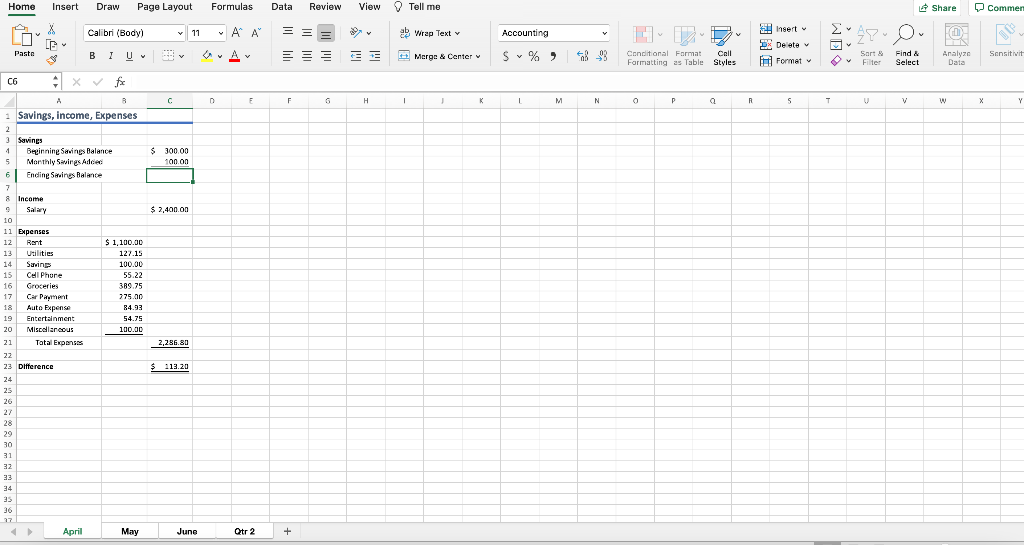
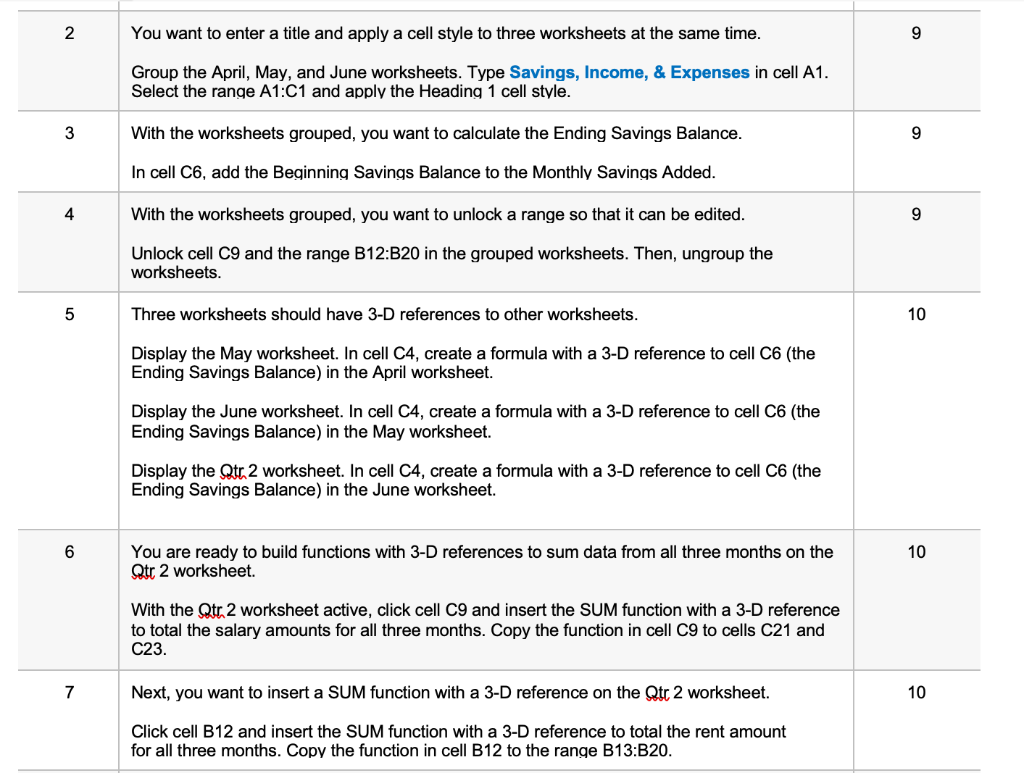
Home Insert Draw Page Layout Formulas Data Review View Tell me Share Commer X Calibri (Body) 11 AA == ab Wrap Text Accounting . 7 .! Insert DX Delete It Format 2 Paste BIU v Av -- Merge & Center v & S % ) Sensitivit Conditional Format Call Formatting as Table Styles Sart Filter Find & Select Analyze Data C E F F H ! 1 M N R S T T v w X X Y $ 300.00 100 on $ 2,400.00 C6 x f A B 1 Savings, income, Expenses 2 3 Savines 4 Beginnine Savings Balance 5 Monthly Savings Added 6 Endine Savings Balance 7 8 Income Salary 10 11 Expenses 12 Rent $ 1,100.00 13 Utilities 127.15 14 Savings 100.00 15 Cell Phore 55.22 16 Groceries 389.75 17 Car Payment 775.00 Auto Expense 84.93 19 Entertainment 54.75 20 Miscellaneous 100.00 21 Total Expenses 22 23 Difference 24 25 26 2,286.80 $ 113.20 28 29 30 31 32 33 24 15 36 27 April May June Qtr 2 + 2 You want to enter a title and apply a cell style to three worksheets at the same time. 9 Group the April, May, and June worksheets. Type Savings, Income, & Expenses in cell A1. Select the range A1:C1 and apply the Heading 1 cell style. 3 With the worksheets grouped, you want to calculate the Ending Savings Balance. 9 In cell C6, add the Beginning Savings Balance to the Monthly Savings Added. 4 With the worksheets grouped, you want to unlock a range so that it can be edited. 9 Unlock cell C9 and the range B12:B20 in the grouped worksheets. Then, ungroup the worksheets. 5 Three worksheets should have 3-D references to other worksheets. 10 Display the May worksheet. In cell C4, create a formula with a 3-D reference to cell C6 (the Ending Savings Balance) in the April worksheet. Display the June worksheet. In cell C4, create a formula with a 3-D reference to cell C6 (the Ending Savings Balance) in the May worksheet. Display the Qtr 2 worksheet. In cell C4, create a formula with a 3-D reference to cell C6 (the Ending Savings Balance) in the June worksheet. 6 10 You are ready to build functions with 3-D references to sum data from all three months on the Qtr 2 worksheet. With the Qtr 2 worksheet active, click cell C9 and insert the SUM function with a 3-D reference to total the salary amounts for all three months. Copy the function in cell C9 to cells C21 and C23. 7 Next, you want to insert a SUM function with a 3-D reference on the Qtr 2 worksheet. 10 Click cell B12 and insert the SUM function with a 3-D reference to total the rent amount for all three months. Copy the function in cell B12 to the range B13:B20. Home Insert Draw Page Layout Formulas Data Review View Tell me Share Commer X Calibri (Body) 11 AA == ab Wrap Text Accounting . 7 .! Insert DX Delete It Format 2 Paste BIU v Av -- Merge & Center v & S % ) Sensitivit Conditional Format Call Formatting as Table Styles Sart Filter Find & Select Analyze Data C E F F H ! 1 M N R S T T v w X X Y $ 300.00 100 on $ 2,400.00 C6 x f A B 1 Savings, income, Expenses 2 3 Savines 4 Beginnine Savings Balance 5 Monthly Savings Added 6 Endine Savings Balance 7 8 Income Salary 10 11 Expenses 12 Rent $ 1,100.00 13 Utilities 127.15 14 Savings 100.00 15 Cell Phore 55.22 16 Groceries 389.75 17 Car Payment 775.00 Auto Expense 84.93 19 Entertainment 54.75 20 Miscellaneous 100.00 21 Total Expenses 22 23 Difference 24 25 26 2,286.80 $ 113.20 28 29 30 31 32 33 24 15 36 27 April May June Qtr 2 + 2 You want to enter a title and apply a cell style to three worksheets at the same time. 9 Group the April, May, and June worksheets. Type Savings, Income, & Expenses in cell A1. Select the range A1:C1 and apply the Heading 1 cell style. 3 With the worksheets grouped, you want to calculate the Ending Savings Balance. 9 In cell C6, add the Beginning Savings Balance to the Monthly Savings Added. 4 With the worksheets grouped, you want to unlock a range so that it can be edited. 9 Unlock cell C9 and the range B12:B20 in the grouped worksheets. Then, ungroup the worksheets. 5 Three worksheets should have 3-D references to other worksheets. 10 Display the May worksheet. In cell C4, create a formula with a 3-D reference to cell C6 (the Ending Savings Balance) in the April worksheet. Display the June worksheet. In cell C4, create a formula with a 3-D reference to cell C6 (the Ending Savings Balance) in the May worksheet. Display the Qtr 2 worksheet. In cell C4, create a formula with a 3-D reference to cell C6 (the Ending Savings Balance) in the June worksheet. 6 10 You are ready to build functions with 3-D references to sum data from all three months on the Qtr 2 worksheet. With the Qtr 2 worksheet active, click cell C9 and insert the SUM function with a 3-D reference to total the salary amounts for all three months. Copy the function in cell C9 to cells C21 and C23. 7 Next, you want to insert a SUM function with a 3-D reference on the Qtr 2 worksheet. 10 Click cell B12 and insert the SUM function with a 3-D reference to total the rent amount for all three months. Copy the function in cell B12 to the range B13:B20









 Study Help