







Question: PLEASE HELP. IN PYTHON AND SHOW OUTPUTS AND DOCUMENTATION! Programming Project: Socket Programming In this project, you'll write a client that will use sockets to
PLEASE HELP. IN PYTHON AND SHOW OUTPUTS AND DOCUMENTATION!
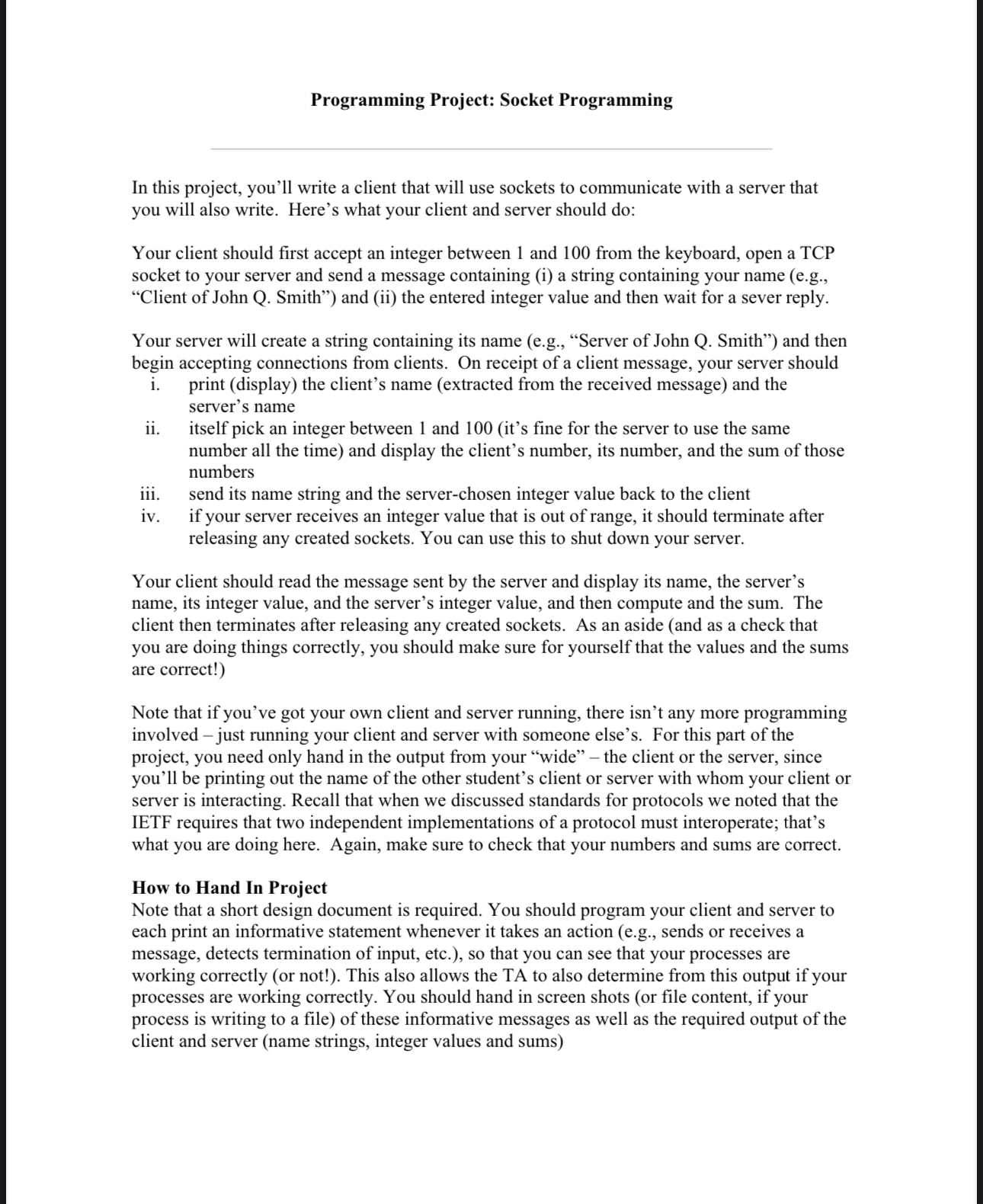
Programming Project: Socket Programming
In this project, you'll write a client that will use sockets to communicate with a server that
you will also write. Here's what your client and server should do:
Your client should first accept an integer between and from the keyboard, open a TCP
socket to your server and send a message containing i a string containing your name eg
"Client of John Q Smith" and ii the entered integer value and then wait for a sever reply.
Your server will create a string containing its name eg "Server of John Q Smith" and then
begin accepting connections from clients. On receipt of a client message, your server should
i print display the client's name extracted from the received message and the
server's name
ii itself pick an integer between and its fine for the server to use the same
number all the time and display the client's number, its number, and the sum of those
numbers
iii. send its name string and the serverchosen integer value back to the client
iv if your server receives an integer value that is out of range, it should terminate after
releasing any created sockets. You can use this to shut down your server.
Your client should read the message sent by the server and display its name, the server's
name, its integer value, and the server's integer value, and then compute and the sum. The
client then terminates after releasing any created sockets. As an aside and as a check that
you are doing things correctly, you should make sure for yourself that the values and the sums
are correct!
Note that if you've got your own client and server running, there isn't any more programming
involved just running your client and server with someone else's. For this part of the
project, you need only hand in the output from your "wide" the client or the server, since
you'll be printing out the name of the other student's client or server with whom your client or
server is interacting. Recall that when we discussed standards for protocols we noted that the
IETF requires that two independent implementations of a protocol must interoperate; that's
what you are doing here. Again, make sure to check that your numbers and sums are correct.
How to Hand In Project
Note that a short design document is required. You should program your client and server to
each print an informative statement whenever it takes an action eg sends or receives a
message, detects termination of input, etc. so that you can see that your processes are
working correctly or not! This also allows the TA to also determine from this output if your
processes are working correctly. You should hand in screen shots or file content, if your
process is writing to a file of these informative messages as well as the required output of the
client and server name strings, integer values and sums
Programming notes
Here are a few tipsthoughts to help you with the project:
You must chose a server port number greater than to be safe, choose a server port
number larger than If you want to explicitly choose you clientside port, also
choose a number larger than
You may need to know your machine's IP address, when one process connects to
another. You can telnet to your own machine and seeing the dotted decimal address
displayed by the telnet program. You can also use the UNIX nslookup command On
Windows, see the ipconfig utility. On a Mac, you can run the terminal program and use
the ifconfig commend just type in ifconfig or ifconfig grep "inet
Many of you will be running the clients and senders on the same UNIX machine eg
by starting up the receiver and running it in the background, then starting up the relay in
the background, and then starting up the sender This is fine; since your using sockets
for communication these processes can run on the same machine or different machines
without modification. Recall the use of the ampersand to start a process in the
background. If you need to kill a process after you have started it you can use the
UNIX kill command. Use the UNIX ps command to find the process id of your server
Make sure you close every socket that you use in your program. If you abort your
program, the socket may still hang around and the next time you try and bind a new
socket to the port ID you previously used but never closed you may get an error.
Also, please be aware that port ID's, when bound to sockets, are systemwide values
and thus other students may be using the port number you are trying to use.
Step by Step Solution
There are 3 Steps involved in it
1 Expert Approved Answer
Step: 1 Unlock

Question Has Been Solved by an Expert!
Get step-by-step solutions from verified subject matter experts
Step: 2 Unlock
Step: 3 Unlock
 Study Help