







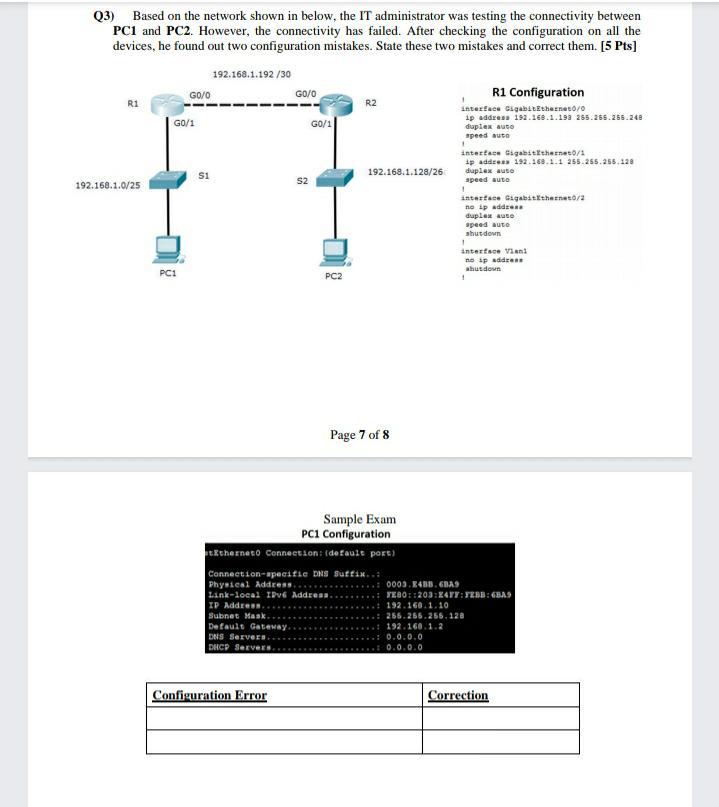
Question: please help me in this question quickly networking waiting... Q3) Based on the network shown in below, the IT administrator was testing the connectivity between
please help me in this question quickly
networking
waiting...
Q3) Based on the network shown in below, the IT administrator was testing the connectivity between PC1 and PC2. However, the connectivity has failed. After checking the configuration on all the devices, he found out two configuration mistakes. State these two mistakes and correct them. [5 Pts] 192.168.1.192 /30 G0/0 G0/0 R1 Configuration R1 R2 Interface Gigabit Ethernet0/0 G0/1 G0/1 1p address 192.168.1.193 255.255.255.248 duplex auto speed auto interface Gigabit Ethernet0/1 ip address 192.168.1.1 255.255.255.138 si 192.168.1.123/26 duplex aus 192.168.1.0/25 speed auto antastic Cigabit Ethernet/ ne ip address duplex aute speed auto shut down 1 interse Vent no ip address PC: shut down PC2 1 . S2 + Page 7 of 8 Sample Exam PC1 Configuration tethernet connection: idefault port) Connection-specific DNS Suffix.. Physical Address 0003.438. GBA Link-local IPv6 Addresa FE80::203:48:28: BAS IP Address.. 192.168.1.10 Subnet Mask 255.255.255.128 Default Gateway. 192.168.1.2 DNS Servers.. 0.0.0.0 DHCP Servers. 0.0.0.0 Configuration Error Correction Q3) Based on the network shown in below, the IT administrator was testing the connectivity between PC1 and PC2. However, the connectivity has failed. After checking the configuration on all the devices, he found out two configuration mistakes. State these two mistakes and correct them. [5 Pts] 192.168.1.192 /30 G0/0 G0/0 R1 Configuration R1 R2 Interface Gigabit Ethernet0/0 G0/1 G0/1 1p address 192.168.1.193 255.255.255.248 duplex auto speed auto interface Gigabit Ethernet0/1 ip address 192.168.1.1 255.255.255.138 si 192.168.1.123/26 duplex aus 192.168.1.0/25 speed auto antastic Cigabit Ethernet/ ne ip address duplex aute speed auto shut down 1 interse Vent no ip address PC: shut down PC2 1 . S2 + Page 7 of 8 Sample Exam PC1 Configuration tethernet connection: idefault port) Connection-specific DNS Suffix.. Physical Address 0003.438. GBA Link-local IPv6 Addresa FE80::203:48:28: BAS IP Address.. 192.168.1.10 Subnet Mask 255.255.255.128 Default Gateway. 192.168.1.2 DNS Servers.. 0.0.0.0 DHCP Servers. 0.0.0.0 Configuration Error Correction
Step by Step Solution
There are 3 Steps involved in it

Get step-by-step solutions from verified subject matter experts
 Study Help