







Question: Please help me out with this problem! I have my file 'myData1.txt' here: 5 100 111 OK 55 5 55 5 Please create a txt
Please help me out with this problem!
I have my file 'myData1.txt' here:
5
100
111
OK
55
5
55
5
Please create a txt file to do this problem. Thank you!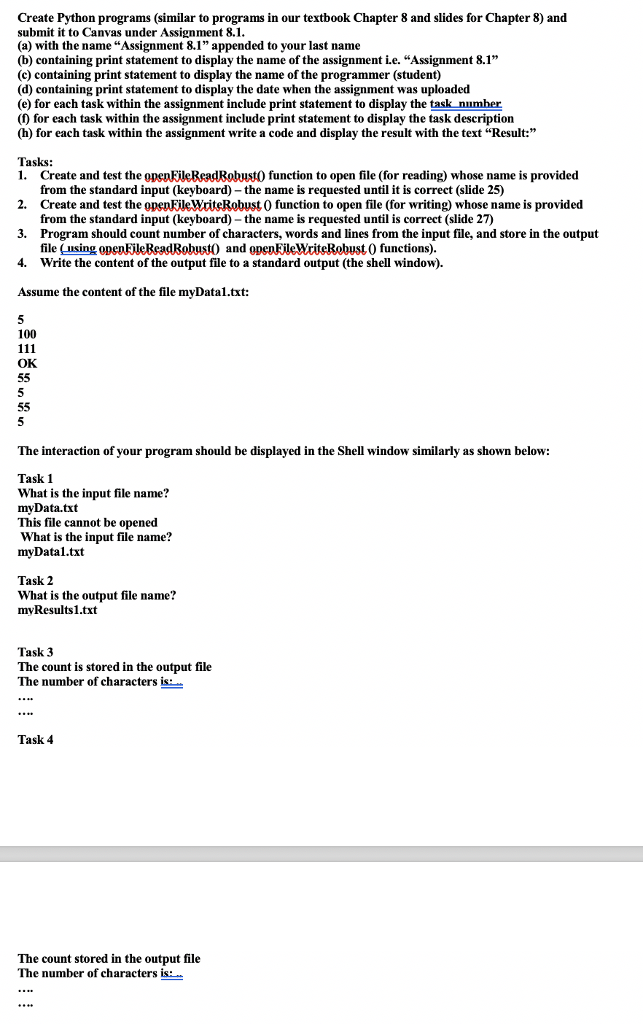
Create Python programs (similar to programs in our textbook Chapter 8 and slides for Chapter 8) and submit it to Canvas under Assignment 8.1 (a) with the name "Assignment 8.1" appended to your last name (b) containing print statement to display the name of the assignment i.e. "Assignment 8.1" (c) containing print statement to display the name of the programmer (student) (d) containing print statement to display the date when the assignment was uploaded (e) for each task within the assignment include print statement to display the task number ( for each task within the assignment include print statement to display the task description (h) for each task within the assignment write a code and display the result with the text Result: Tasks: 1. Create and test the function to open file (for reading) whose name is provided from the standard input (keyboard) - the name is requested until it is correct (slide 25) 2. Create and test the openFileWriteRobust 0 function to open file (for writing) whose name is provided 3. 4. Assume the content of the file myDatal.txt: from the standard input (keyboard) - the name is requested until is correct (slide 27) Program should count number of characters, words and lines from the input file, and store in the output file (using Write the content of the output file to a standard output (the shell window). and open FileWriteobust 0 functions). 100 OK The interaction of your program should be displayed in the Shell window similarly as shown below: Task 1 What is the input file name? myDatatxt This file cannot be opened What is the input file name? mvDatal.txt Task 2 What is the output file name? mvResults1.txt Task 3 The count is stored in the output file The number of characters is: Task 4 The count stored in the output file The number of characters is
Step by Step Solution
There are 3 Steps involved in it

Get step-by-step solutions from verified subject matter experts
 Study Help