







Question: Please help me with question 11 Use a conditional format to highlight the Amount over $300 with Light Red Fill Dark:Red.Text. 0. Add a Total
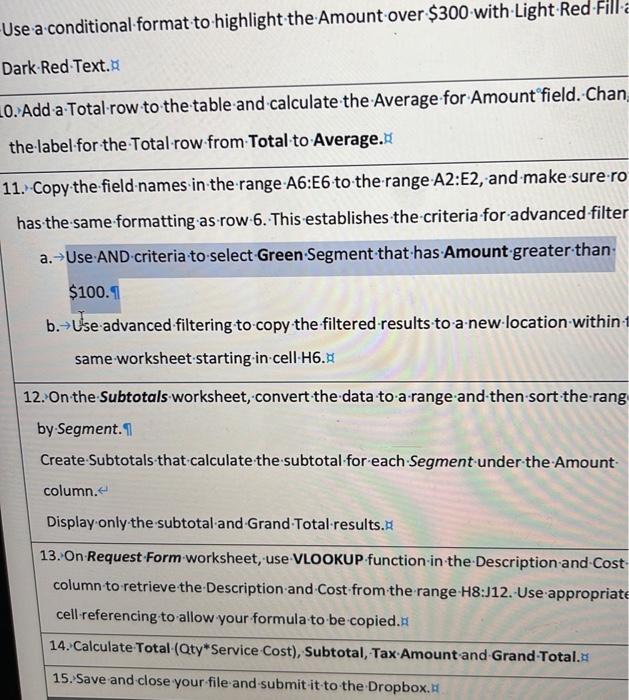
Use a conditional format to highlight the Amount over $300 with Light Red Fill Dark:Red.Text. 0. Add a Total row to the table and calculate the Average for Amount ' field. Chan the label for the Total row from Total to Average. 11. Copy the field names in the range A6:E6 to the range-A2:E2, and make sure ro has the same formatting as row 6 . This establishes the criteria for advanced filter a. Use AND criteria to select Green Segment that has Amount greater than $100.91 b. Use advanced filtering to copy the filtered results to a new location within same worksheet starting in cell-H6." 12. On the Subtotals worksheet, convert the data to a range and then sort the rang by.Segment. Create Subtotals that calculate the subtotal for each Segment under the Amount column. Display only the subtotal:and Grand Total results. 13. On Request Form worksheet, use VLOOKUP function in the Description and Cost. column to retrieve the Description and Cost from the range H8:J12. Use appropriate cell referencing to allow your formula to be copied. 14. Calculate Total-(aty*Service-Cost), Subtotal, Tax:Amount and Grand-Total.s 15. Save and close your file and submit tit to the Dropbox. 1
Step by Step Solution
There are 3 Steps involved in it

Get step-by-step solutions from verified subject matter experts
 Study Help