







Question: Please help with MATLAB 2. Neighbor Identification. Many engineering problems can be solved numerically by dividing a large, compli- cated geometry into a multitude of
Please help with MATLAB
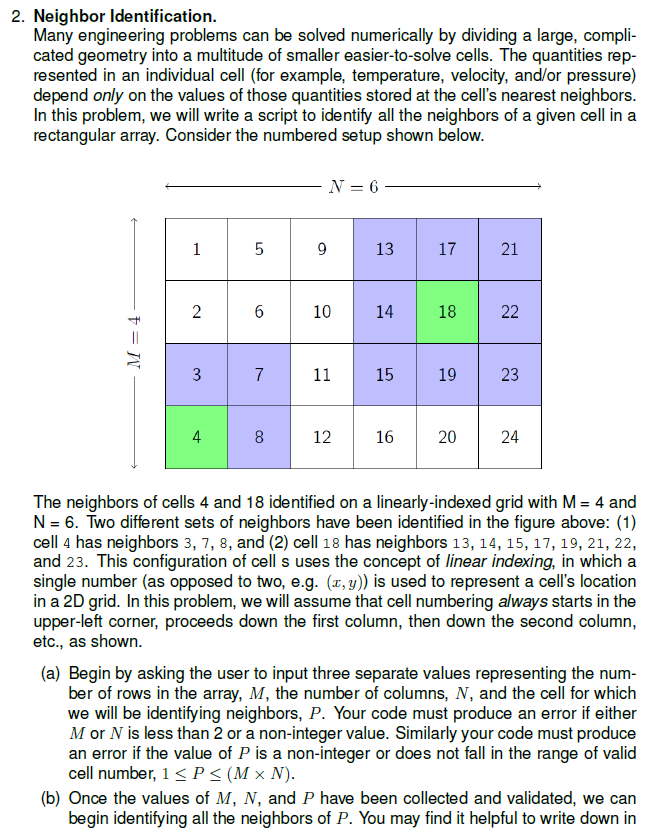
2. Neighbor Identification. Many engineering problems can be solved numerically by dividing a large, compli- cated geometry into a multitude of smaller easier-to-solve cells. The quantities rep- resented in an individual cell (for example, temperature, velocity, and/or pressure) depend only on the values of those quantities stored at the cell's nearest neighbors. In this problem, we will write a script to identify all the neighbors of a given cell in a rectangular array. Consider the numbered setup shown below. - N= 6 5 9 13 17 21 - 2 6 10 14 = 3 7 11 1923 8 12 16 20 24 The neighbors of cells 4 and 18 identified on a linearly-indexed grid with M = 4 and N = 6. Two different sets of neighbors have been identified in the figure above: (1) cell 4 has neighbors 3, 7, 8, and (2) cell 18 has neighbors 13, 14, 15, 17, 19, 21, 22, and 23. This configuration of cells uses the concept of linear indexing, in which a single number (as opposed to two, e.g. (x,y) is used to represent a cell's location in a 2D grid. In this problem, we will assume that cell numbering always starts in the upper-left corner, proceeds down the first column, then down the second column, etc., as shown. (a) Begin by asking the user to input three separate values representing the num- ber of rows in the array, M, the number of columns, N, and the cell for which we will be identifying neighbors, P. Your code must produce an error if either M or N is less than 2 or a non-integer value. Similarly your code must produce an error if the value of P is a non-integer or does not fall in the range of valid cell number, 1
Step by Step Solution
There are 3 Steps involved in it

Get step-by-step solutions from verified subject matter experts
 Study Help