







Question: please help with question 5 and 6 what steps should I take ? Four Winds Energy Boreas Wind Turbine Income Analysis Break Even Point Ured
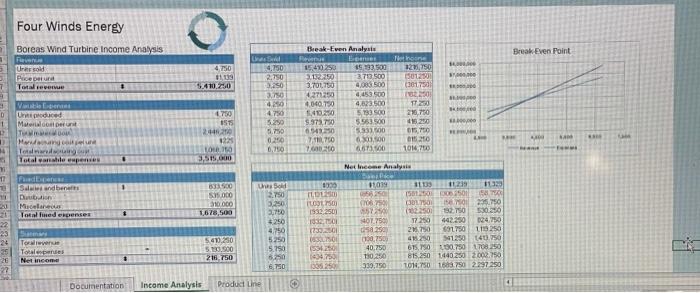
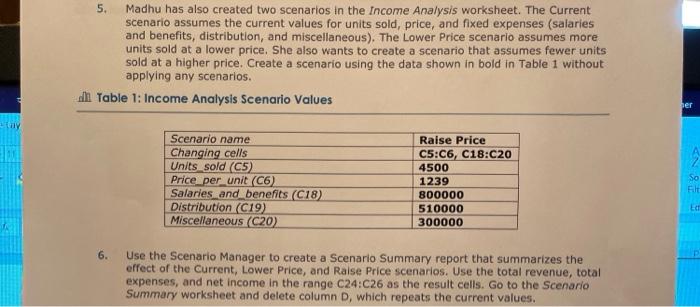
Four Winds Energy Boreas Wind Turbine Income Analysis Break Even Point Ured Puceur 7 Terver 4750 19 S410.230 LE 4.750 2.750 3.250 370 4250 4750 51290 5.750 0260 0,70 Break-Even Analysis Ees 1549250 15 93.500 31220 373 500 3.701730 4.000 500 4271250 4,453.500 4040.750 4.000 1.40250 5133 500 9.373.70 5.563500 6.5420 51331600 7.750 01.00 120 Heinone 12.50 15012301 (361750 230 TI 218.750 419 200 05.10 01520 1016.750 D 1 730 1575 42 1.100,00 Un produced Muelle TM Mwalimu Torsdag Lokale esper - 09 LO 3,515.000 Net Income Analysis Und 10 TI Sandben 1 Dubin Micale 21. Totaled expenses CCOO MON 1900 S500 210.000 1,678,500 3.250 OLD D 25 OL1500 1932.250 10. 1239 250 083 SON 15.50 345 11330 150000 501 ( 23.750 (7822501 32.750 5300 442.250 124.750 21.750 SL750 119 250 495250 51250 1403.750 675,750 0.750 1708250 815,250 1440 250 2002.750 LOW.750 6.750 2297 250 3.79 5.250 4750 5250 5.750 6250 6.750 57 401750 sa 2 0.750 40.750 TO 339.250 54.250 S2000 216.750 Towere Torales Net incon 22 Documentation Income Analysis Producting Madhu has also created two scenarios in the Income Analysis worksheet. The Current scenario assumes the current values for units sold, price, and fixed expenses (salaries and benefits, distribution, and miscellaneous). The Lower Price scenario assumes more units sold at a lower price. She also wants to create a scenario that assumes fewer units sold at a higher price. Create a scenario using the data shown in bold in Table 1 without applying any scenarios. ah Table 1: Income Analysis Scenario Values per Scenario name Changing cells Units sold (C5) Price per unit (C6) Salaries and benefits (C18) Distribution (C19) Miscellaneous (C20) Raise Price C5:C6, C18:C20 4500 1239 800000 510000 300000 So Filt E 6. Use the Scenario Manager to create a Scenario Summary report that summarizes the effect of the Current, Lower Price, and Raise Price scenarios. Use the total revenue, total expenses, and net income in the range C24:C26 as the result cells. Go to the Scenario Summary worksheet and delete column D, which repeats the current values. Four Winds Energy Boreas Wind Turbine Income Analysis Break Even Point Ured Puceur 7 Terver 4750 19 S410.230 LE 4.750 2.750 3.250 370 4250 4750 51290 5.750 0260 0,70 Break-Even Analysis Ees 1549250 15 93.500 31220 373 500 3.701730 4.000 500 4271250 4,453.500 4040.750 4.000 1.40250 5133 500 9.373.70 5.563500 6.5420 51331600 7.750 01.00 120 Heinone 12.50 15012301 (361750 230 TI 218.750 419 200 05.10 01520 1016.750 D 1 730 1575 42 1.100,00 Un produced Muelle TM Mwalimu Torsdag Lokale esper - 09 LO 3,515.000 Net Income Analysis Und 10 TI Sandben 1 Dubin Micale 21. Totaled expenses CCOO MON 1900 S500 210.000 1,678,500 3.250 OLD D 25 OL1500 1932.250 10. 1239 250 083 SON 15.50 345 11330 150000 501 ( 23.750 (7822501 32.750 5300 442.250 124.750 21.750 SL750 119 250 495250 51250 1403.750 675,750 0.750 1708250 815,250 1440 250 2002.750 LOW.750 6.750 2297 250 3.79 5.250 4750 5250 5.750 6250 6.750 57 401750 sa 2 0.750 40.750 TO 339.250 54.250 S2000 216.750 Towere Torales Net incon 22 Documentation Income Analysis Producting Madhu has also created two scenarios in the Income Analysis worksheet. The Current scenario assumes the current values for units sold, price, and fixed expenses (salaries and benefits, distribution, and miscellaneous). The Lower Price scenario assumes more units sold at a lower price. She also wants to create a scenario that assumes fewer units sold at a higher price. Create a scenario using the data shown in bold in Table 1 without applying any scenarios. ah Table 1: Income Analysis Scenario Values per Scenario name Changing cells Units sold (C5) Price per unit (C6) Salaries and benefits (C18) Distribution (C19) Miscellaneous (C20) Raise Price C5:C6, C18:C20 4500 1239 800000 510000 300000 So Filt E 6. Use the Scenario Manager to create a Scenario Summary report that summarizes the effect of the Current, Lower Price, and Raise Price scenarios. Use the total revenue, total expenses, and net income in the range C24:C26 as the result cells. Go to the Scenario Summary worksheet and delete column D, which repeats the current values
Step by Step Solution
There are 3 Steps involved in it

Get step-by-step solutions from verified subject matter experts
 Study Help