







Question: Please help with step J. It says select property rows. However, arn't the properties a column? I selected the 25 row height, but I don't
Please help with step J. It says select property rows. However, arn't the properties a column? I selected the 25 row height, but I don't know if I did it right. Can you tell me if it looks right? I don't want to change the wrong thing. I need to do exactly as part J says for my computer science homework. Tell me if its wrong and how to fix it or how to do it in general. I have excel 2010. Thanks!

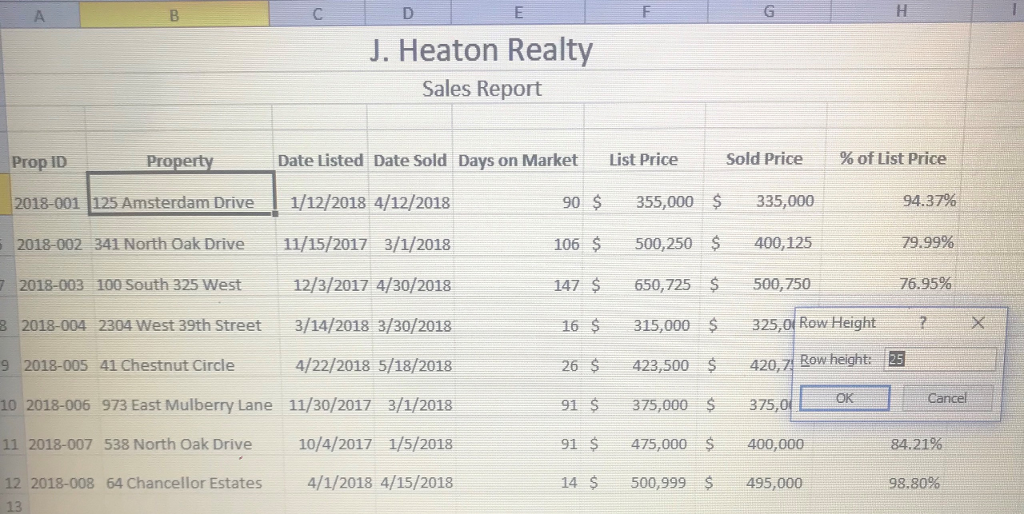
Drive to be 355,000 house on Amsterdam J. Select the property rows and set a 25 row height and apply Middle Align. k. Apply the All Borders border style to the range A4:H12. Adjust column widths as necas I. Apply Align Right and indent twice the values in the range E5:E12. m. Apply 120% scaling. n. Delete the Properties worksheet
Step by Step Solution
There are 3 Steps involved in it

Get step-by-step solutions from verified subject matter experts
 Study Help