







Question: Please help with the parts not done, in Python (jupyter notebook) Exercise 1 Define a python function named f that calculates 1 where x is
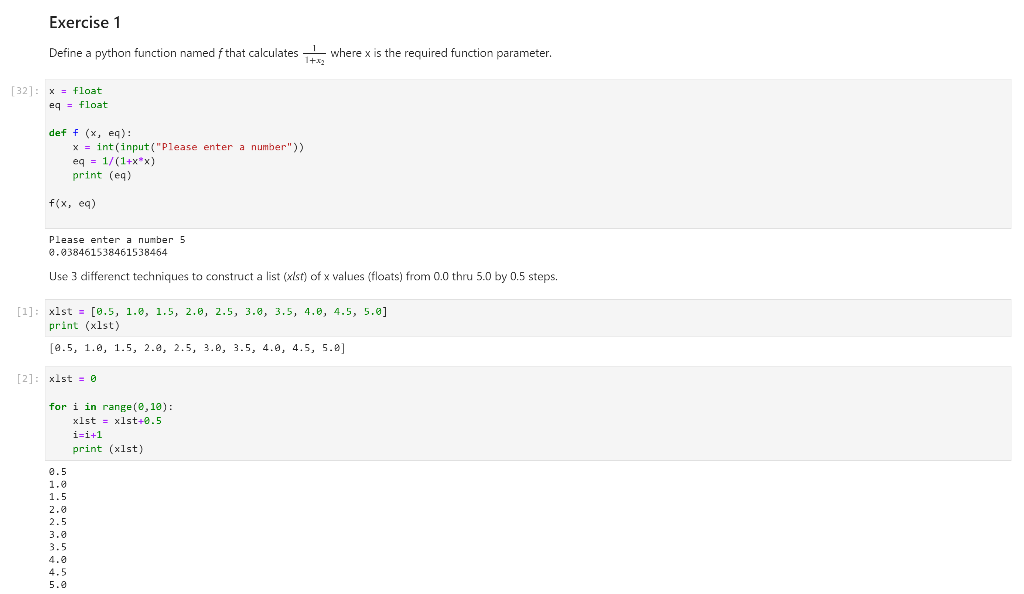
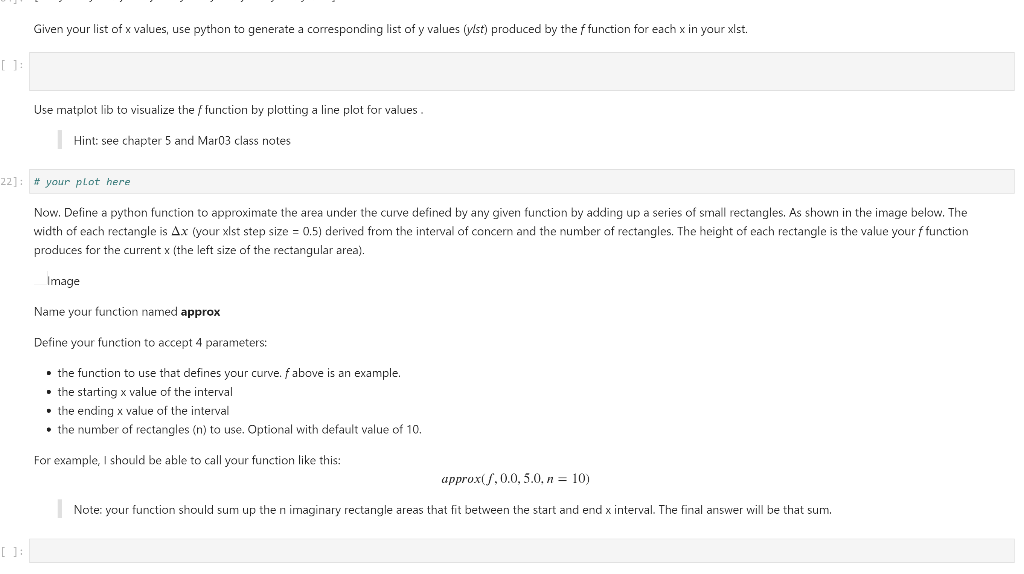
Please help with the parts not done, in Python (jupyter notebook)
Exercise 1 Define a python function named f that calculates 1 where x is the required function parameter. 1+x (32]: x = float eq = float def f (x, eq): x = int(input("Please enter a number")) eq = 1/(1+x*x) print (e) f(x, eq) Please enter a number 5 0.038461538461538464 Use 3 differenct techniques to construct a list (xist) of x values (floats) from 0.0 thru 5.0 by 0.5 steps. [1]: xist = [0.5, 1.0, 1.5, 2.0, 2.5, 3.0, 3.5, 4.0, 4.5, 5.0] print (xlst) [0.5, 1.0, 1.5, 2.0, 2.5, 3.0, 3.5, 4.0, 4.5, 5.2] [2]: xlst = 0 for i in range(0,10): xlst = xlst+0.5 i=1+1 print (xlst) 0.5 1.0 1.5 2.0 2.5 3.0 3.5 4.5 5.0 Given your list of x values, use python to generate a corresponding list of y values (ylst) produced by the f function for each x in your xlst. [] Use matplot lib to visualize the function by plotting a line plot for values Hint: see chapter 5 and Mar03 class notes 22]: # your plot here Now. Define a python function to approximate the area under the curve defined by any given function by adding up a series of small rectangles. As shown in the image below. The width of each rectangle is Ax your xlst step size = 0.5) derived from the interval of concern and the number of rectangles. The height of each rectangle is the value your f function produces for the current x (the left size of the rectangular area). Image Name your function named approx Define your function to accept 4 parameters: the function to use that defines your curve. f above is an example. the starting x value of the interval the ending x value of the interval the number of rectangles (n) to use. Optional with default value of 10 For example, I should be able to call your function like this: approx/.0.0, 5.0, n = 10) Note: your function should sum up then imaginary rectangle areas that fit between the start and end x interval. The final answer will be that sum. Exercise 1 Define a python function named f that calculates 1 where x is the required function parameter. 1+x (32]: x = float eq = float def f (x, eq): x = int(input("Please enter a number")) eq = 1/(1+x*x) print (e) f(x, eq) Please enter a number 5 0.038461538461538464 Use 3 differenct techniques to construct a list (xist) of x values (floats) from 0.0 thru 5.0 by 0.5 steps. [1]: xist = [0.5, 1.0, 1.5, 2.0, 2.5, 3.0, 3.5, 4.0, 4.5, 5.0] print (xlst) [0.5, 1.0, 1.5, 2.0, 2.5, 3.0, 3.5, 4.0, 4.5, 5.2] [2]: xlst = 0 for i in range(0,10): xlst = xlst+0.5 i=1+1 print (xlst) 0.5 1.0 1.5 2.0 2.5 3.0 3.5 4.5 5.0 Given your list of x values, use python to generate a corresponding list of y values (ylst) produced by the f function for each x in your xlst. [] Use matplot lib to visualize the function by plotting a line plot for values Hint: see chapter 5 and Mar03 class notes 22]: # your plot here Now. Define a python function to approximate the area under the curve defined by any given function by adding up a series of small rectangles. As shown in the image below. The width of each rectangle is Ax your xlst step size = 0.5) derived from the interval of concern and the number of rectangles. The height of each rectangle is the value your f function produces for the current x (the left size of the rectangular area). Image Name your function named approx Define your function to accept 4 parameters: the function to use that defines your curve. f above is an example. the starting x value of the interval the ending x value of the interval the number of rectangles (n) to use. Optional with default value of 10 For example, I should be able to call your function like this: approx/.0.0, 5.0, n = 10) Note: your function should sum up then imaginary rectangle areas that fit between the start and end x interval. The final answer will be that sum
Step by Step Solution
There are 3 Steps involved in it

Get step-by-step solutions from verified subject matter experts
 Study Help