







Question: please help with this simple function in MATLAB syntax help turn a black and white image into blue and gold in a matlab function 3
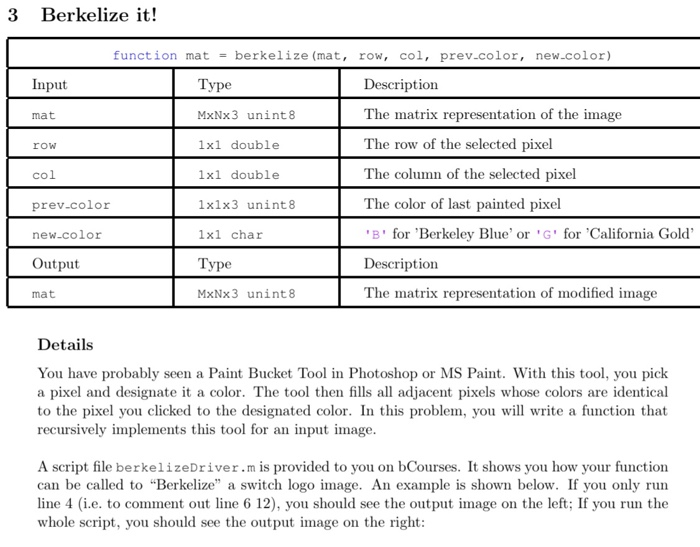
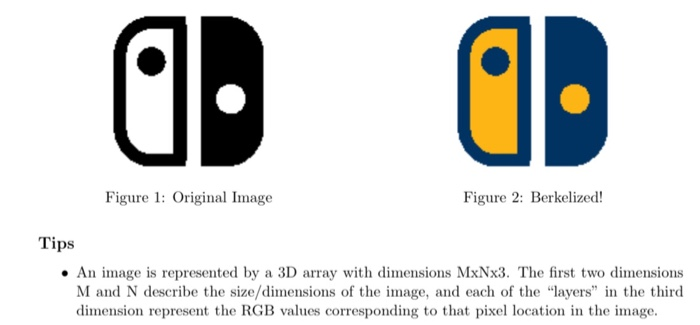
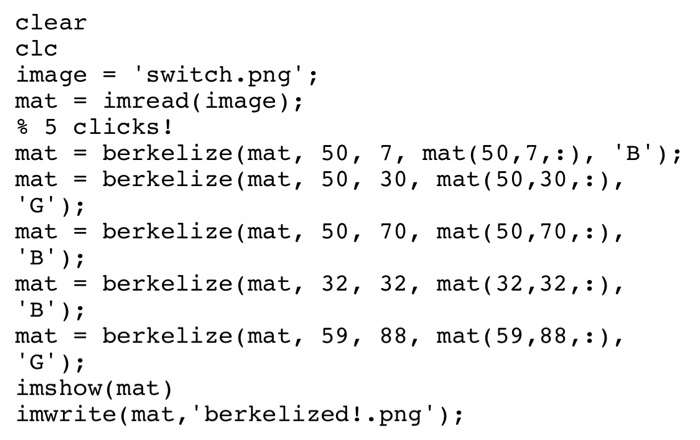
3 Berkelize it! function mat = berkelize (mat, row, col, prev.color, new.color) Input Type Description mat MxNx3 unint 8 The matrix representation of the image row 1xl double col 1x1 double prev.color 1x1x3 unint 8 The row of the selected pixel The column of the selected pixel The color of last painted pixel 'B' for 'Berkeley Blue' or 'G' for 'California Gold' Description The matrix representation of modified image new-color 1xl char Output Type MxNx3 unint8 mat Details You have probably seen a Paint Bucket Tool in Photoshop or MS Paint. With this tool, you pick a pixel and designate it a color. The tool then fills all adjacent pixels whose colors are identical to the pixel you clicked to the designated color. In this problem, you will write a function that recursively implements this tool for an input image. A script file berkelizeDriver.m is provided to you on bCourses. It shows you how your function can be called to "Berkelize" a switch logo image. An example is shown below. If you only run line 4 i.e. to comment out line 6 12), you should see the output image on the left; If you run the whole script, you should see the output image on the right: OD 0 Figure 1: Original Image Figure 2: Berkelized! Tips An image is represented by a 3D array with dimensions MxNx3. The first two dimensions M and N describe the size/dimensions of the image, and each of the "layers" in the third dimension represent the RGB values corresponding to that pixel location in the image. clear clc image = 'switch.png'; mat = imread (image); % 5 clicks! mat = berkelize (mat, 50, 7, mat(50,7,:), 'B'); mat = berkelize (mat, 50, 30, mat (50,30,:), 'G'); mat = berkelize (mat, 50, 70, mat(50,70,:), 'B'); mat = berkelize (mat, 32, 32, mat(32,32,:), 'B'); mat = berkelize (mat, 59, 88, mat(59,88,:), 'G'); imshow(mat) imwrite(mat, 'berkelized!.png')
Step by Step Solution
There are 3 Steps involved in it

Get step-by-step solutions from verified subject matter experts
 Study Help