







Question: Please modify the below scripts to get the attached output: #!/usr/bin/env python3 f = open('file1.txt', 'w') f.write('Line 1Line 2 is a little longerLine 3 is
Please modify the below scripts to get the attached output:
#!/usr/bin/env python3 f = open('file1.txt', 'w') f.write('Line 1Line 2 is a little longerLine 3 is too') f.close() f = open('file2.txt', 'w') f.write('Line 1Line 2 is a little longerLine 3 is as well') f.write('This is the 4th line') f.write('Last line in file') f.close() my_number = 1000 my_list = [1,2,3,4,5] f = open('file3.txt', 'w') f.write(str(my_number) + '') for num in my_list: f.write(str(num) + '') f.close() #------------------------------------------------------------ def append_file_string(file_name, string_of_lines): # Takes two strings, appends the string to the end of the file #def write_file_list(file_name, list_of_lines): # Takes a string and list, writes all items from list to file where each item is one line #def copy_file_add_line_numbers(file_name_read, file_name_write): # Takes two strings, reads data from first file, writes data to new file, adds line number to new file def read_file_string(file_name): f = open(file_name, 'r') return f.read() f.close def read_file_list(file_name): f = open (file_name, 'r') mylist = [] for line in f.readlines(): mylist.append(line.strip()) return mylist if __name__ == '__main__': file1 = 'seneca1.txt' file2 = 'seneca2.txt' file3 = 'seneca3.txt' string1 = 'First LineSecond LineThird Line' list1 = ['Line 1', 'Line 2', 'Line 3'] append_file_string(file1, string1) print(read_file_string(file1)) #write_file_list(file2, list1) print(read_file_string(file2)) copy_file_add_line_numbers(file2, file3) print(read_file_string(file3))OUTPUT
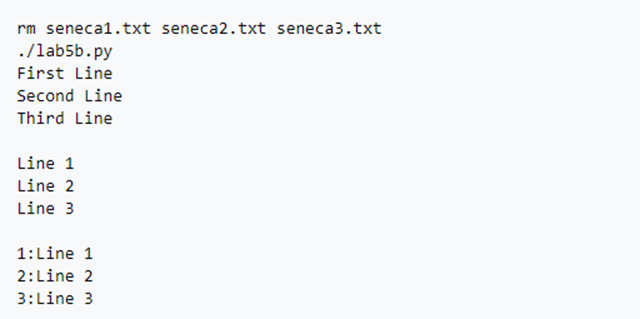
rm seneca1.txt seneca2.txt seneca3.txt ./lab5b.py First Line Second Line Third Line Line 1 Line 2 Line 3 1: Line 1 2:Line 2 3: Line 3
Step by Step Solution
There are 3 Steps involved in it
1 Expert Approved Answer
Step: 1 Unlock

Heres the modified script to achieve the desired output python usrbinenv python3 def appendfilestrin... View full answer
Question Has Been Solved by an Expert!
Get step-by-step solutions from verified subject matter experts
Step: 2 Unlock
Step: 3 Unlock
 Study Help