







Question: -please show cell references -complete #1-8 -there will be multiple tabs in excel once completed. -please have an easy to follow setup thank you!! 1.)
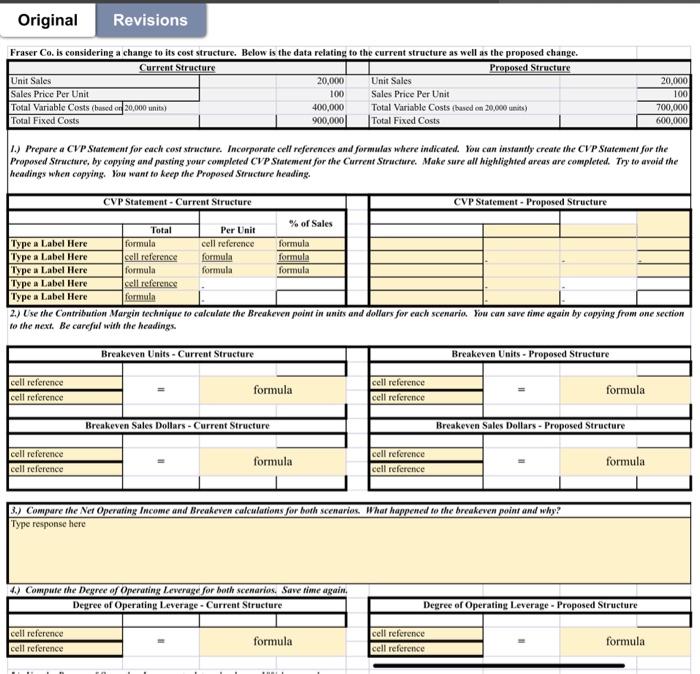
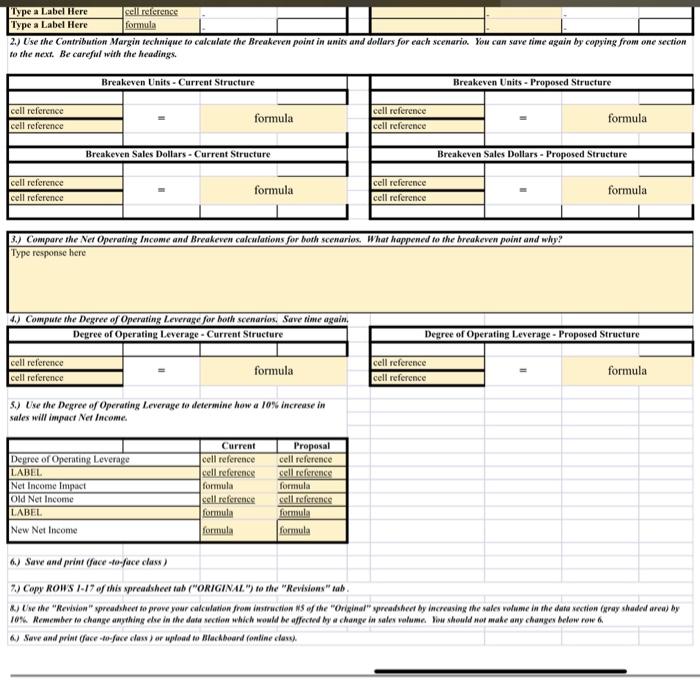
1.) Prepare a CVP Statement for each cost structure. Incorparate cell references and formulas where indicated. You can instantly create the CVP Statement for the Proposed Structure, by copying and pasting your completed CVP Statement for the Current Structure. Make sure all highlighted areas are completed. Try to avoid the headings when copying. You want to keep the Proposed Structure heading. 2.) Use the Contribution Margin technique to calculate the Breakeven poim in units and dollars for each scenario. You can save time again by copying from one section to the next. Be careful with the headings. \begin{tabular}{|l|l|l|l|l|l|l|l|} \hline Type a Label Here & cell reference & & \\ \hline Type a Label Here & formala & & \\ \hline \end{tabular} 2.) Cise the Contribution Margin technique to calculate the Breakeven point in units and dollars for each scenario. You can save time again by copying from one section to the next. Be careful with the headings. 3.) Compare the Net Operating Income and Breakeven calculations for both scenarios. What happened to the breakeven point and why? Type response here 4.) Compute the Degree of Operating Leverage for both scenarios, Save time again, \begin{tabular}{|l|l|l|l|} \hline \multicolumn{3}{|c|}{ Degree of Operating Leverage - Current Structure } \\ \hline & & \\ \hline cell reference & = & formula \\ \hline cell reference & & \\ \hline \end{tabular} 5.) Use the Degree of Operating Leveruge to determine how a los increase in sales will impact Net fincome. 6.) Save and primt (face -fo-face class) 7.) Copy ROWS 1-17 of this spreadsheet tab ("ORIGINAL") to the "Revisions" tab
Step by Step Solution
There are 3 Steps involved in it

Get step-by-step solutions from verified subject matter experts
 Study Help