







Question: please show steps.... EX16 AC CHO3 GRADER ML2 HW - Investment Properties Project Description You are in charge of Dynan Investment's database, which contains all
please show steps....
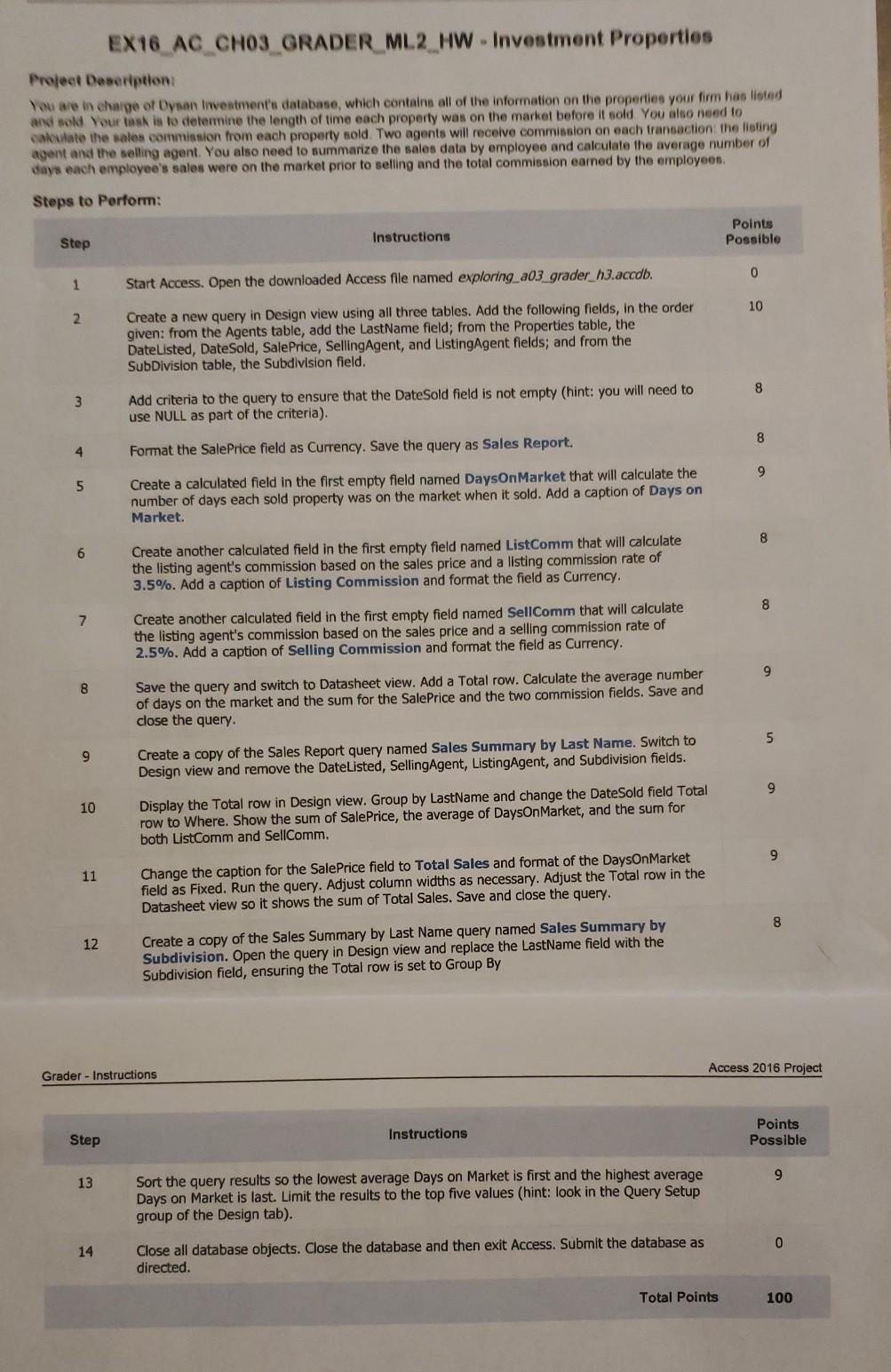
EX16 AC CHO3 GRADER ML2 HW - Investment Properties Project Description You are in charge of Dynan Investment's database, which contains all of the information on the properties your firm has listed and sold Your task is to determine the length of time each property was on the market before it sold You also need to calculate the sales commission from each property sold. Two agents will receive commission on each transaction the listing agent and the selling agent. You also need to summarize the sales data by employee and calculate the average number of days each employee's sales were on the market prior to selling and the total commission earned by the employees Steps to Perform: Points Possible Step Instructions 0 1 Start Access. Open the downloaded Access file named exploring a03 grader_h3.accdb. 10 2 Create a new query in Design view using all three tables. Add the following fields, in the order given: from the Agents table, add the LastName field; from the Properties table, the Date Listed, DateSold, Sale Price, Selling Agent, and ListingAgent fields; and from the SubDivision table, the Subdivision field. 8 3 Add criteria to the query to ensure that the Date Sold field is not empty (hint: you will need to use NULL as part of the criteria). 8 4 Format the Sale Price field as Currency. Save the query as Sales Report. 9 5 Create a calculated field in the first empty field named DaysOnMarket that will calculate the number of days each sold property was on the market when it sold. Add a caption of Days on Market. 8 6 Create another calculated field in the first empty field named ListComm that will calculate the listing agent's commission based on the sales price and a listing commission rate of 3.5%. Add a caption of Listing Commission and format the field as Currency. 8 7 Create another calculated field in the first empty field named SellComm that will calculate the listing agent's commission based on the sales price and a selling commission rate of 2.5%. Add a caption of Selling Commission and format the field as Currency. 9 8 Save the query and switch to Datasheet view. Add a Total row. Calculate the average number of days on the market and the sum for the Sale Price and the two commission fields. Save and close the query. 5 9 Create a copy of the Sales Report query named Sales Summary by Last Name. Switch to Design view and remove the DateListed, SellingAgent, ListingAgent, and Subdivision fields. 9 10 Display the Total row in Design view. Group by LastName and change the Date Sold field Total row to Where. Show the sum of Sale Price, the average of DaysOnMarket, and the sum for both List Comm and SellComm. 9 11 Change the caption for the Sale Price field to Total Sales and format of the DaysOnMarket field as Fixed. Run the query. Adjust column widths as necessary. Adjust the Total row in the Datasheet view so it shows the sum of Total Sales. Save and close the query. 12 Create a copy of the Sales Summary by Last Name query named Sales Summary by Subdivision. Open the query in Design view and replace the LastName field with the Subdivision field, ensuring the Total row is set to Group By Access 2016 Project Grader - Instructions Instructions Points Possible Step 9 13 Sort the query results so the lowest average Days on Market is first and the highest average Days on Market is last. Limit the results to the top five values (hint: look in the Query Setup group of the Design tab). 0 14 Close all database objects. Close the database and then exit Access. Submit the database as directed Total Points 100 EX16 AC CHO3 GRADER ML2 HW - Investment Properties Project Description You are in charge of Dynan Investment's database, which contains all of the information on the properties your firm has listed and sold Your task is to determine the length of time each property was on the market before it sold You also need to calculate the sales commission from each property sold. Two agents will receive commission on each transaction the listing agent and the selling agent. You also need to summarize the sales data by employee and calculate the average number of days each employee's sales were on the market prior to selling and the total commission earned by the employees Steps to Perform: Points Possible Step Instructions 0 1 Start Access. Open the downloaded Access file named exploring a03 grader_h3.accdb. 10 2 Create a new query in Design view using all three tables. Add the following fields, in the order given: from the Agents table, add the LastName field; from the Properties table, the Date Listed, DateSold, Sale Price, Selling Agent, and ListingAgent fields; and from the SubDivision table, the Subdivision field. 8 3 Add criteria to the query to ensure that the Date Sold field is not empty (hint: you will need to use NULL as part of the criteria). 8 4 Format the Sale Price field as Currency. Save the query as Sales Report. 9 5 Create a calculated field in the first empty field named DaysOnMarket that will calculate the number of days each sold property was on the market when it sold. Add a caption of Days on Market. 8 6 Create another calculated field in the first empty field named ListComm that will calculate the listing agent's commission based on the sales price and a listing commission rate of 3.5%. Add a caption of Listing Commission and format the field as Currency. 8 7 Create another calculated field in the first empty field named SellComm that will calculate the listing agent's commission based on the sales price and a selling commission rate of 2.5%. Add a caption of Selling Commission and format the field as Currency. 9 8 Save the query and switch to Datasheet view. Add a Total row. Calculate the average number of days on the market and the sum for the Sale Price and the two commission fields. Save and close the query. 5 9 Create a copy of the Sales Report query named Sales Summary by Last Name. Switch to Design view and remove the DateListed, SellingAgent, ListingAgent, and Subdivision fields. 9 10 Display the Total row in Design view. Group by LastName and change the Date Sold field Total row to Where. Show the sum of Sale Price, the average of DaysOnMarket, and the sum for both List Comm and SellComm. 9 11 Change the caption for the Sale Price field to Total Sales and format of the DaysOnMarket field as Fixed. Run the query. Adjust column widths as necessary. Adjust the Total row in the Datasheet view so it shows the sum of Total Sales. Save and close the query. 12 Create a copy of the Sales Summary by Last Name query named Sales Summary by Subdivision. Open the query in Design view and replace the LastName field with the Subdivision field, ensuring the Total row is set to Group By Access 2016 Project Grader - Instructions Instructions Points Possible Step 9 13 Sort the query results so the lowest average Days on Market is first and the highest average Days on Market is last. Limit the results to the top five values (hint: look in the Query Setup group of the Design tab). 0 14 Close all database objects. Close the database and then exit Access. Submit the database as directed Total Points 100
Step by Step Solution
There are 3 Steps involved in it

Get step-by-step solutions from verified subject matter experts
 Study Help