







Question: Please solve Problem 2 as a MATLAB code a) Here's the MATLAB code for the line fitting function, myline Filename: myline.m function [a,b] = myline(x,y)
Please solve Problem 2 as a MATLAB code
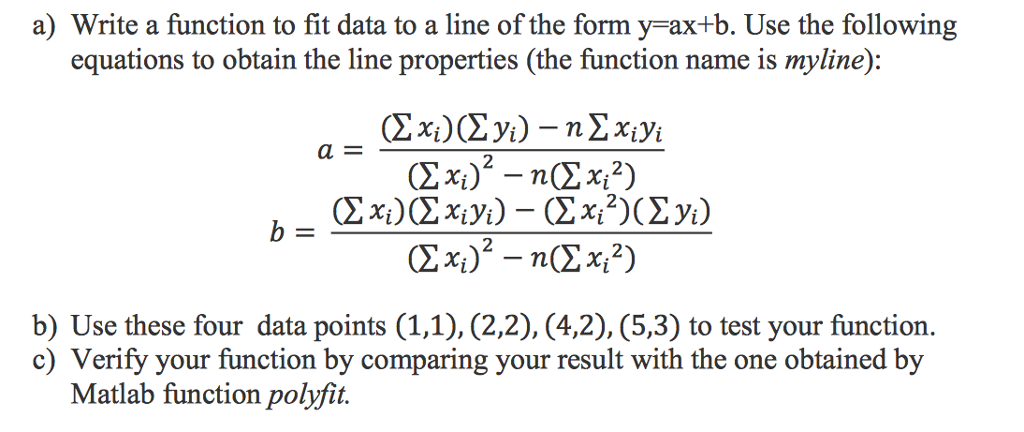
a) Here's the MATLAB code for the line fitting function, myline
Filename: myline.m
function [a,b] = myline(x,y)
%MYLINE Function to fit the line for given data, % Input - x,y vectors of data % Output - a,b coefficient of the line 'y = ax+b'
n = length(x); a = (sum(x)*sum(y)-n*sum(x.*y))/(sum(x)^2 - n*sum(x.^2)); b = (sum(x)*sum(x.*y)- sum(x.^2)*sum(y))/(sum(x)^2-n*sum(x.^2));
end
(b) Using the given data, obtained the following results,
>> x = [1 2 4 5]';
>> y = [1 2 2 3]'; >> [a b] = myline(x,y); >> a
a =
0.4000
>> b
b =
0.8000
(c) Comparing the results with in-built polyfit.
p = polyfit(x,y,1);
>> p
p =
0.4000 0.8000
>> x = linspace(1,5,10); >> y1 = polyval([a b],x); >> y2 = polyval(p,x);
>> plot(x,y1,'rx',x,y2,'bo')
Please Amswer Problem 2:
![code for the line fitting function, myline Filename: myline.m function [a,b] =](https://dsd5zvtm8ll6.cloudfront.net/si.experts.images/questions/2024/09/66f5442fc9f42_80766f5442f5291c.jpg)
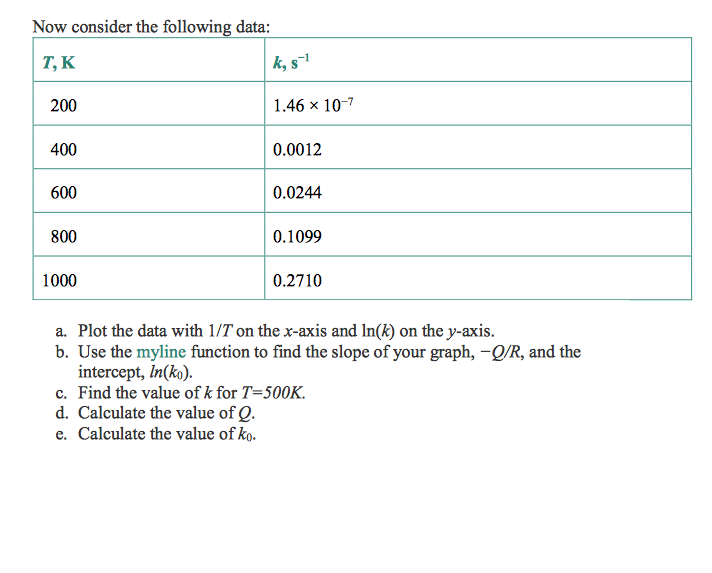
a) Write a function to fit data to a line of the form y ax+b. Use the following equations to obtain the line properties (the function name is myline): a E b) Use these four data points (1,1), (2,2), (4,2), (5,3) to test your function. c) Verify your function by comparing your result with the one obtained by Matlab function polyfit
Step by Step Solution
There are 3 Steps involved in it

Get step-by-step solutions from verified subject matter experts
 Study Help