







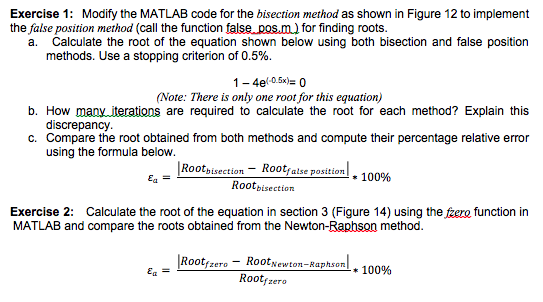
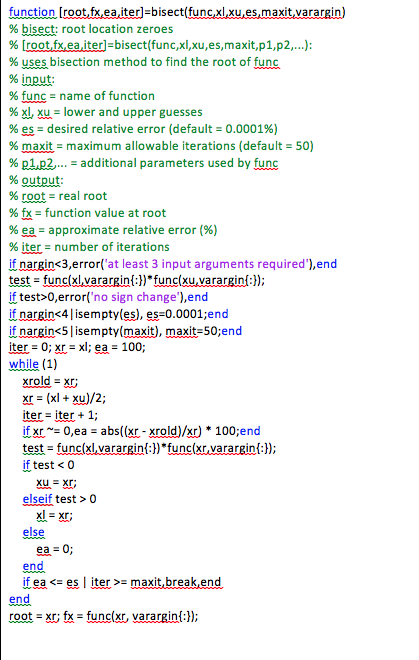
Question: Please solve using MATLAB code 2.5.0.0 Exercise 1: Modify the MATLAB code for the bisection method as shown in Figure 12 to implement the false
Please solve using MATLAB code
Exercise 1: Modify the MATLAB code for the bisection method as shown in Figure 12 to implement the false position method (call the function false pos.m) for finding roots. a. Calculate the root of the equation shown below using both bisection and false position methods. Use a stopping criterion of 0.5% (Note: There is only one root for this equation) b. How many iterations are required to calculate the root for each method? Explain this c. Compare the root obtained from both methods and compute their percentage relative error Rootbisection-Rootfalse position I * 100% discrepancy using the formula below. Rootbisection Exercise 2: Calculate the root of the equation in section 3 (Figure 14) using the zere function in MATLAB and compare the roots obtained from the Newton-Raphson method. Rootfzero-RootNewton-Raphson'. * 100% Rootfzero Exercise 1: Modify the MATLAB code for the bisection method as shown in Figure 12 to implement the false position method (call the function false pos.m) for finding roots. a. Calculate the root of the equation shown below using both bisection and false position methods. Use a stopping criterion of 0.5% (Note: There is only one root for this equation) b. How many iterations are required to calculate the root for each method? Explain this c. Compare the root obtained from both methods and compute their percentage relative error Rootbisection-Rootfalse position I * 100% discrepancy using the formula below. Rootbisection Exercise 2: Calculate the root of the equation in section 3 (Figure 14) using the zere function in MATLAB and compare the roots obtained from the Newton-Raphson method. Rootfzero-RootNewton-Raphson'. * 100% Rootfzero
Step by Step Solution
There are 3 Steps involved in it

Get step-by-step solutions from verified subject matter experts
 Study Help