







Question: Please update the following code sections to be able to work with more sensors (8) preferred. Please only comment lines changed. public partial class Form1
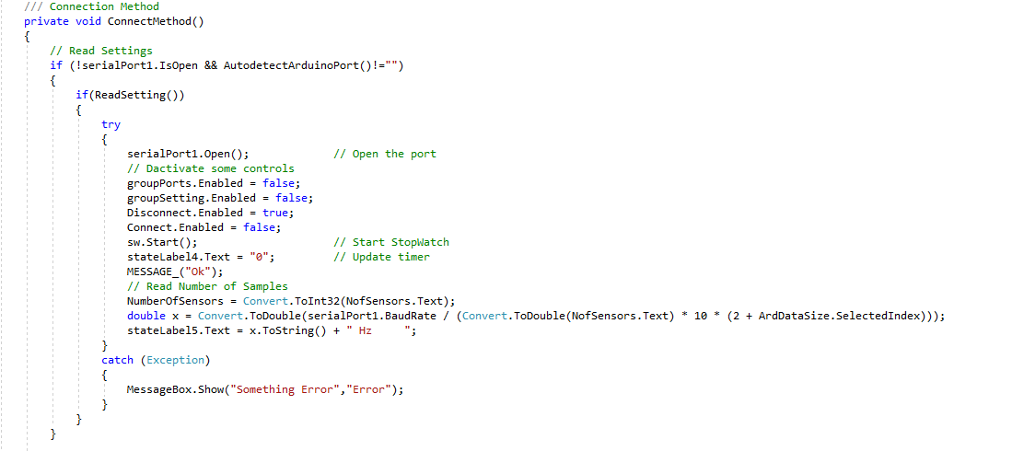
Please update the following code sections to be able to work with more sensors (8) preferred. Please only comment lines changed.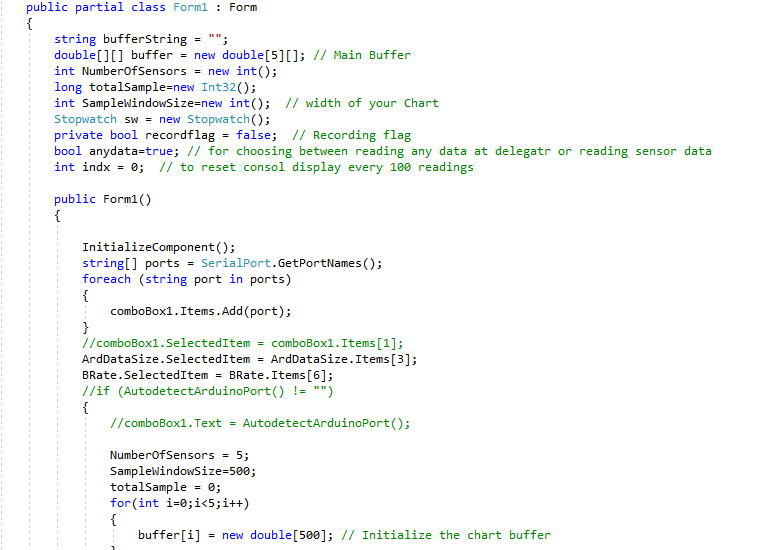
![class Form1 Form string bufferstring = ""; double[][] buffernew double[5][]; // Main](https://dsd5zvtm8ll6.cloudfront.net/si.experts.images/questions/2024/09/66f2c677602ec_55166f2c67706228.jpg)
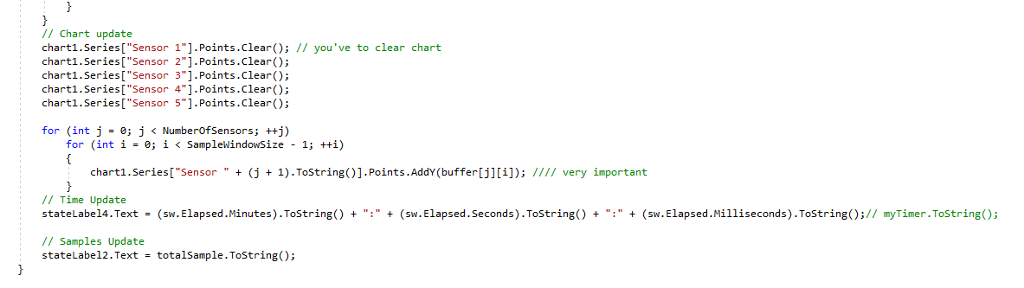
public partial class Form1 Form string bufferstring = ""; double[][] buffernew double[5][]; // Main Buffer int NumberOfSensors-new int(); long totalSample-new Int32); int SamplewindowSize-new int(); /I width of your Chart Stopwatch sw-new Stopwatch(); private bool recordflag-false; // Recording flag bool anydata-true; // for choosing between reading any data at delegatr or reading sensor data int indx = 0; // to reset consol display every 100 readings public Form10) InitializeComponent); string[] portsSerialPort.GetPortNames (); foreach (string port in ports) comboBox1.Items.Add(port); //comboBox1.SelectedItemcomboBox1.Items [1]; ArdDataSize.SelectedItemArdDataSize.Items [3]. BRate.SelectedItemBRate.Items [6]; //if (AutodetectArduinoPort() != "") //comboBox1 . Text = AutodetectArduinoPort(); NumberOfSensors5 SampleWindowSize-500; totalSample e; for(int i-e;i e) // Save the contents of the RichTextBox into the file. //bufferstring..SaveFile(saveFile1.FileName, RichTextBoxstreamType.PlainText) File.writeAllText (saveFile1.FileName, bufferString); // Chart update charti.Series["Sensor 1"].Points.Clear) // you've to clear chart chart1.Series[" Sensor 2"].Points.clear); charti.Series["Sensor 3"].Points.clear) chartl.Series[ "Sensor 4].Points.clerO: charti.Series["Sensor 5"].Points.lear); for (int j " 0; j
Step by Step Solution
There are 3 Steps involved in it

Get step-by-step solutions from verified subject matter experts
 Study Help