







Question: Please use java in Android Studio. please make the app look exactly like the one in the screenshot and include code. thanks! this was all
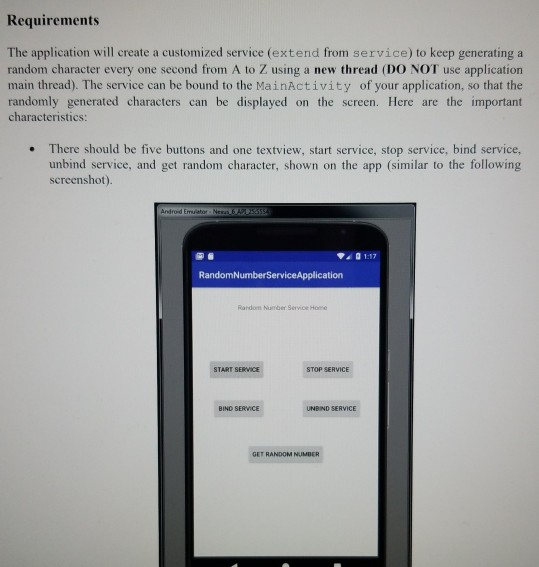
Please use java in Android Studio. please make the app look exactly like the one in the screenshot and include code. thanks!
this was all the information given to me
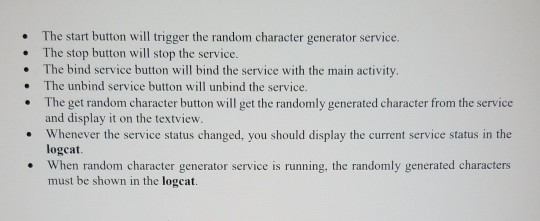
Requirements The application will create a customized service (extend from service) to keep generating a random character every one second from A to Z using a new thread (DO NOT use application main thread). The service can be bound to the MainActivity of your application, so that the randomly generated characters can be displayed on the screen. Here are the important characteristics: There should be five buttons and one textview, start service, stop service, bind service, unbind service, and get random character, shown on the app (similar to the following screenshot) Android Emulator New 3355 01-17 RandomNumberService Application START SERVICE STOP SERVICE BIND SERVICE UNBIND SERVICE GET RANDOM NUMBER The start button will trigger the random character generator service. The stop button will stop the service. The bind service button will bind the service with the main activity. The unbind service button will unbind the service. The get random character button will get the randomly generated character from the service and display it on the textview. Whenever the service status changed, you should display the current service status in the logcat. When random character generator service is running, the randomly generated characters must be shown in the logcat. Requirements The application will create a customized service (extend from service) to keep generating a random character every one second from A to Z using a new thread (DO NOT use application main thread). The service can be bound to the MainActivity of your application, so that the randomly generated characters can be displayed on the screen. Here are the important characteristics: There should be five buttons and one textview, start service, stop service, bind service, unbind service, and get random character, shown on the app (similar to the following screenshot) Android Emulator New 3355 01-17 RandomNumberService Application START SERVICE STOP SERVICE BIND SERVICE UNBIND SERVICE GET RANDOM NUMBER The start button will trigger the random character generator service. The stop button will stop the service. The bind service button will bind the service with the main activity. The unbind service button will unbind the service. The get random character button will get the randomly generated character from the service and display it on the textview. Whenever the service status changed, you should display the current service status in the logcat. When random character generator service is running, the randomly generated characters must be shown in the logcat
Step by Step Solution
There are 3 Steps involved in it

Get step-by-step solutions from verified subject matter experts
 Study Help