







Question: PLEASE USE JAVA Open up ObjectAnimationsActivity and its layout (activity_object_animations) Create fields for each view, and initialize them in onCreate using findViewById() Create an instance
PLEASE USE JAVA
- Open up ObjectAnimationsActivity and its layout (activity_object_animations)
- Create fields for each view, and initialize them in onCreate using findViewById()
- Create an instance of AppCompatSeekBar.OnSeekBarChangeListener inside onCreate(), and set it on each SeekBar using setOnSeekBarChangeListener()
- Fill in the updatePreview() method to satisfy the requirements in its TODO comment
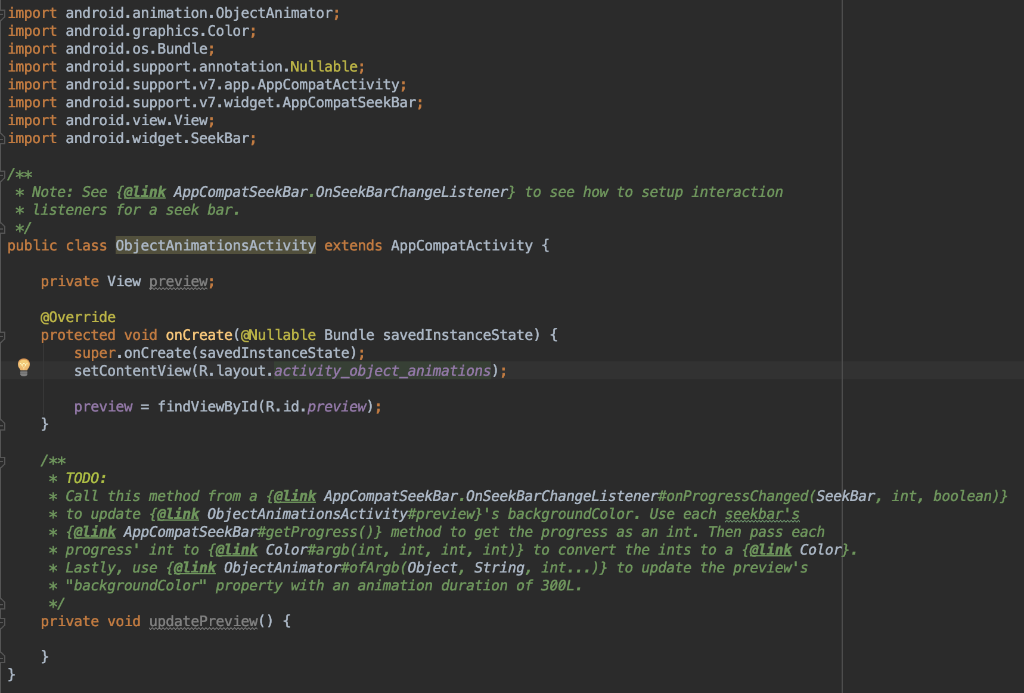
Object Animation Activity Below:
activity_object_animations below:
import android.animation.0bjectAnimator; import android.graphics.Color; import android.os.Bundle; import android.support.annotation.Nullable; import android. support.v7.app.AppCompatActivity import android. support.v7.widget.AppCompatSeekBar import android.view.View import android.widget. SeekBar kck Note: See falink AppCompatSeekBar.OnSeekBarChangeListener to see how to setup interaction k listeners for a seek bar. public class ObjectAnimationsActivity extends AppCompatActivity t private View preview @override protected void onCreate(@Nullable Bundle savedInstanceState) t super.onCreate(savedInstanceState); setContentView(R.layout.activity_object_animations); preview-findViewById (R.id.preview); kx TODO: * Call this method from a {@Link AppCompatSeekBar.OnSeekBarChangeListener#onProgressChanged (SeekBar, int, boolean)} * to update {eLink 0bjectAnimationsActivity#preview)'s backgroundColor. Use each seekbar's * {@Link AppCompatSeekBar#getProgress()} method to get the progress as an int. Then pass each * progress' int to {@Link Color#argb(int, int, int, int)) to convert the ints to a {@Link Color). * Lastly, use {@Link 0bjectAnimator#ofArgb (Object, String, int )} to update the preview's "backgroundColor" property with an animation duration of 300L k/ private void updatePreview)
Step by Step Solution
There are 3 Steps involved in it

Get step-by-step solutions from verified subject matter experts
 Study Help