







Question: PLEASE USE THE ATTACHED DATA. PART 1 AND PART 2 SHOULD BE COMPLETED SEPARATELY. PLEASE SHOW THE EXCEL FORMULA USED. THANKS. Students should be able
PLEASE USE THE ATTACHED DATA. PART AND PART SHOULD BE COMPLETED SEPARATELY. PLEASE SHOW THE EXCEL FORMULA USED. THANKS.
Students should be able to:
Use cell referencing in calculations mixed and absolute references
Use Data Validation to restrict data type
Use XLOOKUP
Use IF function and nested if statements
Use conditional formatting
Context
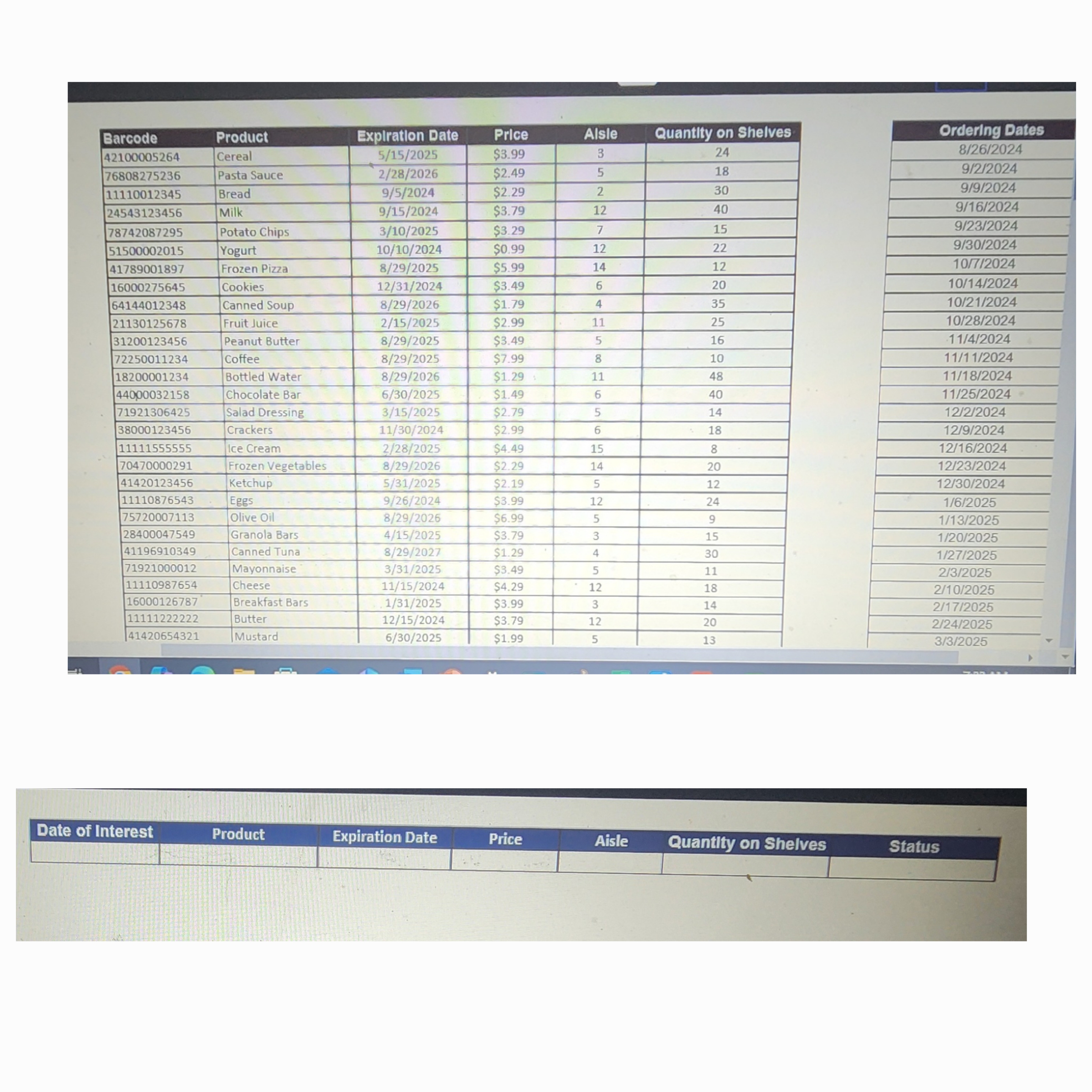
A local grocery store has been receiving complaints from customers that products on their shelves are expired. Youve been hired as their engineering intern to create an Excel worksheet which will help employees know if products on their shelves should be removed.
Task
Part : Use the Excel Template worksheet entitled Grocery Store Part to complete the following:
Use data validation to select a date of interest from the date range in column R
Use data validation to select a product of interest from the products in column L
Populate CF using XLOOKUP and mixedabsolute referencing.
In G use an IF statement to determine if the product is expired as compared to the date of interest selected in cell A
a If its expired, display the status as EXPIRED in cell G
b If its still good, display the status as OK in cell G
Use conditional formatting to colorcode the status in G
a If its expired, display the status in dark red text with a light red background.
b If its still good, display the status in dark green text with a light green background
PART : Use the Excel Template worksheet entitled Grocery Store Part to complete the following:
Copy over your table cells A:G from part
Update your data validation to select a product of interest from the extended list in column L
Adjust cells CF to ensure your XLOOKUP is referencing the extended table down to row
In G update to a nested IF statement to determine if the product is expired as compared to the date of interest selected in cell A
a If the product doesnt expire, display the status as NEVER EXPIRES in cell G
b If its expired, display the status as EXPIRED in cell G
c If its still good, display the status as OK in cell G
Update your conditional formatting to colorcode the status in G
a If it never expires, display the status in dark yellow text with a light yellow background.
b If its expired, display the status in dark red text with a light red background.
c If its still good, display the status in dark green text with a light green background
Step by Step Solution
There are 3 Steps involved in it
1 Expert Approved Answer
Step: 1 Unlock

Question Has Been Solved by an Expert!
Get step-by-step solutions from verified subject matter experts
Step: 2 Unlock
Step: 3 Unlock
 Study Help