







Question: Please write basicly arduino codes CE 302/342 Fundamentals of Microprocessors Laboratory Project Fall 2023 In this project you are expected to read data from the
Please write basicly arduino codes
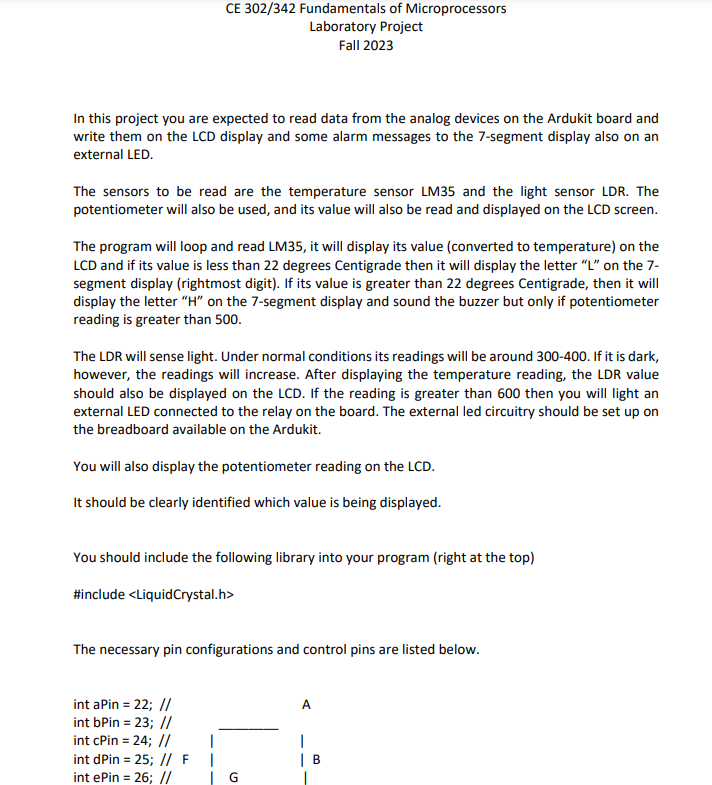
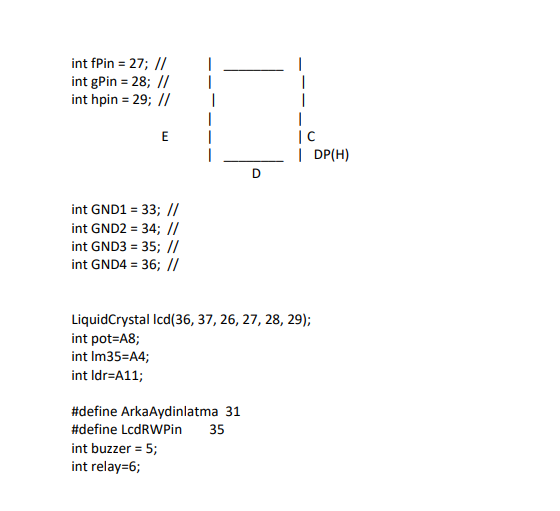
CE 302/342 Fundamentals of Microprocessors Laboratory Project Fall 2023 In this project you are expected to read data from the analog devices on the Ardukit board and write them on the LCD display and some alarm messages to the 7-segment display also on an external LED. The sensors to be read are the temperature sensor LM35 and the light sensor LDR. The potentiometer will also be used, and its value will also be read and displayed on the LCD screen. The program will loop and read LM35, it will display its value (converted to temperature) on the LCD and if its value is less than 22 degrees Centigrade then it will display the letter " L " on the 7segment display (rightmost digit). If its value is greater than 22 degrees Centigrade, then it will display the letter " H " on the 7-segment display and sound the buzzer but only if potentiometer reading is greater than 500 . The LDR will sense light. Under normal conditions its readings will be around 300-400. If it is dark, however, the readings will increase. After displaying the temperature reading, the LDR value should also be displayed on the LCD. If the reading is greater than 600 then you will light an external LED connected to the relay on the board. The external led circuitry should be set up on the breadboard available on the Ardukit. You will also display the potentiometer reading on the LCD. It should be clearly identified which value is being displayed. You should include the following library into your program (right at the top) \#include The necessary pin configurations and control pins are listed below. intGND1=33;//intGND2=34;//intGND3=35;//intGND4=36;// LiquidCrystal Icd(36, 37, 26, 27, 28, 29); int pot=A8; int Im35=A4; int Idr=A11; \#define ArkaAydinlatma 31 \#define LcdRWPin 35 int buzzer =5; int relay =6
Step by Step Solution
There are 3 Steps involved in it

Get step-by-step solutions from verified subject matter experts
 Study Help