







Question: pleasee help me can you solve it using cisco packet tracer - Run Cisco Packet Tracer simulator to solve this exam. 1- Build the following
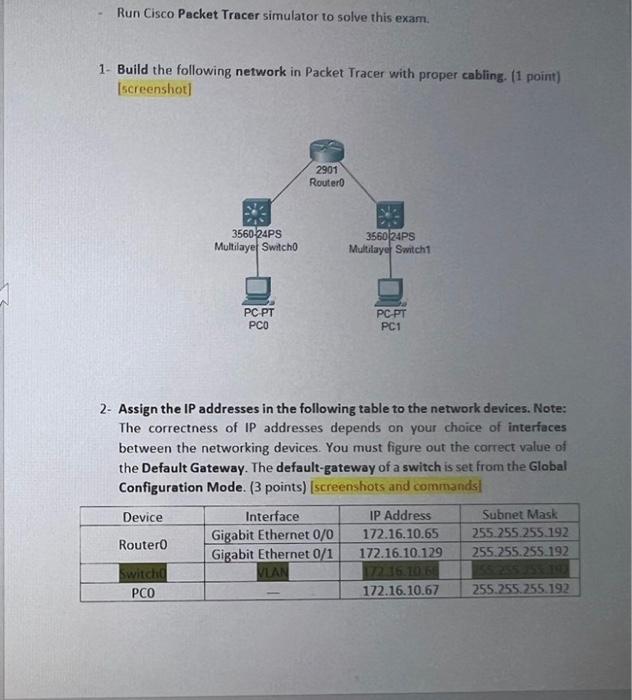
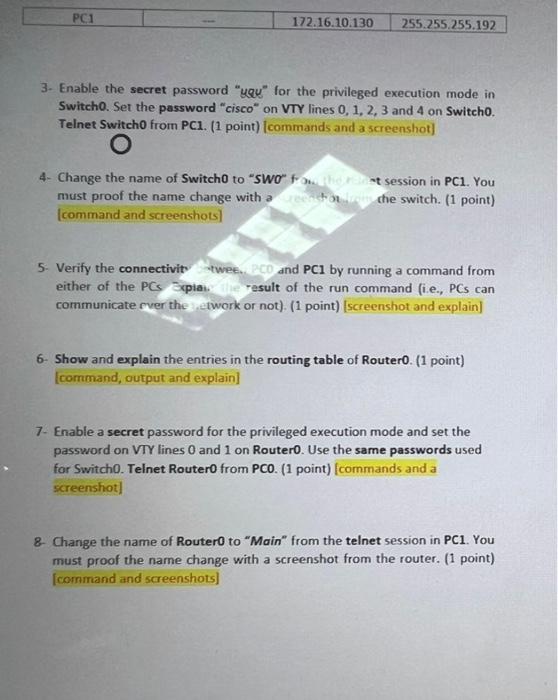
- Run Cisco Packet Tracer simulator to solve this exam. 1- Build the following network in Packet Tracer with proper cabling. (1 point) [screenshot] 2- Assign the IP addresses in the following table to the network devices. Note: The correctness of IP addresses depends on your choice of interfaces between the networking devices. You must figure out the correct value of the Default Gateway. The default-gateway of a switch is set from the Global Configuration Mode. (3 points) [screenshots and commands) Switcho. Set the password "cisco" on VTY lines 0,1,2,3 and 4 on Switch0. Telnet Switch 0 from PC1. (1 point) [commands and a screenshot) 4. Change the name of Switch0 to "SWO" froti. session in PC1. You must proof the name change with a cinthe switch. (1 point) [command and screenshots] 5. Verify the connectivit twee., PCO and PC1 by running a command from either of the PCs Expia. result of the run command (i.e., PCs can communicate over the ietwork or not). (1 point) [screenshot and explain] 6. Show and explain the entries in the routing table of Router0. ( 1 point) [command, output and explain] 7. Enable a secret password for the privileged execution mode and set the password on VTY lines 0 and 1 on Router0. Use the same passwords used for Switch0. Telnet Router0 from PCO. (1 point) [commands and a screenshot] 8. Change the name of Router0 to "Main" from the telnet session in PC1. You must proof the name change with a screenshot from the router. (1 point) [command and screenshots]
Step by Step Solution
There are 3 Steps involved in it

Get step-by-step solutions from verified subject matter experts
 Study Help