







Question: pls use gui and show step by step bcs i am confuse with jbutton (calculate) part. thank you You are required to develop a Java
pls use gui and show step by step bcs i am confuse with jbutton (calculate) part. thank you 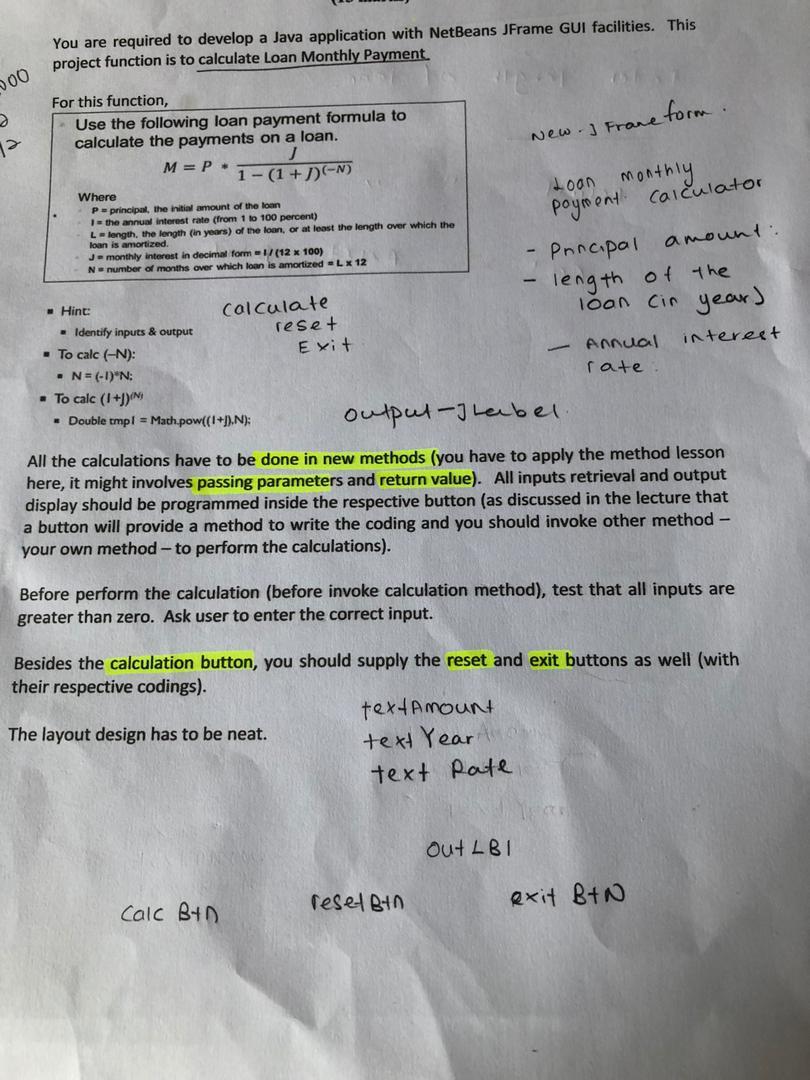
You are required to develop a Java application with NetBeans JFrame GUI facilities. This project function is to calculate Loan Monthly Payment. 300 1 New. Frane form. For this function, Use the following loan payment formula to calculate the payments on a loan. M= P. 1 - (1 + )(-N) Where P = principal, the initial amount of the loan 1- the annual interest rate (from 1 to 100 percent) L-length, the length (in years of the loan, or at least the length over which the loan is amortized. J - monthly interest in decimal form = 1/(12 x 100) N number of months over which loan is amortized LX 12 Loon monthly payment calculator Principal amount length of the Hint: calculate reset Exit loan cin year) Annual interest rate Identify inputs output To calc (-N): . N= (-1)"N: - To calc (1 +J) Double tmpl = Math.pow((1+).N): output- Label All the calculations have to be done in new methods (you have to apply the method lesson here, it might involves passing parameters and return value). All inputs retrieval and output display should be programmed inside the respective button (as discussed in the lecture that a button will provide a method to write the coding and you should invoke other method - your own method to perform the calculations). Before perform the calculation (before invoke calculation method), test that all inputs are greater than zero. Ask user to enter the correct input. Besides the calculation button, you should supply the reset and exit buttons as well (with their respective codings). textAmount The layout design has to be neat. text Year text Pate out LB1 reset Bin exit B+N Calc btn
Step by Step Solution
There are 3 Steps involved in it

Get step-by-step solutions from verified subject matter experts
 Study Help