







Question: Plz code in C Message Cipher Download message_cipher.c here, or copy it to your CSE account using the following command: [ $ mathrm{cp} text {-n
Plz code in C
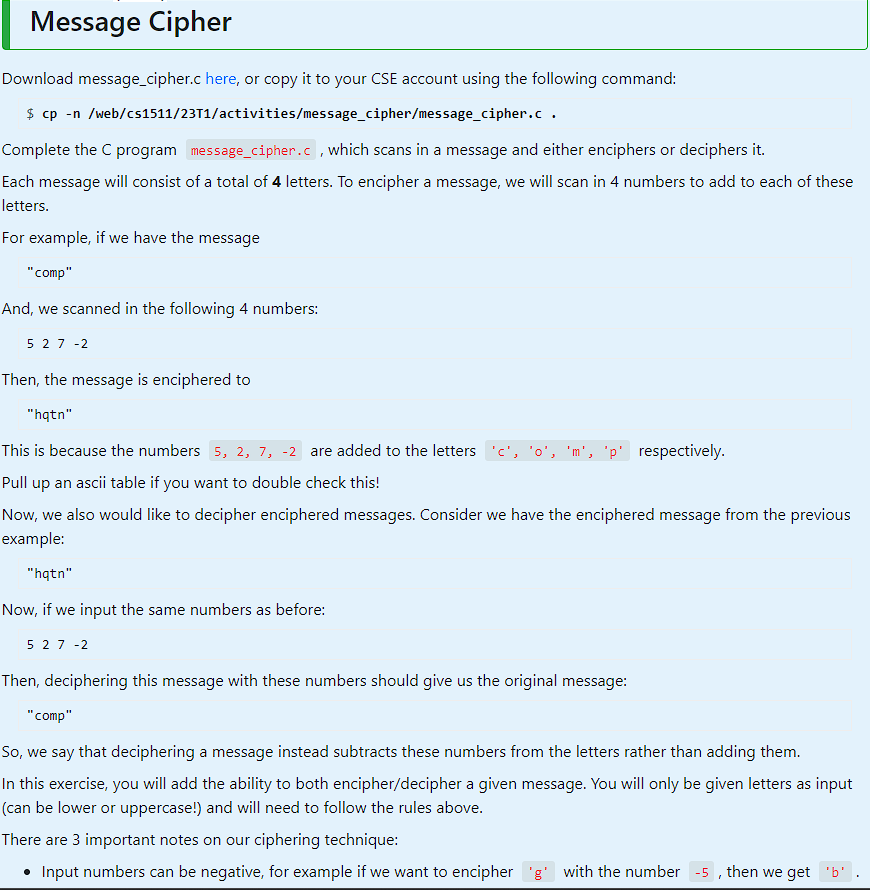
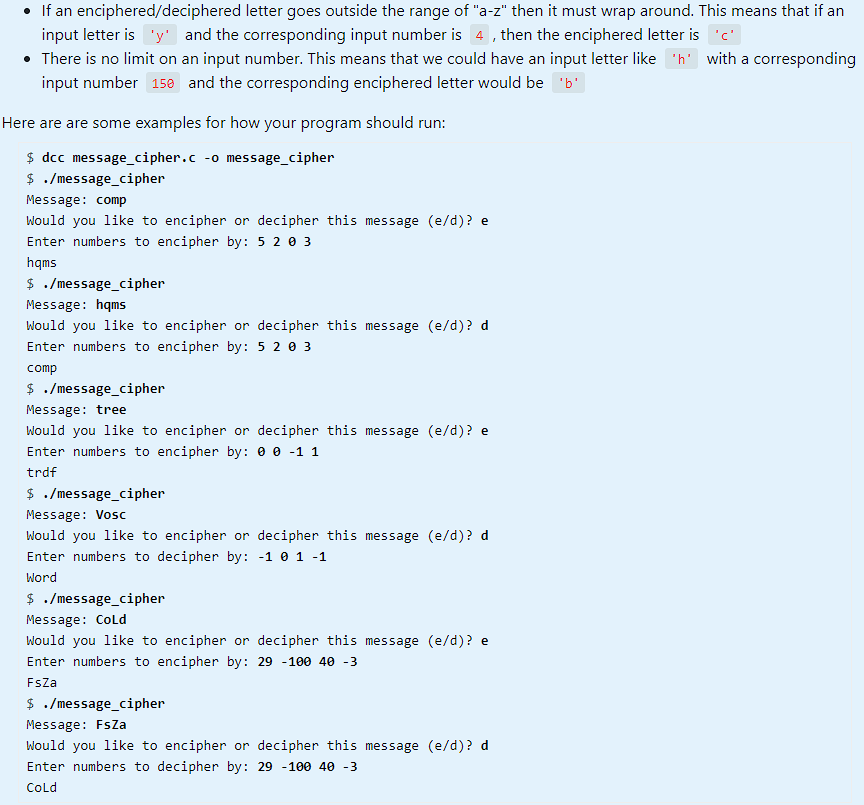
Message Cipher Download message_cipher.c here, or copy it to your CSE account using the following command: \[ \$ \mathrm{cp} \text {-n /web/cs1511/23T1/activities/message_cipher/message_cipher. } c \text {. } \] Complete the C program which scans in a message and either enciphers or deciphers it. Each message will consist of a total of 4 letters. To encipher a message, we will scan in 4 numbers to add to each of these letters. For example, if we have the message "comp" And, we scanned in the following 4 numbers: 5272 Then, the message is enciphered to "hqtn" This is because the numbers are added to the letters respectively. Pull up an ascii table if you want to double check this! Now, we also would like to decipher enciphered messages. Consider we have the enciphered message from the previous example: "hqtn" Now, if we input the same numbers as before: 5272 Then, deciphering this message with these numbers should give us the original message: "comp" So, we say that deciphering a message instead subtracts these numbers from the letters rather than adding them. In this exercise, you will add the ability to both encipher/decipher a given message. You will only be given letters as input (can be lower or uppercase!) and will need to follow the rules above. There are 3 important notes on our ciphering technique: - Input numbers can be negative, for example if we want to encipher with the number , then we get - If an enciphered/deciphered letter goes outside the range of "a-z" then it must wrap around. This means that if an input letter is ' y ' and the corresponding input number is , then the enciphered letter is - There is no limit on an input number. This means that we could have an input letter like with a corresponding input number and the corresponding enciphered letter would be Here are are some examples for how your program should run: $ dcc message_cipher.c -o message_cipher $./ message_cipher Message: comp Would you like to encipher or decipher this message (e/d)? e Enter numbers to encipher by: 5203 hqms $./message_cipher Message: hqms Would you like to encipher or decipher this message (e/d)? d Enter numbers to encipher by: 5203 comp $./message_cipher Message: tree Would you like to encipher or decipher this message (e/d)? e Enter numbers to encipher by: 0011 trdf $./message_cipher Message: Vosc Would you like to encipher or decipher this message (e/d)? d Enter numbers to decipher by: 10011 Word $./message_cipher Message: CoLd Would you like to encipher or decipher this message (e/d)? e Enter numbers to encipher by: 29100403 FsZa $./message_cipher Message: FsZa Would you like to encipher or decipher this message (e/d)? d Enter numbers to decipher by: 29100403 cold Message Cipher Download message_cipher.c here, or copy it to your CSE account using the following command: \[ \$ \mathrm{cp} \text {-n /web/cs1511/23T1/activities/message_cipher/message_cipher. } c \text {. } \] Complete the C program which scans in a message and either enciphers or deciphers it. Each message will consist of a total of 4 letters. To encipher a message, we will scan in 4 numbers to add to each of these letters. For example, if we have the message "comp" And, we scanned in the following 4 numbers: 5272 Then, the message is enciphered to "hqtn" This is because the numbers are added to the letters respectively. Pull up an ascii table if you want to double check this! Now, we also would like to decipher enciphered messages. Consider we have the enciphered message from the previous example: "hqtn" Now, if we input the same numbers as before: 5272 Then, deciphering this message with these numbers should give us the original message: "comp" So, we say that deciphering a message instead subtracts these numbers from the letters rather than adding them. In this exercise, you will add the ability to both encipher/decipher a given message. You will only be given letters as input (can be lower or uppercase!) and will need to follow the rules above. There are 3 important notes on our ciphering technique: - Input numbers can be negative, for example if we want to encipher with the number , then we get - If an enciphered/deciphered letter goes outside the range of "a-z" then it must wrap around. This means that if an input letter is ' y ' and the corresponding input number is , then the enciphered letter is - There is no limit on an input number. This means that we could have an input letter like with a corresponding input number and the corresponding enciphered letter would be Here are are some examples for how your program should run: $ dcc message_cipher.c -o message_cipher $./ message_cipher Message: comp Would you like to encipher or decipher this message (e/d)? e Enter numbers to encipher by: 5203 hqms $./message_cipher Message: hqms Would you like to encipher or decipher this message (e/d)? d Enter numbers to encipher by: 5203 comp $./message_cipher Message: tree Would you like to encipher or decipher this message (e/d)? e Enter numbers to encipher by: 0011 trdf $./message_cipher Message: Vosc Would you like to encipher or decipher this message (e/d)? d Enter numbers to decipher by: 10011 Word $./message_cipher Message: CoLd Would you like to encipher or decipher this message (e/d)? e Enter numbers to encipher by: 29100403 FsZa $./message_cipher Message: FsZa Would you like to encipher or decipher this message (e/d)? d Enter numbers to decipher by: 29100403 cold
Step by Step Solution
There are 3 Steps involved in it

Get step-by-step solutions from verified subject matter experts
 Study Help