







Question: Polynomial interpolation (25 points) Download the starter code Hw5p1.m from CANVAS Files section folder HW Problems to your computer, and rename it as YourlastnameyourfirstnameHw5p1.m. This
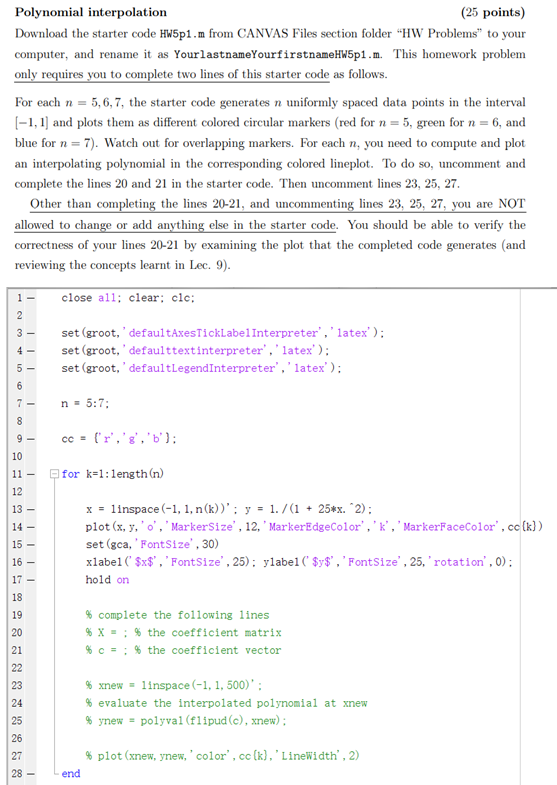
Polynomial interpolation (25 points) Download the starter code Hw5p1.m from CANVAS Files section folder "HW Problems" to your computer, and rename it as YourlastnameyourfirstnameHw5p1.m. This homework problem only requires you to complete two lines of this starter code as follows. For each n = 5,6,7, the starter code generates n uniformly spaced data points in the interval [-1,1) and plots them as different colored circular markers (red for n = 5, green for n = 6, and blue for n = 7). Watch out for overlapping markers. For each n, you need to compute and plot an interpolating polynomial in the corresponding colored lineplot. To do so, uncomment and complete the lines 20 and 21 in the starter code. Then uncomment lines 23, 25, 27. Other than completing the lines 20-21, and uncommenting lines 23, 25, 27, you are NOT allowed to change or add anything else in the starter code. You should be able to verify the correctness of your lines 20-21 by examining the plot that the completed code generates (and reviewing the concepts learnt in Lec. 9). close all; clear: clc; 1 2 3- 4- set (groot,' defaultAxesTickLabel Interpreter', 'latex'); set (groot,' defaulttextinterpreter', 'latex'); set (groot,' defaultLegendInterpreter', 'latex'); 5 - 6 7 - n = 5:7: 8 9- cc = ('r''g','b']: 10 11 - 12 for k=1:length (n) 13 - 14 - 15 x = linspace (-1, 1, n(k))': y = 1./(1 + 25*x. 2): plot(x, y, 'o', 'MarkerSize', 12, ' MarkerEdgeColor", 'k', 'MarkerFaceColor", cc (k)) set (gca,' FontSize', 30) xlabel('$x$', 'FontSize', 25): ylabel ( $y$", 'FontSize', 25,' rotation', 0); 16 - 17 - hold on 18 19 20 21 % complete the following lines % X= ; % the coefficient matrix %C= : % the coefficient vector 22 23 % xnew - linspace (-1, 1, 500)': % evaluate the interpolated polynomial at xnew % ynew = polyval(flipud (c), xnew): 24 25 26 27 28 % plot (xnew, ynew,'color', cc (k), 'LineWidth', 2) - end
Step by Step Solution
There are 3 Steps involved in it

Get step-by-step solutions from verified subject matter experts
 Study Help