







Question: Preliminary work for this Project 1 . Use the CREATE and SELECT SQL statements to Create a Temporary table as a full copy ( all
Preliminary work for this Project
Use the CREATE and SELECT SQL statements to Create a Temporary table as a full copy all rows & columns of the table ORDERS. Name the new table ORDERSCOPY.
Display the content of the new table.
Write a SQL statement to convert the column ORDERMODE of your ORDERSCOPY table into Capital letters use the builtin function UPPER
Write a SQL statement to check, by COUNTing, if there are NULLs in the SALESREPID column of the table ORDERSCOPY.
Display the rows having null values in the SALESREPID column.
Write a SQL statement to replace all NULLs in the column SALESREPID of the table ORDERSCOPY with as an ID for a vitual Sales Representative
Display the content of the table ORDERSCOPY.
Run the statement SELECT COUNTPROMOTIONID FROM ORDERSCOPY; Note that you get althought there are rows with NULL in the column PROMOTIONID
Explain why you get zero.
Write a SQL statement to replace all nulls in the PROMOTIONID column of the table ORDERSCOPY with zero
Rerun the statement SELECT COUNTPROMOTIONID FROM ORDERSCOPY; Explain why this result value.
You need table ORDERSCOPY to complete your Project
Project Tasks.
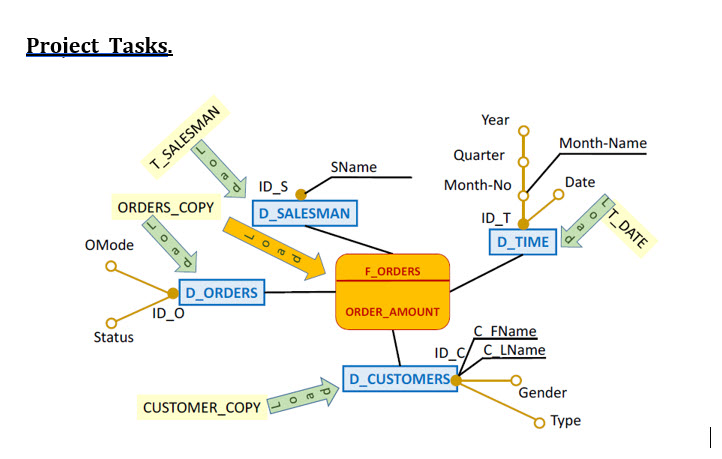
You want to load a Star Schema as shown above. To do this you must use the tables that you have prepared in previous project TDATE, CUSTOMERSCOPY, and ORDERSCOPY.
The OE database does not have a SALESMAN table, we need to CREATE one called TSALESMAN SALESREPID SNAME from the OEORDERS.SALESREPID; its columns are:
SALESREPID unique values. Replace Null IDs with ; it is better than ignore Nulls in analysis. Do not define a PK because the table has too few rows.
SNAME is a new column. Unfortunately, we do not have the names of the sales representatives in the OE database. To overcome this problem and facilitate filling the new table, set the SNAME as the concatenation of the SALESREPID and the constant NAMEfor example, Salesman will have name NAME; note this tip is just for the lab work but does not apply is real situations.
You should get the following content for TSALESMAN check attachment. CCDS Data Warehouse
Create Dimensions
Use the CREATE with an embedded SELECT statement and tables TDATE, CUSTOMERSCOPY, ORDERSCOPY, and TSALESMAN to create and load the four dimensional tables DORDERS, DCUSTOMERS, DTIME and DSALESMAN as they are described in the figure shows in the attachment.
For each Dimension, define the PK constraint and name it as follows:
PKDORDERS Primary Kay for DORDERS
PKDSALESMAN Primary Kay for DSALESMAN
PKDTIME Primary Kay for DTIME
PKDCUSTOMERS Primary Kay for DCUSTOMERS
Create Fact Table
CREATE the fact table FORDERS FORDERSID ORDERAMOUNT,...Complete with the other columns....
The PK of the fact table FORDERS could be either the concatenation of all FKs referencing the dimensions linked to the fact, or the UNIQUE column FORDERSID Define a PK constraint called PKFORDERSID on the column FORDERSID
The Fact table FORDERS references the four dimensions DTIME, DCUSTOMERS, DORDERS and DSALESMAN. Define all its Foreign keys Follow the naming convention: FKORDERSTODATE,
Create an Oracle Sequence SEQFORDERS starting with You will use this sequence to populate FORDERSID primary key
Develop SQL statements to load FORDERS. Note that the measure ORDERAMOUNT is in EURO and you extract it from the table ORDERSCOPY.
Display the SUM of the column ORDERAMOUNT from the fact FORDERS.
Display the Turnover sum of ORDERAMOUNT by Customer IDC CFName and by Year.
COUNT the number of ORDERS having an amount greater that a given value choose a value
Display the percentage of amount of DIRECT Orders and ONLINE Orders.
Step by Step Solution
There are 3 Steps involved in it
1 Expert Approved Answer
Step: 1 Unlock

Question Has Been Solved by an Expert!
Get step-by-step solutions from verified subject matter experts
Step: 2 Unlock
Step: 3 Unlock
 Study Help