



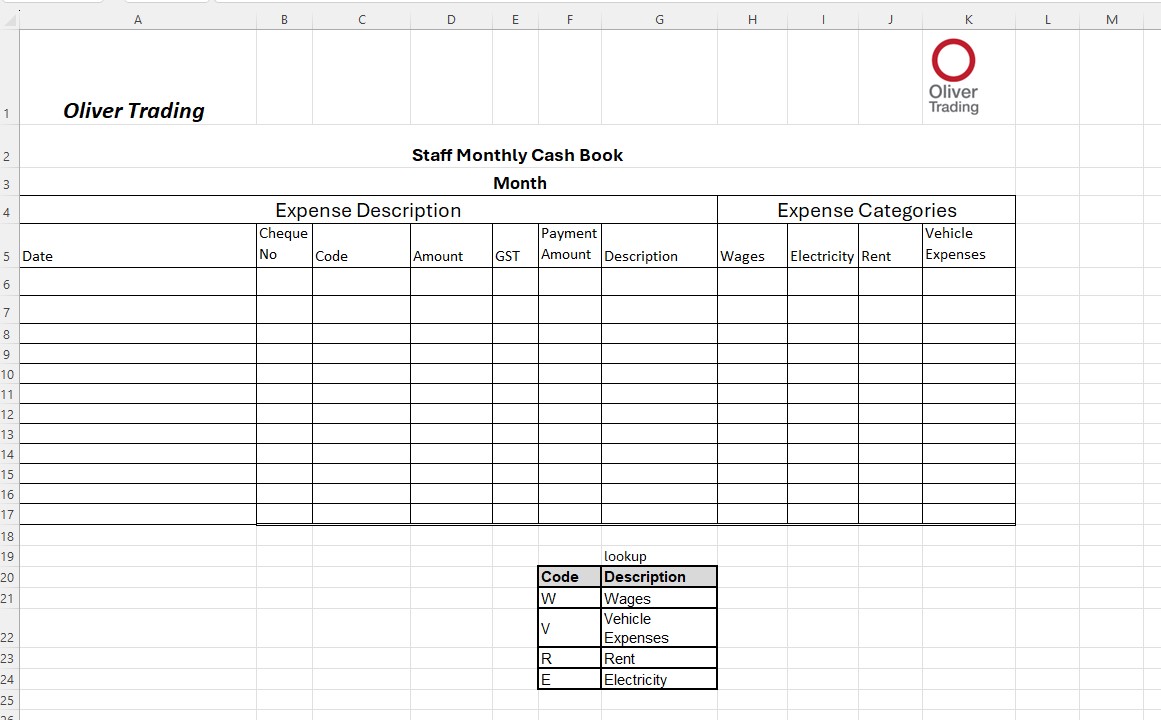
Question: Prepare a logical formula (IF) in the expense category columns, which will return the GST exclusive amount from the amount column into the appropriate expense
Prepare a logical formula (IF) in the expense category columns, which will return the GST exclusive amount from the amount column into the appropriate expense category column.
Insert formula to calculate the GSTamount. GST is 1/10 of the Amount.
NOTE: There is no GST on Wages, so you will need a formula that will determine if the code is W and if so enter 0, if not then calculate for GST.
Insert formula to Payment Amount and totals at the bottom. NOTE: Payment Amount is the total of Amount +GST
Format the Amount / GST / Payment Amount / Wages / Electricity / Rent Vehicle Expenses to number, 2 decimals. Format the Total row to currency and 2 decimals.
Use a function underneath your main table in a spot of your choosing that will show the countof each expenditure per type.
Use a function underneath your main table in a spot of your choosing that will show the averagespent on each expense type. You must do this manually by adding up the expenses and dividing by the count produced in 3.6 (Do not use =AVERAGE).
In a spot of your choosing, write the phrase "Total Budget". In the cell next to it, write "200000"
Underneath the total budget row, write the phrase "Suplus/Deficit". In the cell next to it, use a formula to calculate how much surplus/deficit the organisation has.The formula should be a reference to your 200000 then subtract the total expenses for the business.
Step by Step Solution
There are 3 Steps involved in it

Get step-by-step solutions from verified subject matter experts