







Question: Problem 10-28 Complete the steps below using cell references to given data or previous calculations. In some cases, a simple cell reference is all you
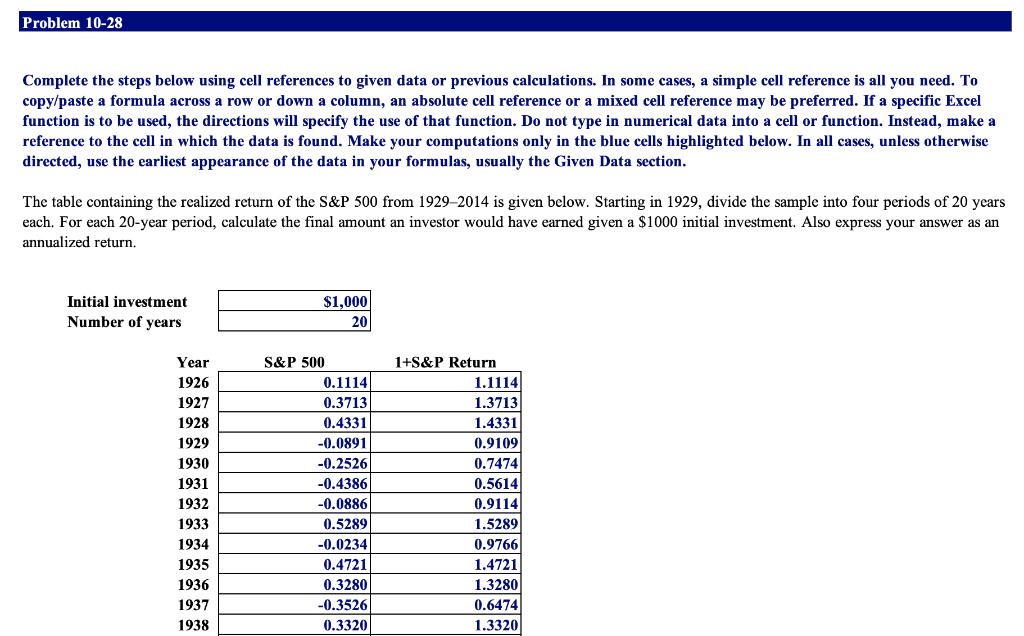
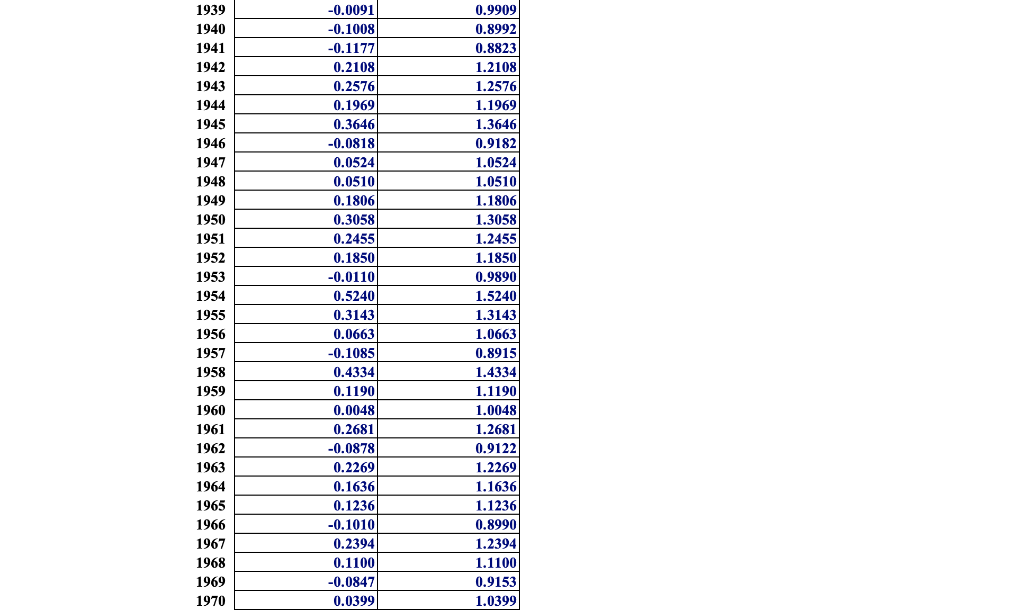
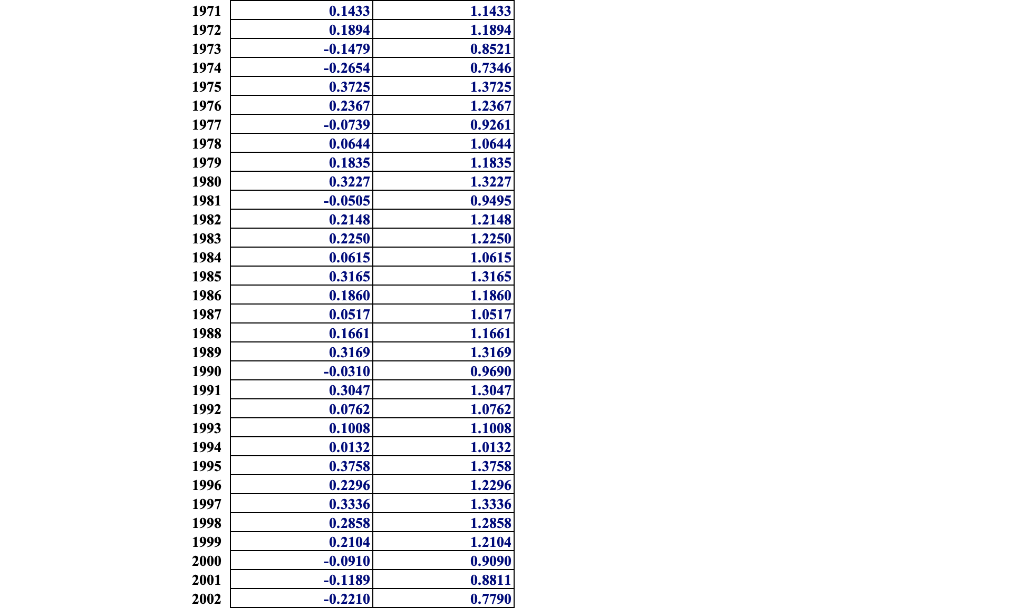
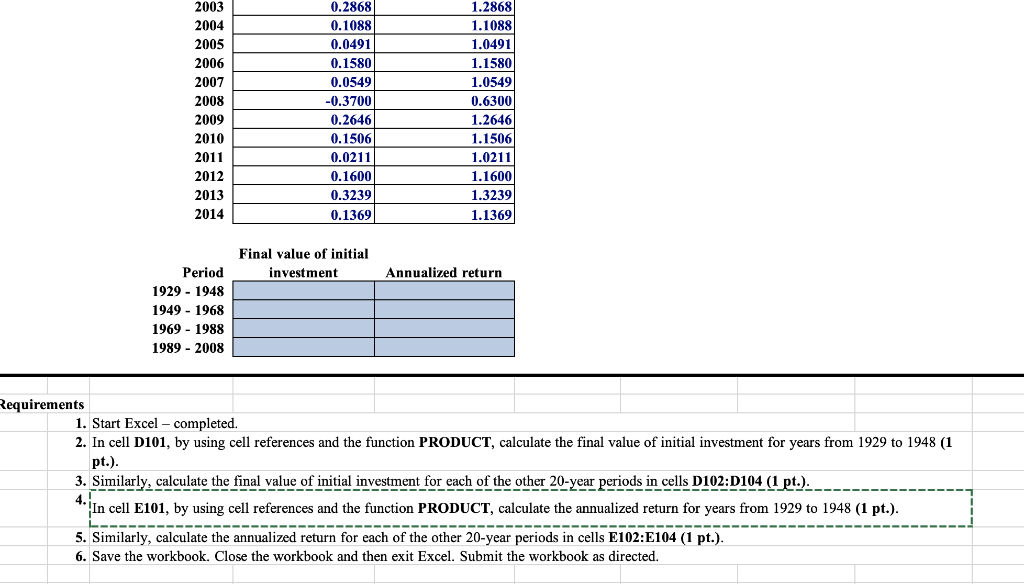
Problem 10-28 Complete the steps below using cell references to given data or previous calculations. In some cases, a simple cell reference is all you need. To copy/paste a formula across a row or down a column, an absolute cell reference or a mixed cell reference may be preferred. If a specific Excel function is to be used, the directions will specify the use of that function. Do not type in numerical data into a cell or function. Instead, make a reference to the cell in which the data is found. Make your computations only in the blue cells highlighted below. In all cases, unless otherwise directed, use the earliest appearance of the data in your formulas, usually the Given Data section. The table containing the realized return of the S&P 500 from 19292014 is given below. Starting in 1929, divide the sample into four periods of 20 years each. For each 20-year period, calculate the final amount an investor would have earned given a $1000 initial investment. Also express your answer as an annualized return. Initial investment Number of years $1,000 20 Year 1926 1927 1928 1929 1930 1931 1932 S&P 500 0.1114 0.3713 0.4331 -0.0891 -0.2526 -0.4386 -0.0886 0.5289 -0.0234 0.4721 0.3280 -0.3526 0.33201 1+S&P Return 1.1114 1.3713 1.4331 0.9109 0.7474 0.5614 0.9114 1.5289 0.9766 1.4721 1.3280 0.6474 1.3320 1933 1934 1935 1936 1937 1938 1939 1940 1941 1942 1943 1944 1945 1946 1947 1948 1949 1950 1951 1952 1953 1954 1955 1956 1957 1958 1959 1960 1961 1962 1963 1964 1965 1966 1967 1968 1969 1970 -0.0091 -0.1008 -0.1177 0.2108 0.2576 0.1969 0.3646 -0.0818 0.0524 0.0510 0.1806 0.3058 0.2455 0.1850 -0.0110 0.5240 0.3143 0.0663 -0.1085 0.4334 0.1190 0.0048 0.2681 -0.0878 0.2269 0.1636 0.1236 -0.1010 0.2394 0.1100 -0.0847 0.0399 0.9909 0.8992 0.8823 1.2108 1.2576 1.1969 1.3646 0.9182 1.0524 1.0510 1.1806 1.3058 1.2455 1.1850 0.98901 1.5240 1.3143 1.0663 0.8915 1.4334 1.1190 1.0048 1.2681 0.9122 1.2269 1.1636 1.1236 0.8990 1.2394 1.1100 0.9153 1.0399 1971 1972 1973 1974 1975 1976 1977 1978 1979 1980 1981 1982 1983 1984 1985 1986 1987 1988 1989 1990 1991 1992 1993 1994 1995 1996 1997 1998 1999 2000 2001 2002 0.1433 0.1894 -0.1479 -0.2654 0.3725 0.2367 -0.0739 0.0644 0.1835) 0.3227 -0.05051 0.2148 0.2250 0.0615 0.3165) 0.1860 0.0517 0.1661 0.3169 -0.0310 0.3047 0.0762 0.1008 0.0132 0.3758 0.2296 0.3336 0.2858 0.2104 -0.0910 -0.1189 -0.2210 1.1433 1.1894 0.8521 0.7346 1.3725 1.2367 0.9261 1.0644 1.1835 1.3227 0.9495 1.2148 1.2250 1.0615 1.3165 1.1860 1.0517 1.1661 1.3169 0.9690) 1.3047 1.0762 1.1008 1.0132 1.3758 1.2296 1.3336 1.2858 1.2104 0.9090 0.8811 0.7790 2003 2004 2005 2006 2007 2008 2009 2010 2011 2012 2013 2014 0.2868 0.1088 0.0491 0.1580 0.0549 -0.3700 0.2646 0.1506 0.0211 0.1600 0.3239 0.1369 1.2868 1.1088 1.0491 1.1580 1.0549 0.6300 1.2646 1.1506 1.0211 1.1600 1.3239 1.1369 Final value of initial investment Annualized return Period 1929 - 1948 1949 - 1968 1969 - 1988 1989 - 2008 Requirements 1. Start Excel - completed. 2. In cell D101, by using cell references and the function PRODUCT, calculate the final value of initial investment for years from 1929 to 1948 (1 pt.). 3. Similarly, calculate the final value of initial investment for each of the other 20-year periods in cells D102:D104 (1 pt.). 4. In cell E101, by using cell references and the function PRODUCT, calculate the annualized return for years from 1929 to 1948 (1 pt.). 5. Similarly, calculate the annualized return for each of the other 20-year periods in cells E102:E104 (1 pt.). 6. Save the workbook. Close the workbook and then exit Excel. Submit the workbook as directed
Step by Step Solution
There are 3 Steps involved in it

Get step-by-step solutions from verified subject matter experts
 Study Help