



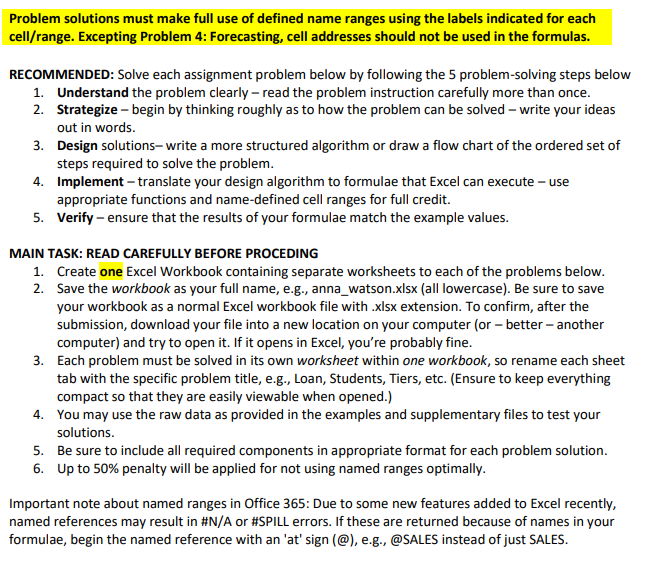
Question: Problem solutions must make full use of defined name ranges using the labels indicated for each cell / range . Excepting Problem 4 : Forecasting,
Problem solutions must make full use of defined name ranges using the labels indicated for each
cellrange Excepting Problem : Forecasting, cell addresses should not be used in the formulas.
MAIN TASK: READ CAREFULLY BEFORE PROCEDING
Create one Excel Workbook containing separate worksheets to each of the problems below.
Save the workbook as your full name, eg annawatson.xlsx all lowercase Be sure to save
your workbook as a normal Excel workbook file with xlsx extension. To confirm, after the
submission, download your file into a new location on your computer or better another
computer and try to open it If it opens in Excel, you're probably fine.
Each problem must be solved in its own worksheet within one workbook, so rename each sheet
tab with the specific problem title, eg Loan, Students, Tiers, etc. Ensure to keep everything
compact so that they are easily viewable when opened.
You may use the raw data as provided in the examples and supplementary files to test your
solutions.
Be sure to include all required components in appropriate format for each problem solution.
Up to penalty will be applied for not using named ranges optimally.
Important note about named ranges in Office : Due to some new features added to Excel recently,
named references may result in #NA or #SPILL errors. If these are returned because of names in your
formulae, begin the named reference with an at sign @ eg @SALES instead of just SALES.
Step by Step Solution
There are 3 Steps involved in it
1 Expert Approved Answer
Step: 1 Unlock

Question Has Been Solved by an Expert!
Get step-by-step solutions from verified subject matter experts
Step: 2 Unlock
Step: 3 Unlock