Question: Problem Solve Student data file needed: No data file needed You will save your file as: Opm01ch01 JobSearchPortfolio_LastFirst.mpp Sales & Marketing Planning Your Job Search
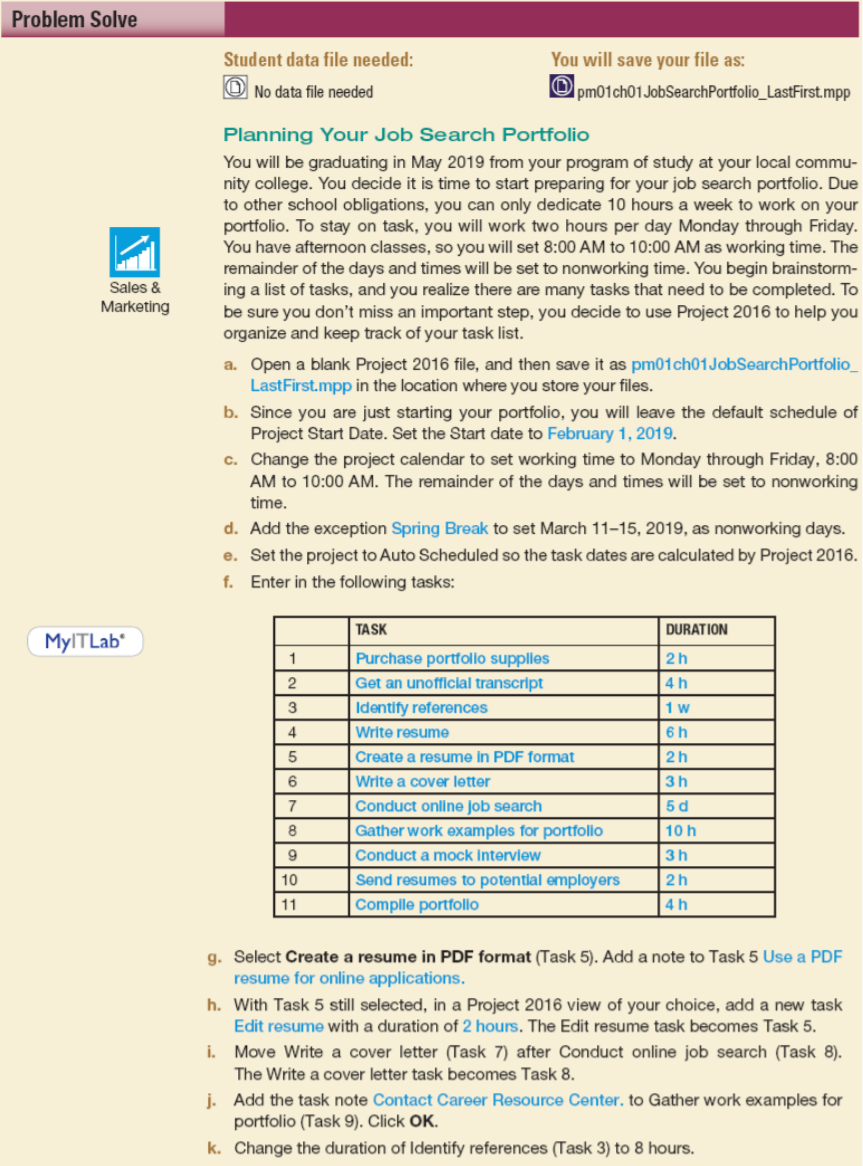
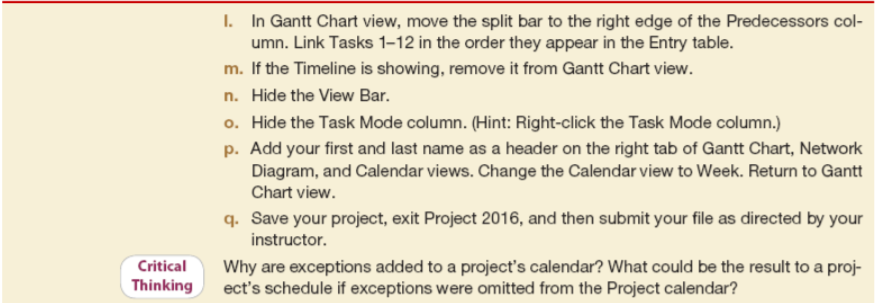
Problem Solve Student data file needed: No data file needed You will save your file as: Opm01ch01 JobSearchPortfolio_LastFirst.mpp Sales & Marketing Planning Your Job Search Portfolio You will be graduating in May 2019 from your program of study at your local commu- nity college. You decide it is time to start preparing for your job search portfolio. Due to other school obligations, you can only dedicate 10 hours a week to work on your portfolio. To stay on task, you will work two hours per day Monday through Friday. You have afternoon classes, so you will set 8:00 AM to 10:00 AM as working time. The remainder of the days and times will be set to nonworking time. You begin brainstorm- ing a list of tasks, and you realize there are many tasks that need to be completed. To be sure you don't miss an important step, you decide to use Project 2016 to help you organize and keep track of your task list. a. Open a blank Project 2016 file, and then save it as pm01ch01 JobSearchPortfolio_ LastFirst.mpp in the location where you store your files. b. Since you are just starting your portfolio, you will leave the default schedule of Project Start Date. Set the Start date to February 1, 2019. c. Change the project calendar to set working time to Monday through Friday, 8:00 AM to 10:00 AM. The remainder of the days and times will be set to nonworking time. d. Add the exception Spring Break to set March 11-15, 2019, as nonworking days. e. Set the project to Auto Scheduled so the task dates are calculated by Project 2016. f. Enter in the following tasks: TASK DURATION MyltLab 1 2 3 4 5 6 Purchase portfolio supplies Get an unofficial transcript Identify references Write resume Create a resume in PDF format Write a cover letter Conduct online job search Gather work examples for portfolio Conduct a mock interview Send resumes to potential employers Compile portfolio 2h 4 h 1 w 6 h 2 h 3 h 5d 10 h 3h 2h 4h 7 8 9 10 11 g. Select Create a resume in PDF format (Task 5). Add a note to Task 5 Use a PDF resume for online applications. h. With Task 5 still selected, in a Project 2016 view of your choice, add a new task Edit resume with a duration of 2 hours. The Edit resume task becomes Task 5. i. Move Write a cover letter (Task 7) after Conduct online job search (Task 8). The Write a cover letter task becomes Task 8. j. Add the task note Contact Career Resource Center. to Gather work examples for portfolio (Task 9). Click OK. k. Change the duration of Identify references (Task 3) to 8 hours. I. In Gantt Chart view, move the split bar to the right edge of the Predecessors col- umn. Link Tasks 1-12 in the order they appear in the Entry table. m. If the Timeline is showing, remove it from Gantt Chart view. n. Hide the View Bar. o. Hide the Task Mode column. (Hint: Right-click the Task Mode column.) p. Add your first and last name as a header on the right tab of Gantt Chart, Network Diagram, and Calendar views. Change the Calendar view to Week. Return to Gantt Chart view. 4. Save your project, exit Project 2016, and then submit your file as directed by your instructor. Why are exceptions added to a project's calendar? What could be the result to a proj- ect's schedule if exceptions were omitted from the Project calendar? Critical Thinking









 Study Help