







Question: Problem: Write a C++ program to write to an output file amortization tables based on input from an input file. In main, do the following:
Problem: Write a C++ program to write to an output file amortization tables based on input from an input file. In main, do the following:
call a function (given in a separate Code File) to open the input file (in which you read the filename from the user and open the file, and if it opens, return true, otherwise, print an error message and return false)
Prog. Code File //USE THE FOLLOWING IN YOUR .cpp FILE for opening the input file:
bool openInputFile(ifstream &ifs)
{
string filename;
cout
getline(cin, filename);
ifs.open(filename.c_str());
return ifs.is_open();
}
MODIFY the openInputFile function for openOutputFile (change ifstream to ofstream, change the prompt to "Enter the output filename: "
call another function to open an output file(SIMILAR to the given openInputFile function, and if it opens, return true, otherwise, print an error message and return false)
if the input file or output file DIDN'T open, end the program **Read from the input file the loan amount (double), APR (double for annual percentage rate), the term (int, in months) of a loan. (This may be a function with reference parameters, or just read from the input file in main.)
Call a function (that you write) to calculate the monthly payment, but ROUNDED TO THE NEAREST 100TH. How to round to the 100th is in A. below. This function MUST return the monthly payment in a return statement.
monthly payment formula: 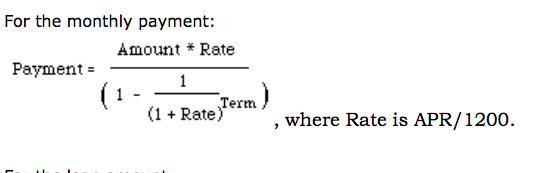
Call a function (that you write) to write to the output file the monthly payment and an amortization schedule (see B. below) for a loan for the life of the loan.
Repeat to ** while the input function returns true (THIS IS A WHILE LOOP)
A. To round a number to the nearest 100th, if you're using CodeBlocks or a compiler that has a round function, do: round(number*100.)/100. IF you don't have the round function, do: floor(number*100. + 0.5)/100. OPTIONAL: write a function that returns the rounded value (double) in a return statement.
B. In the function that writes an amortization schedule to the output file, because you already opened the output file (and will write more to it later), the ofstream varialbe MUST be a REFERENCE PARAMETER. You'll be using all the input values (the loan amount, APR, and term) AND the monthly payment in the calculations, so they MUST be "received" from main (value parameters).
The amortization schedule should include the payment number (starting at 1), the interest and principal of each monthly payment, and the balance after each monthly payment. The rate must be calculated (APR/1200.) AND the balance must be initialized to the loan amount BEFORE the loop. Write the header information (loan amount, APR, and term), then column headers as shown in the test output file.
Then USE A FOR LOOP (so the starting payment number is 1, last payment number is term, and you increment the payment number by 1) to calculate and write the following to the output file! The calculations for the interest, principal and balance MUST BE DONE IN ANOTHER FUNCTION but called from here (see C. below), then are written to the output file in this function. Be sure to format the numbers to the floating numbers are written with 2 places to the right of the decimal point (fixed) and are lined up in columns (use setw for each).
C. In the amortization calculations function, the interest, principal, and balance will be calculated, SO they MUST be REFERENCE PARAMETERS. You'll also need to pass the rate and monthly payment by value (which has already been calculated from the APR in the table writing function B.
Here are the calculations: interest = balance * rate (be sure to round to nearest 100th) principal = payment - interest balance = balance - principal
HINT: When writing the module specs and writing this in C++, this function is writing a table using the input values AND the monthly payment, but anything calculated is NOT needed in main, so the only "reference parameter" is the output file variable. The input values and monthly payment are ONLY "receives". (Note: the last balance may become negative due to rounding, which is OK)
DO NOT USE ANY EXTERNAL VARIABLES (i.e., variables MUST be declared inside of main or inside of functions). (External const is OK, because they're not variables)
PUT ALL THE FUNCTION DEFINITIONS AFTER MAIN, so you MUST PUT FUNCTION PROTOTYPE DECLARATIONS FOR ALL THE FUNCTION BEFORE MAIN! Include in your programs: for loop where indicated above while loop for the main loop functions (as specified above)
Turn in the output file using the InputFile.txt.
For the monthly payment: Amount Rate Payment Term (1 Rate) where Rate is APR/1200
Step by Step Solution
There are 3 Steps involved in it

Get step-by-step solutions from verified subject matter experts
 Study Help