







Question: Process Programming Open the program ftest.py and try running to the program to see how it works. code: import os , sys , time pid
Process Programming
Open the program
ftest.py and try running to the program to see how it works.
code:
import os sys time
pid osfork
if pid :
printThis is the child... starting the calculator"
osexeclusrbingnomecalculator", "this parameter is ignored"
sysexit
printThis is the parent... who will wait for seconds and then stop"
time.sleep
The program
runs a new child process using the fork command as and the child process runs the gnome
calculatorprogram.
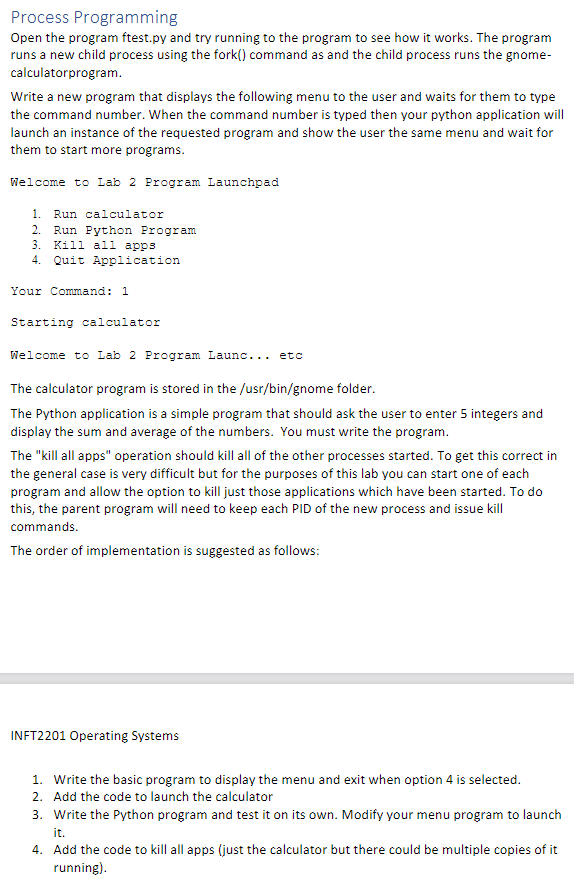
Write a new program that displays the following menu to the user and waits for them to type
the command number. When the command number is typed then your python application will
launch an instance of the requested program and show the user the same menu and wait for
them to start more programs.
What the code should look like:
Welcome to Lab Program Launchpad
Run calculator
Run Python Program
Kill all apps
Quit Application
Your Command:
Starting calculator
Welcome to Lab Program Launc... etc
The calculator program is stored in the usrbingnome folder.
The Python application is a simple program that should ask the user to enter integers and
display the sum and average of the numbers. You must write the program.
The "kill all apps" operation should kill all of the other processes started. To get this correct in
the general case is very difficult but for the purposes of this lab you can start one of each
program and allow the option to kill just those applications which have been started. To do
this, the parent program will need to keep each PID of the new process and issue kill
commands.
The order of implementation is suggested as follows:
INFT Operating Systems
Write the basic program to display the menu and exit when option is selected.
Add the code to launch the calculator
Write the Python program and test it on its own. Modify your menu program to launch
it
Add the code to kill all apps just the calculator but there could be multiple copies of it
running
Step by Step Solution
There are 3 Steps involved in it
1 Expert Approved Answer
Step: 1 Unlock

Question Has Been Solved by an Expert!
Get step-by-step solutions from verified subject matter experts
Step: 2 Unlock
Step: 3 Unlock
 Study Help