







Question: Program2 #include pch.h #include #include #include #define PI 3.142857 using namespace std; int main() { float r, h, C, Sa, V, Vn, Rn; cout cin
Program2
#include "pch.h"
#include
#include
#include
#define PI 3.142857
using namespace std;
int main()
{
float r, h, C, Sa, V, Vn, Rn;
cout
cin >> r;
cout
cin >> h;
C = 2 * PI * r;
Sa = 2 * PI * r * r + 2 * PI * r * h;
V = PI * r * r * h;
Vn = V + (V / 2);
Rn = sqrt(Vn / (PI*h));
cout
cout
return 0;
}
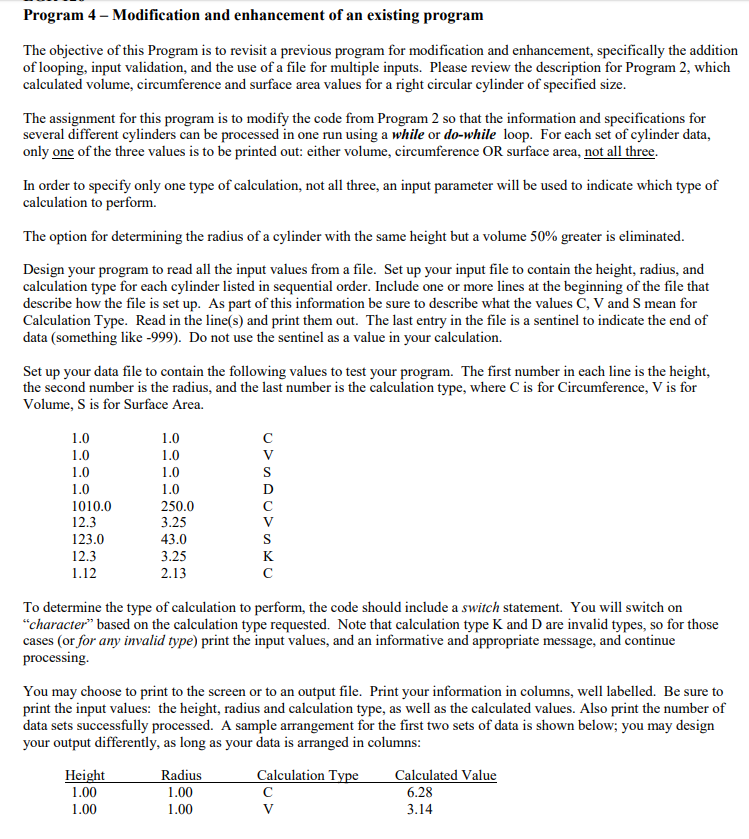
Program 4 - Modification and enhancement of an existing program d enhancement, specifically the addition The objective of this Program is to revisit a previous program for r of looping, input validation, and the use of a file for multiple inputs. Please review the description for Program 2, which calculated volume, circumference and surface area values for a right circular cylinder of specified size modification an The assignment for this program is to modify the code from Program 2 so that the information and specifications for several different cylinders can be processed in one run using a while or do-while loop. For each set of cylinder data, only one of the three values is to be printed out: either volume, circumference OR surface area, not all three In order to specify only one type of calculation, not all three, an input parameter will be used to indicate which type of calculation to perform. The option for determining the radius of a cylinder with the same height but a volume 50% greater is eliminated. Design your program to read all the input values from a file. Set up your input file to contain the height, radius, and calculation type for each cylinder listed in sequential order. Include one or more lines at the beginning of the file that describe how the file is set up. As part of this information be sure to describe what the values C, V and S mean for Calculation Type. Read in the line(s) and print them out. The last entry in the file is a sentinel to indicate the end of data (something like -999). Do not use the sentinel as a value in your calculation. Set up your data file to contain the following values to test your program. The first number in each line is the height, the second number is the radius, and the last number is the calculation type, where C is for Circumference, V is for Volume, S is for Surface Area. 010.0 12.3 123.0 12.3 1.12 250.0 3.25 43.0 3.25 2.13 To determine the type of calculation to perform, the code should include a switch statement. You will switch or "character" based on the calculation type requested. Note that calculation type K and D are invalid types, so for those cases (or for any invalid type) print the input values, and an informative and appropriate message, and continue processing. You may choose to print to the screen or to an output file. Print your information in columns, well labelled. Be sure to print the input values: the height, radius and calculation type, as well as the calculated values. Also print the number of data sets successfully processed. A your output differently, as long as your data is arranged in columns sample arrangement for the first two sets of data is shown below; you may design Height 1.00 1.00 Radius 1.00 1.00 Calculation Ty Calculated Value 6.28 3.14
Step by Step Solution
There are 3 Steps involved in it

Get step-by-step solutions from verified subject matter experts
 Study Help