







Question: Programming Assignment in C. Please show description. Thank You Program Description: This program will be written in the C language, and will display the contents
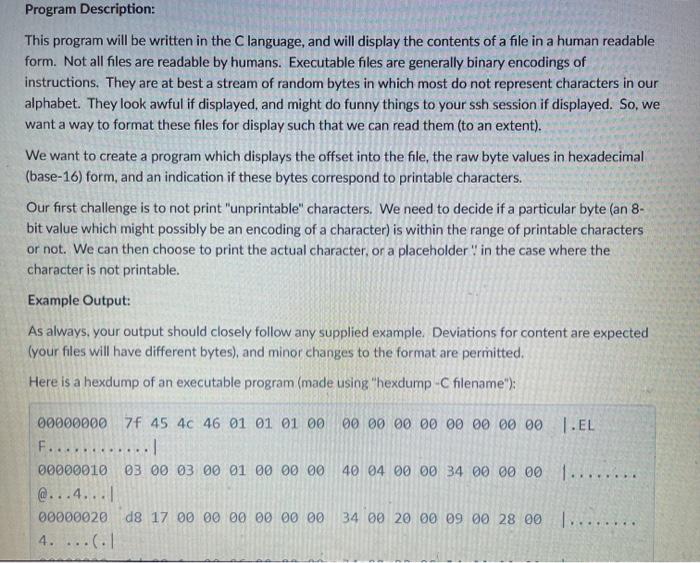
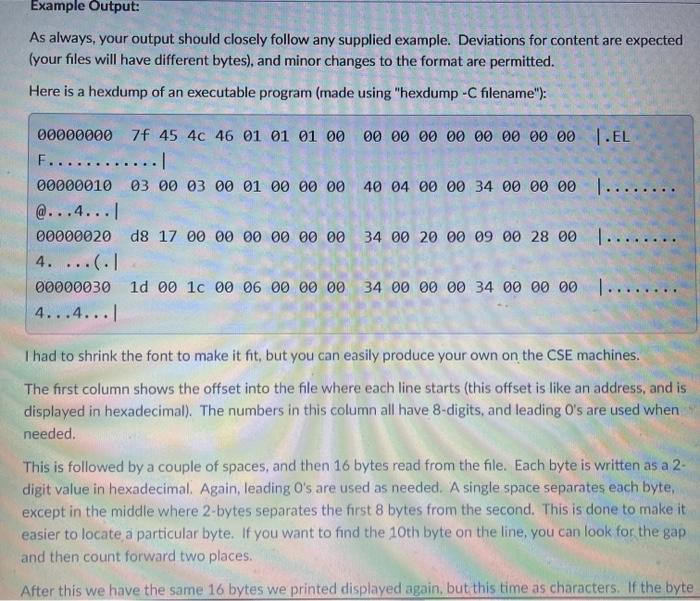
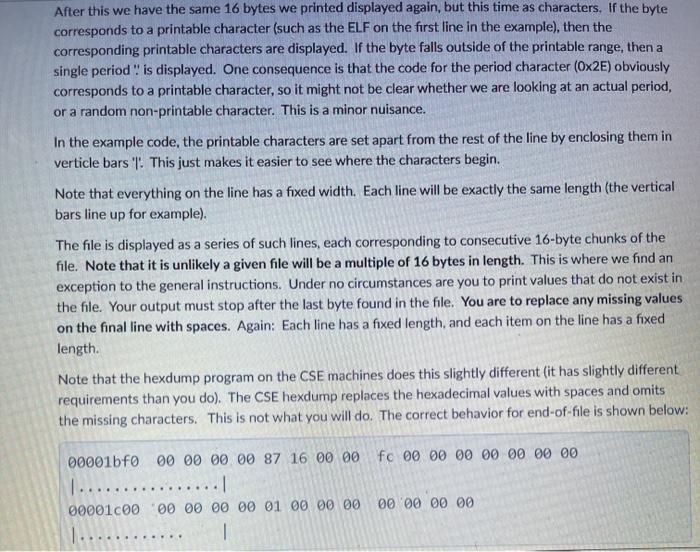
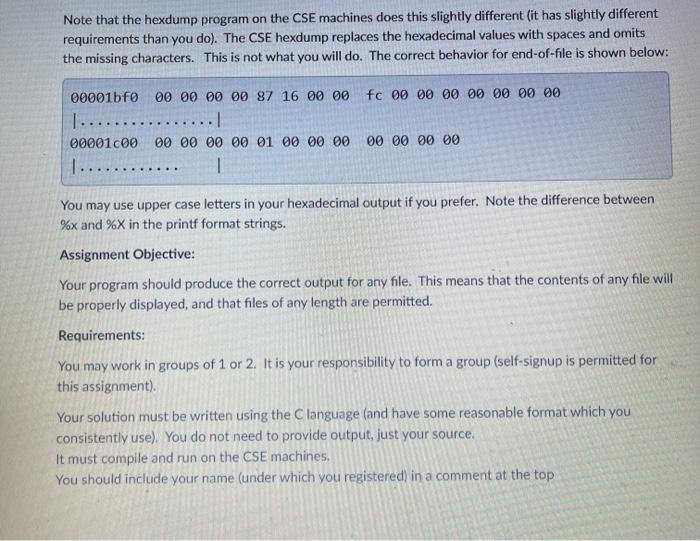
Program Description: This program will be written in the C language, and will display the contents of a file in a human readable form. Not all files are readable by humans. Executable files are generally binary encodings of instructions. They are at best a stream of random bytes in which most do not represent characters in our alphabet. They look awful if displayed, and might do funny things to your ssh session if displayed. So, we want a way to format these files for display such that we can read them (to an extent). We want to create a program which displays the offset into the file, the raw byte values in hexadecimal (base-16) form, and an indication if these bytes correspond to printable characters. Our first challenge is to not print "unprintable" characters. We need to decide if a particular byte (an 8- bit value which might possibly be an encoding of a character) is within the range of printable characters or not. We can then choose to print the actual character, or a placeholder in the case where the character is not printable. Example Output: As always, your output should closely follow any supplied example. Deviations for content are expected (your files will have different bytes), and minor changes to the format are permitted. Here is a hexdump of an executable program (made using "hexdump-C filename"); 00 00 00 00 00 00 00 00 L.EL 40 04 00 00 34 00 00 00 1....... 000000007F 45 40 46 01 01 01 00 F............ 00000010 03 00 03 00 01 00 00 00 @...4... 00000020 08 17 00 00 00 00 00 00 4. ...(:1 34 00 20 00 09 00 28 00 ....... Example Output: As always, your output should closely follow any supplied example. Deviations for content are expected (your files will have different bytes), and minor changes to the format are permitted. Here is a hexdump of an executable program (made using "hexdump-C filename"); 00000000 7f 45 46 46 01 01 01 00 00 00 00 00 00 00 00 00 T.EL F............ 00000010 03 00 03 00 01 00 00 00 40 04 00 00 34 00 00 00 I ...... @...4...1 00000020 d8 17 00 00 00 00 00 00 34 00 20 00 09 00 28 00 1..... 4. ....1 00000030 10 00 10 00 06 00 00 00 34 00 00 00 34 00 00 00 )..... 4...4...1 I had to shrink the font to make it fit, but you can easily produce your own on the CSE machines. The first column shows the offset into the file where each line starts (this offset is like an address, and is displayed in hexadecimal). The numbers in this column all have 8-digits, and leading O's are used when needed. This is followed by a couple of spaces, and then 16 bytes read from the file. Each byte is written as a 2- digit value in hexadecimal. Again, leading O's are used as needed. A single space separates each byte, except in the middle where 2-bytes separates the first 8 bytes from the second. This is done to make it easier to locate a particular byte. If you want to find the 10th byte on the line, you can look for the gap and then count forward two places. After this we have the same 16 bytes we printed displayed again, but this time as characters. If the byte After this we have the same 16 bytes we printed displayed again, but this time as characters. If the byte corresponds to a printable character (such as the ELF on the first line in the example), then the corresponding printable characters are displayed. If the byte falls outside of the printable range, then a single period is displayed. One consequence is that the code for the period character (OX2E) obviously corresponds to a printable character, so it might not be clear whether we are looking at an actual period, or a random non-printable character. This is a minor nuisance. In the example code, the printable characters are set apart from the rest of the line by enclosing them in verticle bars 'l. This just makes it easier to see where the characters begin. Note that everything on the line has a fixed width. Each line will be exactly the same length (the vertical bars line up for example) The file is displayed as a series of such lines, each corresponding to consecutive 16-byte chunks of the file. Note that it is unlikely a given file will be a multiple of 16 bytes in length. This is where we find an exception to the general instructions. Under no circumstances are you to print values that do not exist in the file. Your output must stop after the last byte found in the file. You are to replace any missing values on the final line with spaces. Again: Each line has a fixed length, and each item on the line has a fixed length Note that the hexdump program on the CSE machines does this slightly different (it has slightly different requirements than you do). The CSE hexdump replaces the hexadecimal values with spaces and omits the missing characters. This is not what you will do. The correct behavior for end-of-file is shown below: 00001bf0 00 00 00 00 87 16 00 00 fc 00 00 00 00 00 00 00 00001 000 00 00 00 00 01 00 00 00 00 00 00 00 Note that the hexdump program on the CSE machines does this slightly different (it has slightly different requirements than you do). The CSE hexdump replaces the hexadecimal values with spaces and omits the missing characters. This is not what you will do. The correct behavior for end-of-file is shown below: fc 00 00 00 00 00 00 00 00001bf0 00 00 00 00 87 16 00 00 1................! 00001000 00 00 00 00 01 00 00 00 1 .......... 1 00 00 00 00 You may use upper case letters in your hexadecimal output if you prefer. Note the difference between %x and %X in the printf format strings. Assignment Objective: Your program should produce the correct output for any file. This means that the contents of any file will be properly displayed, and that files of any length are permitted. Requirements: You may work in groups of 1 or 2. It is your responsibility to form a group (self-signup is permitted for this assignment). Your solution must be written using the language (and have some reasonable format which you consistently use). You do not need to provide output, just your source. It must compile and run on the CSE machines You should include your name (under which you registered in a comment at the top Program Description: This program will be written in the C language, and will display the contents of a file in a human readable form. Not all files are readable by humans. Executable files are generally binary encodings of instructions. They are at best a stream of random bytes in which most do not represent characters in our alphabet. They look awful if displayed, and might do funny things to your ssh session if displayed. So, we want a way to format these files for display such that we can read them (to an extent). We want to create a program which displays the offset into the file, the raw byte values in hexadecimal (base-16) form, and an indication if these bytes correspond to printable characters. Our first challenge is to not print "unprintable" characters. We need to decide if a particular byte (an 8- bit value which might possibly be an encoding of a character) is within the range of printable characters or not. We can then choose to print the actual character, or a placeholder in the case where the character is not printable. Example Output: As always, your output should closely follow any supplied example. Deviations for content are expected (your files will have different bytes), and minor changes to the format are permitted. Here is a hexdump of an executable program (made using "hexdump-C filename"); 00 00 00 00 00 00 00 00 L.EL 40 04 00 00 34 00 00 00 1....... 000000007F 45 40 46 01 01 01 00 F............ 00000010 03 00 03 00 01 00 00 00 @...4... 00000020 08 17 00 00 00 00 00 00 4. ...(:1 34 00 20 00 09 00 28 00 ....... Example Output: As always, your output should closely follow any supplied example. Deviations for content are expected (your files will have different bytes), and minor changes to the format are permitted. Here is a hexdump of an executable program (made using "hexdump-C filename"); 00000000 7f 45 46 46 01 01 01 00 00 00 00 00 00 00 00 00 T.EL F............ 00000010 03 00 03 00 01 00 00 00 40 04 00 00 34 00 00 00 I ...... @...4...1 00000020 d8 17 00 00 00 00 00 00 34 00 20 00 09 00 28 00 1..... 4. ....1 00000030 10 00 10 00 06 00 00 00 34 00 00 00 34 00 00 00 )..... 4...4...1 I had to shrink the font to make it fit, but you can easily produce your own on the CSE machines. The first column shows the offset into the file where each line starts (this offset is like an address, and is displayed in hexadecimal). The numbers in this column all have 8-digits, and leading O's are used when needed. This is followed by a couple of spaces, and then 16 bytes read from the file. Each byte is written as a 2- digit value in hexadecimal. Again, leading O's are used as needed. A single space separates each byte, except in the middle where 2-bytes separates the first 8 bytes from the second. This is done to make it easier to locate a particular byte. If you want to find the 10th byte on the line, you can look for the gap and then count forward two places. After this we have the same 16 bytes we printed displayed again, but this time as characters. If the byte After this we have the same 16 bytes we printed displayed again, but this time as characters. If the byte corresponds to a printable character (such as the ELF on the first line in the example), then the corresponding printable characters are displayed. If the byte falls outside of the printable range, then a single period is displayed. One consequence is that the code for the period character (OX2E) obviously corresponds to a printable character, so it might not be clear whether we are looking at an actual period, or a random non-printable character. This is a minor nuisance. In the example code, the printable characters are set apart from the rest of the line by enclosing them in verticle bars 'l. This just makes it easier to see where the characters begin. Note that everything on the line has a fixed width. Each line will be exactly the same length (the vertical bars line up for example) The file is displayed as a series of such lines, each corresponding to consecutive 16-byte chunks of the file. Note that it is unlikely a given file will be a multiple of 16 bytes in length. This is where we find an exception to the general instructions. Under no circumstances are you to print values that do not exist in the file. Your output must stop after the last byte found in the file. You are to replace any missing values on the final line with spaces. Again: Each line has a fixed length, and each item on the line has a fixed length Note that the hexdump program on the CSE machines does this slightly different (it has slightly different requirements than you do). The CSE hexdump replaces the hexadecimal values with spaces and omits the missing characters. This is not what you will do. The correct behavior for end-of-file is shown below: 00001bf0 00 00 00 00 87 16 00 00 fc 00 00 00 00 00 00 00 00001 000 00 00 00 00 01 00 00 00 00 00 00 00 Note that the hexdump program on the CSE machines does this slightly different (it has slightly different requirements than you do). The CSE hexdump replaces the hexadecimal values with spaces and omits the missing characters. This is not what you will do. The correct behavior for end-of-file is shown below: fc 00 00 00 00 00 00 00 00001bf0 00 00 00 00 87 16 00 00 1................! 00001000 00 00 00 00 01 00 00 00 1 .......... 1 00 00 00 00 You may use upper case letters in your hexadecimal output if you prefer. Note the difference between %x and %X in the printf format strings. Assignment Objective: Your program should produce the correct output for any file. This means that the contents of any file will be properly displayed, and that files of any length are permitted. Requirements: You may work in groups of 1 or 2. It is your responsibility to form a group (self-signup is permitted for this assignment). Your solution must be written using the language (and have some reasonable format which you consistently use). You do not need to provide output, just your source. It must compile and run on the CSE machines You should include your name (under which you registered in a comment at the top
Step by Step Solution
There are 3 Steps involved in it

Get step-by-step solutions from verified subject matter experts
 Study Help