







Question: Programming Language: Java Please include all screenshots of inputs and outputs very clearly. This needs to be done in Java using OOP concepts. The program
Programming Language: Java Please include all screenshots of inputs and outputs very clearly. This needs to be done in Java using OOP concepts.
The program should allow a customer to perform basic banking operations (withdraw, deposit and print current balance) on their banking account.
1. Create a Fake Database of customers. Do this by creating the appropriate construct that will allow you to create any number of customers you want. Lastly, create an Array that stores the below 3 customers with their respective values.
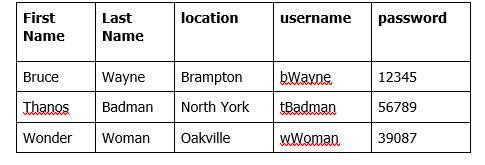
2. Create a Fake Database of Accounts. Do this by creating the appropriate construct that will allow you to create an unlimited number of Bank Accounts. Lastly, create an Array that stores the below Bank Accounts with their respective values.
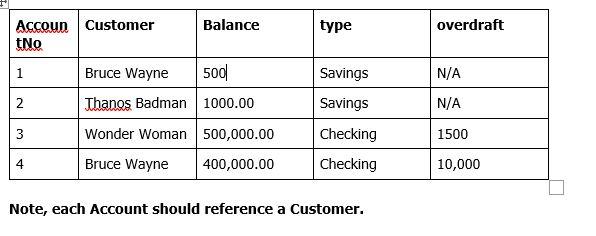
3.
- Your class design must ensure that money can be withdrawn and deposited from any Account. The actual withdrawal and deposit functionality must be modeled within class(es) outside of the main class.
Saving Accounts do not have an overdraft. Thus, customers that hold these accounts should not be able to withdraw more money than what exists in their current balance. For example, if a customers current balance is $300.00 and they try to withdraw $500.00 the program should print a message saying The amount you are trying to withdraw exceeds your current balance.
Whereas, if a customer has a Checking Account then they can withdraw more than what exists in their current balance, up to their overdraft limit. For Example, if the customer overdraft limit is 500 and their current balance is $300.00 and they withdraw 500 their current balance will now be updated to -200.
All the functionality regarding Savings and Checking accounts should be modeled as an inheritance hierarchy.
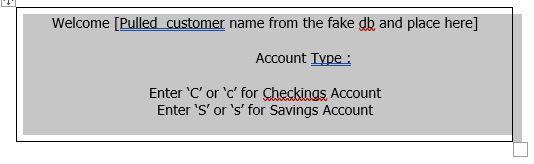
4. In the main method, the program should prompt and allow the customer to enter their username and password. Your program must then search the Fake Database to ensure that the username and password pair that you entered is correct. Once the information matches a username and password pairt that exists in the Fake Database, the program should produce the below menu
5. After the user enters the account type, as in the above, they must be presented with the below menu that will allow them to perform key banking operations.
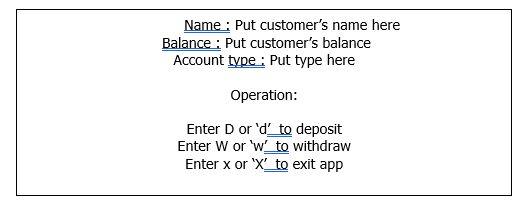
- If the user enters D or d, it implies the user wants to deposit money into their account. The program should then prompt and capture the amount that they want to deposit and update the customers existing balance (for the logged in account type)
- Also, if the user enters code W'' or w, it implies that the user wants to withdraw money from their account. The program should then prompt and capture the amount that they want to withdraw from their account. The program should lastly update the customers current balance by subtracting the amount they wish to withdraw from their existing current balance.
- Note, after the program performs a deposit or withdrawal, the program should then present the above menu with the updated balance. This should happen continuously until the user enters x of X to exit the program.
- If the user enters X or x, the program should display a goodbye message and then terminates.
Note, this program must be coded in the Context of OOP. Thus, all classes should be encapsulated and all classes should contain pertinent properties and methods.
location username password First Name Last Name Bruce Brampton bWayne 12345 Wayne Badman Thanos North York tBadman 56789 Wonder Woman Oakville wWoman 39087 type overdraft N/A 2 Accoun Customer Balance tNo 1 Bruce Wayne 500 2 Thanos Badman 1000.00 3 Wonder Woman 500,000.00 Bruce Wayne 400,000.00 N/A Savings Savings Checking Checking 1500 10,000 Note, each Account should reference a Customer. Welcome (Pulled customer name from the fake db and place here] Account Type : Enter 'C' or 'd' for Checkings Account Enter 'S' or 's' for Savings Account Name : Put customer's name here Balance : Put customer's balance Account type : Put type here Operation: Enter D or 'd' to deposit Enter W or 'w' to withdraw Enter x or 'X' to exit app
Step by Step Solution
There are 3 Steps involved in it

Get step-by-step solutions from verified subject matter experts
 Study Help