







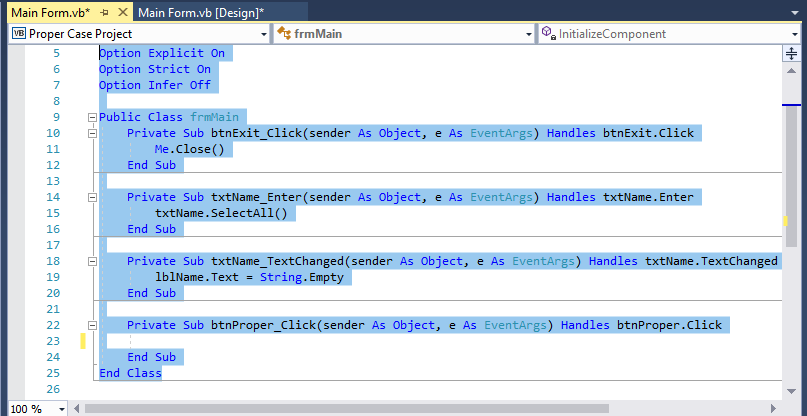
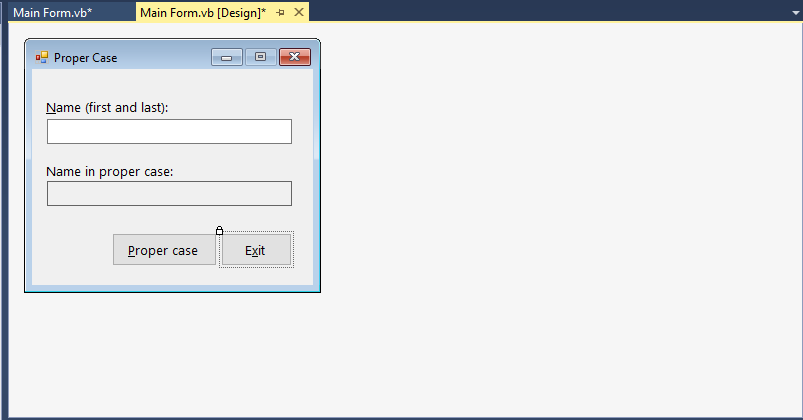
Question: Programming with Microsoft Visual Basic 2017 8th Edition Chapter 7 Question 12 In this exercise, you modify the Proper Case Application from Exercise 6. If
 Programming with Microsoft Visual Basic 2017 8th Edition
Chapter 7 Question 12
In this exercise, you modify the Proper Case Application from Exercise 6. If necessary, complete Exercise 6. Then, use Windows to make a copy of the Proper Case Solution folder. Rename the Copy Proper case Solution-Middle. Open the Proper Case Solution.sln file contained in the Proper Case Solution-Middle folder. Modify the application to allow the user to also enter his or her middle name or middle initial. The btnProper_Click Procedure should display the full name, which might include a middle name or middle initial, in proper case. Save the solution and then start and test the application. (if the user enters "john smith" as the name, the application should display "John Smith". If the user enters "john thomas smith", the application should display "John Thomas Smith". if the user enters "carol g. jones", the application should display "Carol G. Jones". If the user enters two Spaces, "Pam", two Spaces, "grace", three spaces, "darwin", and two spaces, the application should display "Pam Grace Darwin".)
Main Form.vb* X Main Form.vb [Design] VE Proper Case Project frm Main e InitializeComponent ption Explicit On Option Strict On Option Infer Off 6 7 8 9 EPublic Class frmMain 10 Private Sub btnExit_Click(sender As object, e As EventArgs) Handles btnExit.Click Me.Close() 12 End Sub Private Sub txtName-Enter(sender s Object, e End Sub E Handles txtName. Ent 14 15 txtName.SelectAll() 17 18 Private Sub txtName_TextChanged (sender As object, e As EventArgs) Handles txtName.TextChanged lblName.Text - String. Empty 20 21 22 Private Sub btnProper_Click(sender As object, e As EventArgs) Handles btnProper Click End Sub 23 End Su End Class 25 26 100 % Main Form.vb* Main Form.vb [Design]* a x Proper Case Name (first and last) Name in proper case Proper case
Step by Step Solution
There are 3 Steps involved in it

Get step-by-step solutions from verified subject matter experts
 Study Help