







Question: project ch11_ex3_SortedCustomers includes the two classes below Customer.java public class Customer { private String email; private String firstName; private String lastName; public Customer(String email, String
project ch11_ex3_SortedCustomers includes the two classes below
Customer.java
public class Customer {
private String email; private String firstName; private String lastName;
public Customer(String email, String firstName, String lastName) { this.email = email; this.firstName = firstName; this.lastName = lastName; }
public void setEmail(String email) { this.email = email; }
public String getEmail() { return email; }
public void setFirstName(String firstName) { this.firstName = firstName; }
public String getFirstName() { return firstName; }
public void setLastName(String lastName) { this.lastName = lastName; }
public String getLastName() { return lastName; } }
SortedCustomersApp.java
import java.util.Arrays;
public class SortedCustomersApp {
public static void main(String[] args) {
} }
1. Use proper statement indentation and meaningful variable names in the code.
2. Add a multi-line description of this application that also includes your name and the date written at the beginning of the code.
3. Add appropriate descriptive comments to each line of code you add to the project explaining why the code is in the application.
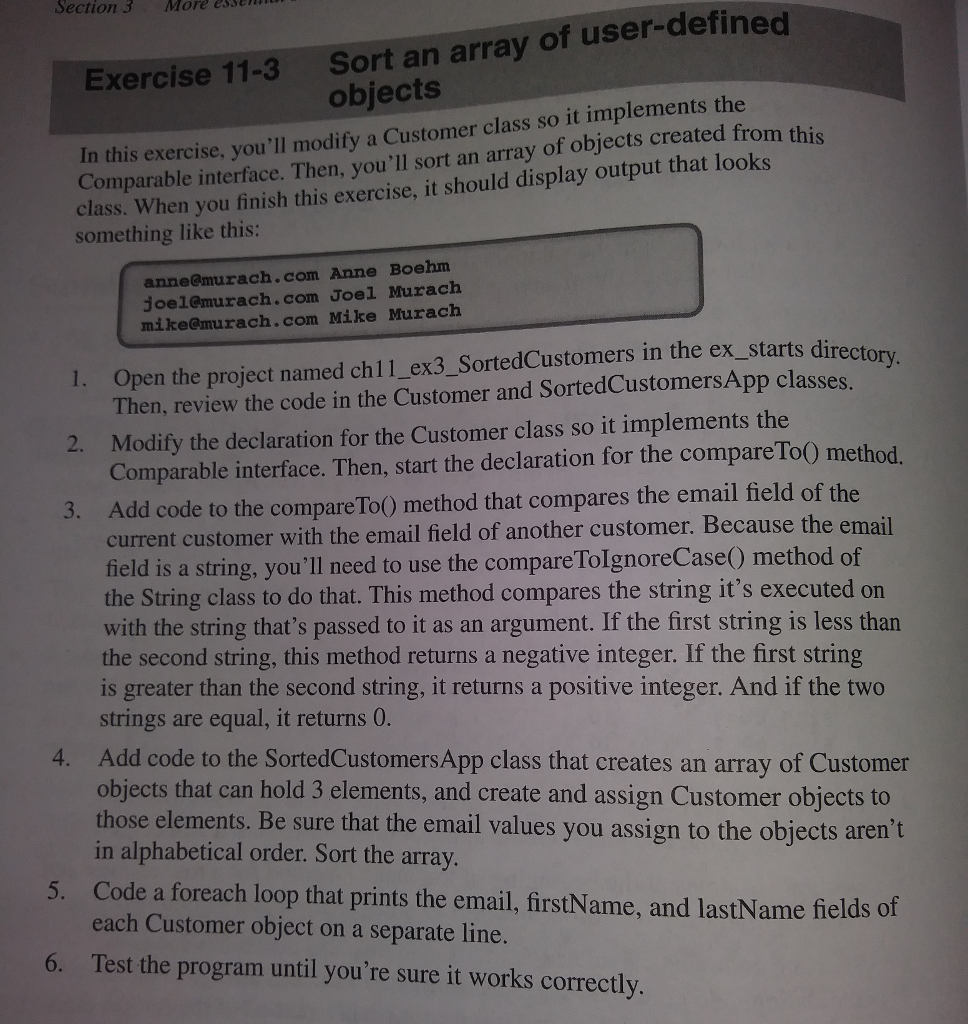
Section 3 More essen Sort an array of user-defined objects Exercise 11-3 In this exercise, you'll modify a Customer class so it implements the Comparable interface. Then, you'll sort an array of objects created from this class. When you finish this exercise, it should display output that looks something like this anne@murach.com Anne Boehm joel@murach.com Joel Murach mike@murach.com Mike Murach I. Open the project named ch11_ex3_SortedCustomers in the ex_starts directo Then, review the code in the Customer and SortedCustomers App classes Modify the declaration for the Customer class so it implements the Comparable interface. Then, start the declaration for the compareTo0 method. Add code to the compare ToO method that compares the email field of the current customer with the email field of another customer. Because the email field is a string, you'll need to use the compare TolgnoreCase) method of the String class to do that. This method compares the string it's executed on 2. 3. with the string that's passed to it as an argument. If the first string is less than the second string, this method returns a negative integer. If the first string is greater than the second string, it returns a positive integer. And if the two strings are equal, it returns 0 Add code to the SortedCustomersApp class that creates an array of Customer objects that can hold 3 elements, and create and assign Customer objects to those elements. Be sure that the email values you assign to the objects aren't in alphabetical order. Sort the array. 4. each Customer object on a separate line. Test the program until you're sure it works correctly. and lastName fields of 6
Step by Step Solution
There are 3 Steps involved in it

Get step-by-step solutions from verified subject matter experts
 Study Help