Question: prt 1 implementing myshell and capturing result your shell program must provide services to support the following commands and features Note: The commands are shown
prt 1 implementing myshell and capturing result
your shell program must provide services to support the following commands and features
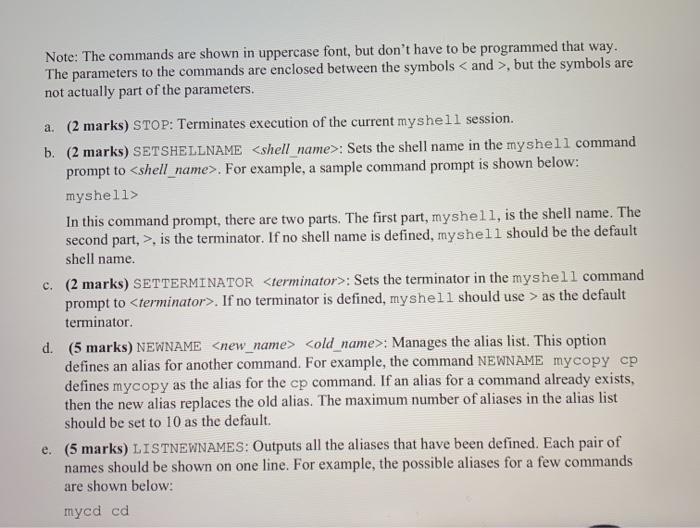
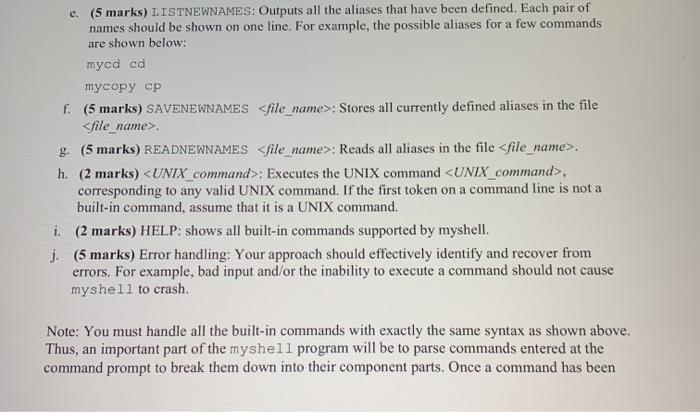
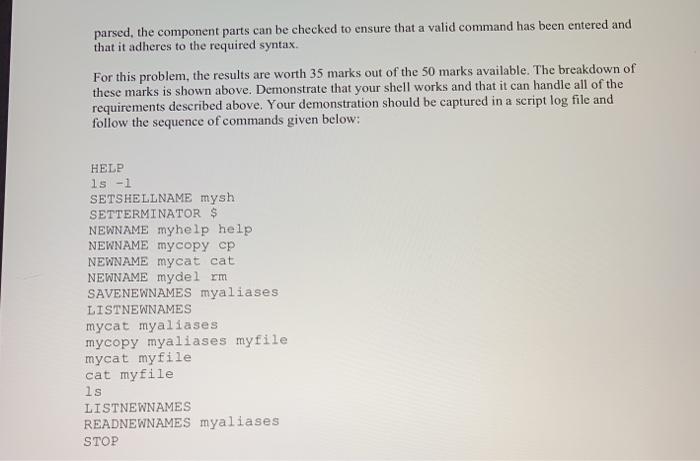
Note: The commands are shown in uppercase font, but don't have to be programmed that way. The parameters to the commands are enclosed between the symbols and >, but the symbols are not actually part of the parameters. a. (2 marks) STOP: Terminates execution of the current myshell session. b. (2 marks) SETSHELLNAME : Sets the shell name in the myshell command prompt to . For example, a sample command prompt is shown below: myshells In this command prompt, there are two parts. The first part, myshell, is the shell name. The second part, >, is the terminator. If no shell name is defined, myshell should be the default shell name. c. (2 marks) SETTERMINATOR : Sets the terminator in the myshell command prompt to . If no terminator is defined, myshell should use > as the default terminator. d. (5 marks) NEWNAME : Manages the alias list. This option defines an alias for another command. For example, the command NEWNAME mycopy cp defines mycopy as the alias for the cp command. If an alias for a command already exists, then the new alias replaces the old alias. The maximum number of aliases in the alias list should be set to 10 as the default. e. (5 marks) LISTNEWNAMES: Outputs all the aliases that have been defined. Each pair of names should be shown on one line. For example, the possible aliases for a few commands are shown below: mycd cd e. (5 marks) LISTNEWNAMES: Outputs all the aliases that have been defined. Each pair of names should be shown on one line. For example, the possible aliases for a few commands are shown below: mycd cd mycopy cp f. (5 marks) SAVENEWNAMES : Stores all currently defined aliases in the file Sfile name> g. (5 marks) READNEWNAMES h. (2 marks) : Executes the UNIX command , corresponding to any valid UNIX command. If the first token on a command line is not a built-in command, assume that it is a UNIX command. i. (2 marks) HELP: shows all built-in commands supported by myshell. j. (5 marks) Error handling: Your approach should effectively identify and recover from errors. For example, bad input and/or the inability to execute a command should not cause myshell to crash Note: You must handle all the built-in commands with exactly the same syntax as shown above. Thus, an important part of the myshell program will be to parse commands entered at the command prompt to break them down into their component parts. Once a command has been parsed, the component parts can be checked to ensure that a valid command has been entered and that it adheres to the required syntax. For this problem, the results are worth 35 marks out of the 50 marks available. The breakdown of these marks is shown above. Demonstrate that your shell works and that it can handle all of the requirements described above. Your demonstration should be captured in a script log file and follow the sequence of commands given below: HELP ls -1 SETSHELLNAME mysh SETTERMINATOR $ NEWNAME myhelp help NEWNAME mycopy cp NEWNAME mycat cat NEWNAME mydel rm SAVENEWNAMES myaliases LISTNEWNAMES mycat myaliases mycopy myaliases myfile mycat myfile cat myfile ls LISTNEWNAMES READNEWNAMES myaliases STOP









 Study Help