







Question: PURPOSE This assignment requires you to write another C + + program using the Unix system calls. It should give you experience in using the
PURPOSE
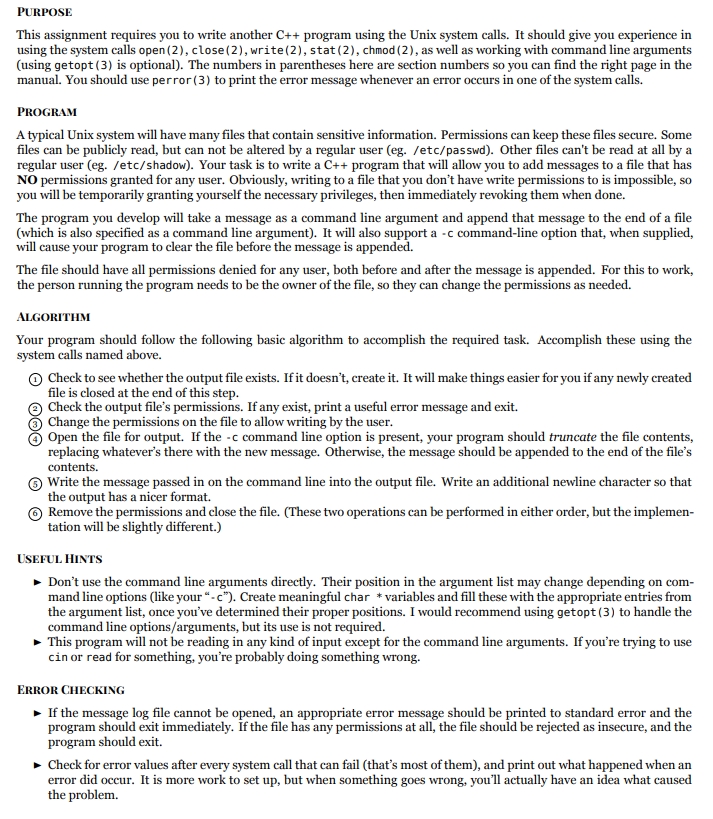
This assignment requires you to write another C program using the Unix system calls. It should give you experience in
using the system calls open close write stat chmod as well as working with command line arguments
using getopt is optional The numbers in parentheses here are section numbers so you can find the right page in the
manual. You should use perror to print the error message whenever an error occurs in one of the system calls.
PROGRAM
A typical Unix system will have many files that contain sensitive information. Permissions can keep these files secure Some
files can be publicly read, but can not be altered by a regular user egetcpasswd Other files can't be read at all by a
regular user egetcshadow Your task is to write a C program that will allow you to add messages to a file that has
NO permissions granted for any user. Obviously, writing to a file that you don't have write permissions to is impossible, so
you will be temporarily granting yourself the necessary privileges, then immediately revoking them when done.
The program you develop will take a message as a command line argument and append that message to the end of a file
which is also specified as a command line argument It will also support a c commandline option that, when supplied,
will cause your program to clear the file before the message is appended.
The file should have all permissions denied for any user, both before and after the message is appended. For this to work,
the person running the program needs to be the owner of the file, so they can change the permissions as needed.
ALGORITHM
Your program should follow the following basic algorithm to accomplish the required task. Accomplish these using the
system calls named above.
Check to see whether the output file exists. If it doesn't, create it It will make things easier for you if any newly created
file is closed at the end of this step.
Check the output file's permissions. If any exist, print a useful error message and exit.
Change the permissions on the file to allow writing by the user.
Open the file for output. If the c command line option is present, your program should truncate the file contents,
replacing whatever's there with the new message. Otherwise, the message should be appended to the end of the file's
contents.
Write the message passed in on the command line into the output file. Write an additional newline character so that
the output has a nicer format.
Remove the permissions and close the file. These two operations can be performed in either order, but the implemen
tation will be slightly different.
USEFUL HINTS
Don't use the command line arguments directly. Their position in the argument list may change depending on com
mand line options like your c Create meaningful char variables and fill these with the appropriate entries from
the argument list, once you've determined their proper positions. I would recommend using getopt to handle the
command line optionsarguments but its use is not required.
This program will not be reading in any kind of input except for the command line arguments. If you're trying to use
cin or read for something, you're probably doing something wrong.
ERROR CHECKING
If the message log file cannot be opened, an appropriate error message should be printed to standard error and the
program should exit immediately. If the file has any permissions at all, the file should be rejected as insecure, and the
program should exit.
Check for error values after every system call that can fail thats most of them and print out what happened when an
error did occur. It is more work to set up but when something goes wrong, you'll actually have an idea what caused
the problem.
Step by Step Solution
There are 3 Steps involved in it
1 Expert Approved Answer
Step: 1 Unlock

Question Has Been Solved by an Expert!
Get step-by-step solutions from verified subject matter experts
Step: 2 Unlock
Step: 3 Unlock
 Study Help