







Question: ***Python 3.6*** 2. Write a script called fileprinter.py that asks the user to input the name of a file, opens the file, reads its contents,
***Python 3.6***
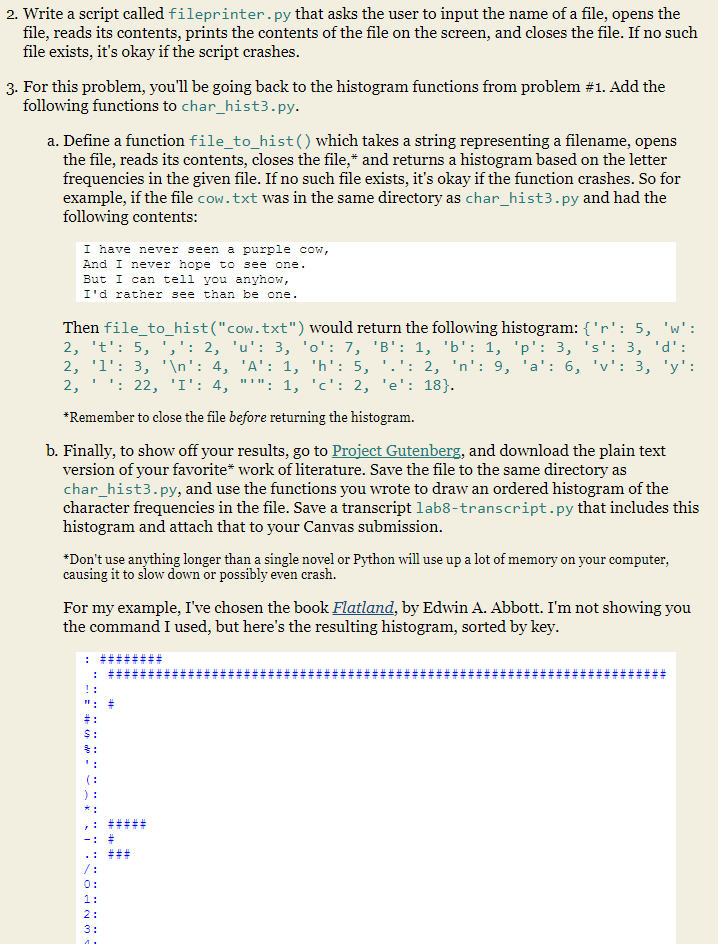
2. Write a script called fileprinter.py that asks the user to input the name of a file, opens the file, reads its contents, prints the contents of the file on the screen, and closes the file. If no such file exists, it's okay if the script crashes 3. For this problem, you'll be going back to the histogram functions from problem #1. Add the tollowing functions to char_hist3.py a. Define a function file to hist() which takes a string representing a filename, opens the file, reads its contents, closes the file,* and returns a histogram based on the letter frequencies in the given file. If no such file exists, it's okay if the function crashes. So for example, if the file cow.txt was in the same directory as char_hist3.py and had the following contents I have never seen a purple cow, And I never hope to see one But l can tell you anynow I'd rather see than be one Then file_to_hist("cow.txt") would return the following histogram:'r': 5, 'w' *Remember to close the file before returning the histogram. b. Finally, to show off your results, go to Project Gutenberg, and download the plain text version of your favorite* work of literature. Save the file to the same directory as char hist3.py, and use the functions you wrote to draw an ordered histogram of the character frequencies in the file. Save a transcript lab8-transcript.py that includes this histogram and attach that to your Canvas submission Don't use anything longer than a single novel or Python will use up a lot of memory on your computer, causing it to slow down or possibly even crash. For my example, I've chosen the book Flatland, by Edwin A. Abbott. I'm not showing you the command I used, but here's the resulting histogram, sorted by key
Step by Step Solution
There are 3 Steps involved in it

Get step-by-step solutions from verified subject matter experts
 Study Help