







Question: python Activity 1 Take the file called accounts.txt from D2L. Save it in the same folder as your Lab python file. Open it with Notepad
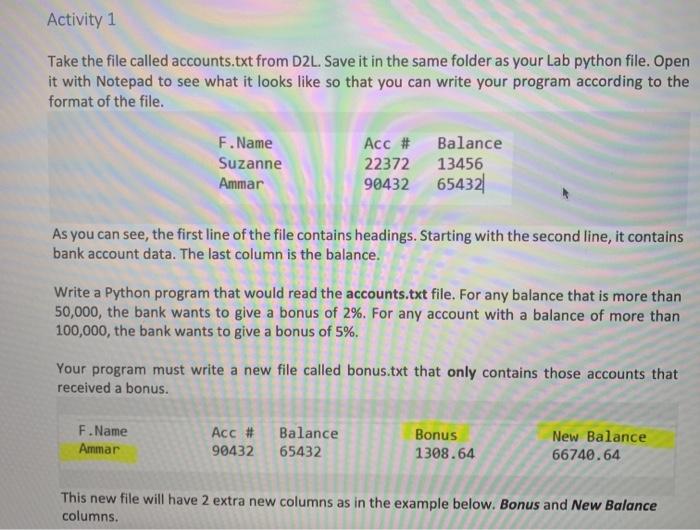
Activity 1 Take the file called accounts.txt from D2L. Save it in the same folder as your Lab python file. Open it with Notepad to see what it looks like so that you can write your program according to the format of the file. F.Name Suzanne Ammar Acc # Balance 22372 13456 90432 65432 As you can see, the first line of the file contains headings. Starting with the second line, it contains bank account data. The last column is the balance. Write a Python program that would read the accounts.txt file. For any balance that is more than 50,000, the bank wants to give a bonus of 2%. For any account with a balance of more than 100,000, the bank wants to give a bonus of 5%. Your program must write a new file called bonus.txt that only contains those accounts that received a bonus. F.Name Ammar Acc # 90432 Balance 65432 Bonus 1308.64 New Balance 66740.64 This new file will have 2 extra new columns as in the example below. Bonus and New Balance columns
Step by Step Solution
There are 3 Steps involved in it

Get step-by-step solutions from verified subject matter experts
 Study Help