







Question: Python Code : Thank you very much for your explanation! I still have a question about the same exercise, please kindly explain to me thanks
Python Code :
Thank you very much for your explanation! I still have a question about the same exercise, please kindly explain to me thanks a lot!
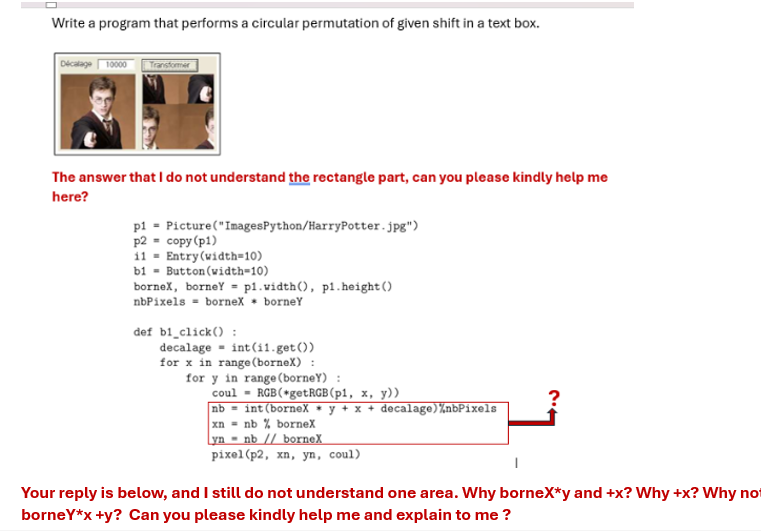
Write a program that performs a circular permutation of given shift in a text box.
The answer that I do not understand the rectangle part, can you please kindly help me here?
p PictureImagesPythonHarryPotterjpg
p copyp
Entrywidth
b Buttonwidth
borneX, borneY puidth pheight
nbPixels borneX borneY
def bclick :
decalage intiget
for x in rangeborneX :
for y in rangeborneY :
coul RGBgetRGBp x y
nb intborneX y x decalagenbPixels
xn nb borneX
yntextrmnb bornex
pixelp xn yn coul
Your reply is below, and I still do not understand one area. Why borneX y and x Why x Why no borne Ystar xy Can you please kindly help me and explain to me Step : Calculate the Shifted Index nb
nb intborneX yx decalage nbPixels
Explanation:
Including Position and Shift: The following function calculates the linear index of a pixel located at position x y of an image: borneX yx :Decalage is the planned displacement. Sum these to get the new, shifted index.
Step by Step Solution
There are 3 Steps involved in it
1 Expert Approved Answer
Step: 1 Unlock

Question Has Been Solved by an Expert!
Get step-by-step solutions from verified subject matter experts
Step: 2 Unlock
Step: 3 Unlock
 Study Help