







Question: Python Coding Excerise: PLEASE DO NOT USE CSV MODULE PLEASE (import csv), if possible, use split(). You are given a CSV file containing stock information.
Python Coding Excerise: PLEASE DO NOT USE CSV MODULE PLEASE (import csv), if possible, use split(). You are given a CSV file containing stock information. It has the following columns: Date, Open (2), Close, High, Low, Volume, and Adj Close. Write function "def testdata" with the following agruments...
def testdata(filename, col, day): """Queries data loaded intoprogram. Arguments: filename: A string for the filename containing the stock data, in CSV format. col: A string of either "date", "open", "high", "low", "close", "volume", or "adj_close" for the column of stock market data to look into. The string arguments MUST be LOWERCASE! day: An integer reflecting the absolute number of the day in the data to look up, e.g. day 1, 15, or 1200 is row 1, 15, or 1200 in the file. Returns: A value selected for the stock on some particular day, in some column col. The returned value *must* be of the appropriate type, such as float, int or str. """
It should return something like this:
>>> val = test_data("AAPL.csv", "close", 25) >>> val 4.073661 >>> type(val) >>> Example of input data: aapl.csv 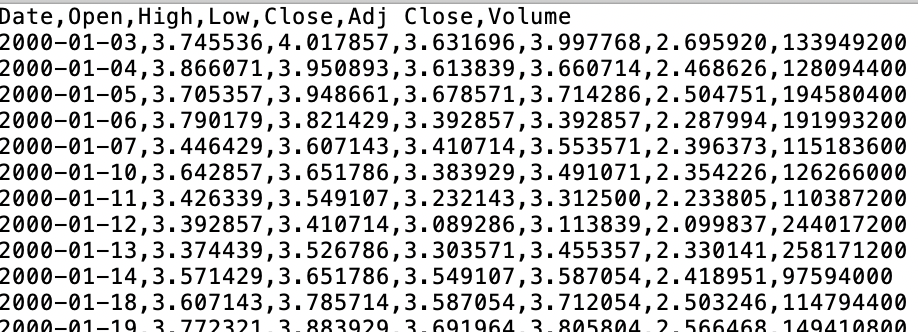
Date, Open,High,Low,Close, Adj Close, Volume 2000-01-03,3.745536,4.017857,3.631696,3.997768,2.695920,133949200 2000-01-04,3.866071,3.950893,3.613839,3.660714,2.468626,128094400 2000-01-05,3.705357,3.948661,3.678571,3.714286,2.504751,194580400 2000-01-06,3.790179,3.821429,3.392857,3.392857,2.287994,191993200 2000-01-07,3.446429,3.607143,3.410714,3.553571,2.396373,1151836060 2000-01-10,3.642857,3.651786,3.383929,3.491071,2.354226,126266000 2000-01-11,3.426339,3.549107,3.232143,3.312500,2.233805,110387200 2000-01-12,3.392857,3.410714,3.089286,3.113839,2.099837,244017200 2000-01-13,3.374439,3.526786,3.303571,3.455357,2.330141,258171200 2000-01-14,3.571429,3.651786,3.549107,3.587054,2.418951,97594000 2000-01-18,3.607143,3.785714,3.587054,3.712054,2.503246,114794400 a00-01-193.7723213.883929 3.691964 3.805804 2 566468 1494108a0
Step by Step Solution
There are 3 Steps involved in it

Get step-by-step solutions from verified subject matter experts
 Study Help