







Question: Python DataFrame pandas. how to merge/map multiple CVS files into one CSV file so that each of the columns stacks under each other and add
Python DataFrame pandas.
how to merge/map multiple CVS files into one CSV file so that each of the columns stacks under each other and add a column with the file name like in the screenshot. I need to add the name of the file so i know from which file the column was taken.
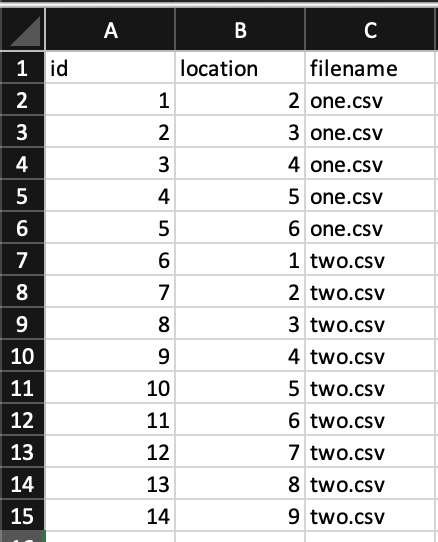
\begin{tabular}{|c|r|r|c||} \hline & A & B & C \\ \hline 1 & id & location & filename \\ \hline 2 & 1 & 2 one.csv \\ \hline 3 & 2 & 3 one.csv \\ \hline 4 & 3 & 4 one.csv \\ \hline 5 & 4 & 5 one.csv \\ \hline 6 & 5 & 6 one.csv \\ \hline 7 & 6 & 1 two.csv \\ \hline 8 & 7 & 2 two.csv \\ \hline 9 & 8 & 3 two.csv \\ \hline 10 & 9 & 4 two.csv \\ \hline 11 & 10 & 5 two.csv \\ \hline 12 & 11 & 6 two.csv \\ \hline 13 & 12 & 7 two.csv \\ \hline 14 & 13 & 8 two.csv \\ \hline 15 & 14 & 9 two.csv \\ \hline \end{tabular}
Step by Step Solution
There are 3 Steps involved in it

Get step-by-step solutions from verified subject matter experts
 Study Help