







Question: Python - help with my bankprint() function. I am literally getting an error message stating: Invalid syntax. I have tried with different indents but
Python - help with my bankprint() function. I am literally getting an error message stating: " Invalid syntax". I have tried with different indents but nothing is working. What I am doing wrong here?
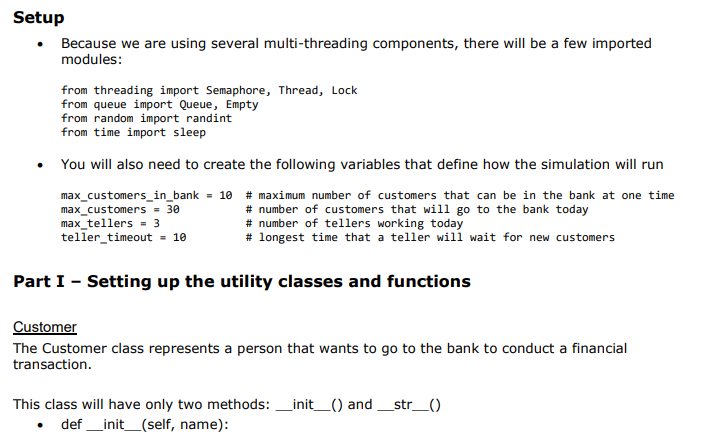
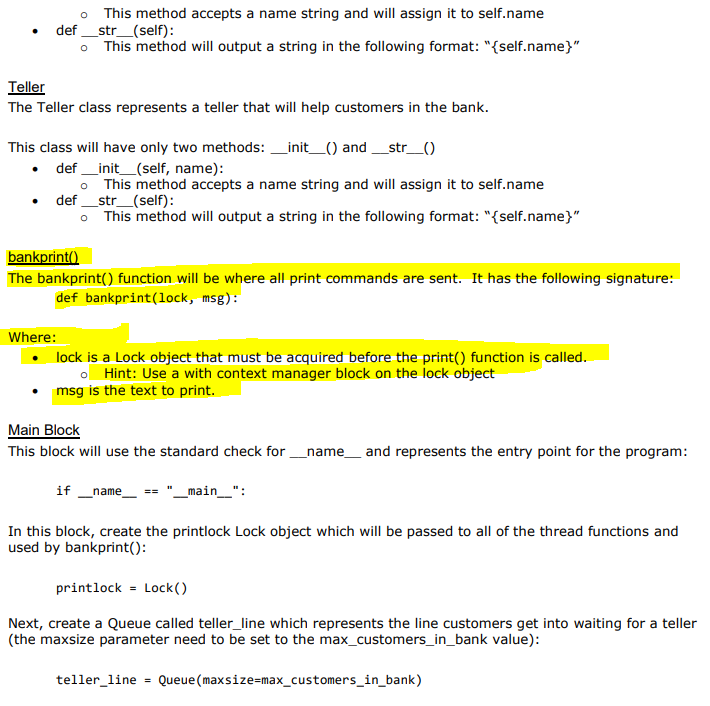
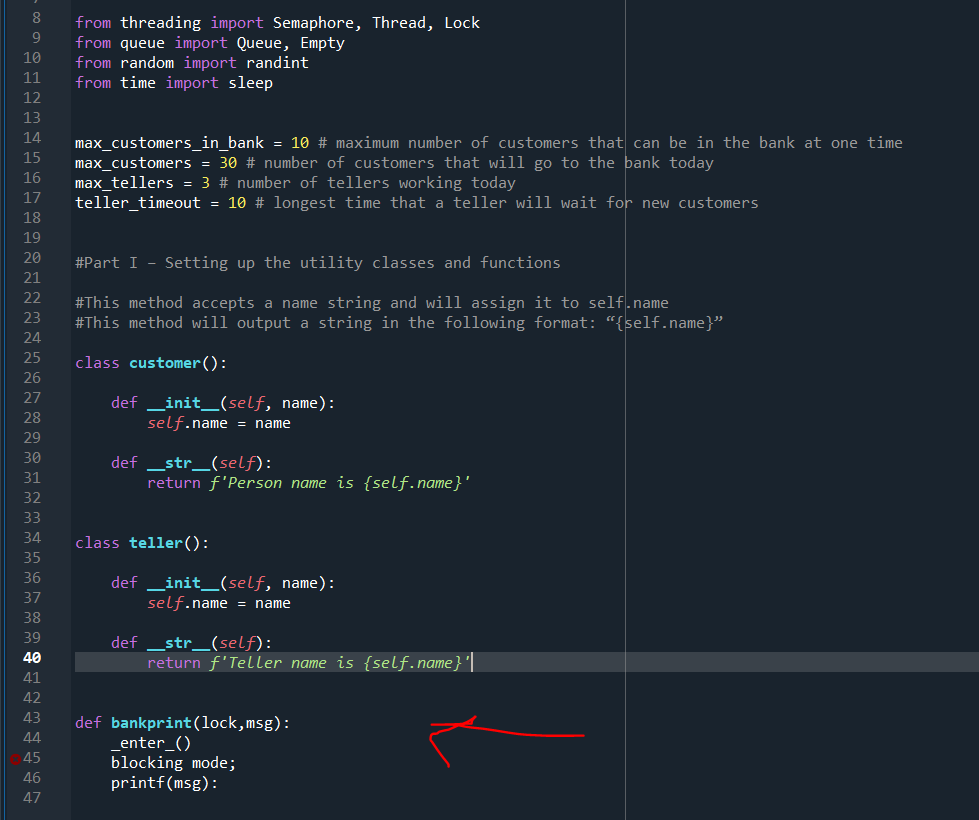
Setup Because we are using several multi-threading components, there will be a few imported modules: from threading import Semaphore, Thread, Lock from queue import Queue, Empty from random import randint from time import sleep You will also need to create the following variables that define how the simulation will run max_customers_in_bank = 10 # maximum number of customers that can be in the bank at one time max_customers = 30 # number of customers that will go to the bank today max_tellers = 3 # number of tellers working today teller_timeout - 10 # longest time that a teller will wait for new customers Part I - Setting up the utility classes and functions Customer The Customer class represents a person that wants to go to the bank to conduct a financial transaction. This class will have only two methods: __init__() and __str_0 def __init__(self, name): . o This method accepts a name string and will assign it to self.name def __str_(self): This method will output a string in the following format: "{self.name}" Teller The Teller class represents a teller that will help customers in the bank. This class will have only two methods: __init__() and __str_() def __init__(self, name): This method accepts a name string and will assign it to self.name def_str_(self): This method will output a string in the following format: "{self.name}" bankprint() The bankprint() function will be where all print commands are sent. It has the following signature: def bankprint(lock, msg): Where: lock is a Lock object that must be acquired before the print() function is called. o Hint: Use a with context manager block on the lock object msg is the text to print. Main Block This block will use the standard check for _name__ and represents the entry point for the program: if name == "_main__": In this block, create the printlock Lock object which will be passed to all of the thread functions and used by bankprint(): printlock = Lock() Next, create a Queue called teller_line which represents the line customers get into waiting for a teller (the maxsize parameter need to be set to the max_customers_in_bank value): teller_line = Queue (maxsize=max_customers_in_bank) from threading import Semaphore, Thread, Lock from queue import Queue, Empty from random import randint from time import sleep max_customers_in_bank = 10 # maximum number of customers that can be in the bank at one time max_customers = 30 # number of customers that will go to the bank today max_tellers = 3 # number of tellers working today teller_timeout = 10 # longest time that a teller will wait for new customers #Part I - Setting up the utility classes and functions #This method accepts a name string and will assign it to self.name #This method will output a string in the following format: "{self.name}" class customer(): 8 9 10 11 12 13 14 15 16 17 18 19 20 21 22 23 24 25 26 27 28 29 30 31 32 33 34 35 36 37 38 39 40 41 42 43 44 45 46 47 def _init__(self, name): self.name = name def _str_(self): return f'Person name is {self.name}' class teller(): def __init__(self, name): self.name = name def str (self): return f'Teller name is {self.name} | def bankprint(lock, msg): _enter_() blocking mode; printf(msg)
Step by Step Solution
There are 3 Steps involved in it

Get step-by-step solutions from verified subject matter experts
 Study Help