







Question: %% Python Jupitar Notebook - Please let me know if you need anything I have pasted the carsData.csv file data in bellow. Thank you%%% CarsData.csv
%% Python Jupitar Notebook - Please let me know if you need anything I have pasted the carsData.csv file data in bellow. Thank you%%%
CarsData.csv
mpg,engine,horse,weight,acceleration,year,origin,cylinder
18,307,130,3504,12,1994,1,8 27,350,165,3693,11.5,1995,1,4 18,318,150,3436,11,2003,1,8 20,304,150,3433,12,1997,1,6 21,302,140,3449,10.5,1997,1,6 15,429,198,4341,10,2000,1,8 28,454,220,4354,9,1994,1,4 14,440,215,4312,8.5,1995,1,8 25,455,225,4425,10,2000,1,4 15,390,190,3850,8.5,1997,1,8
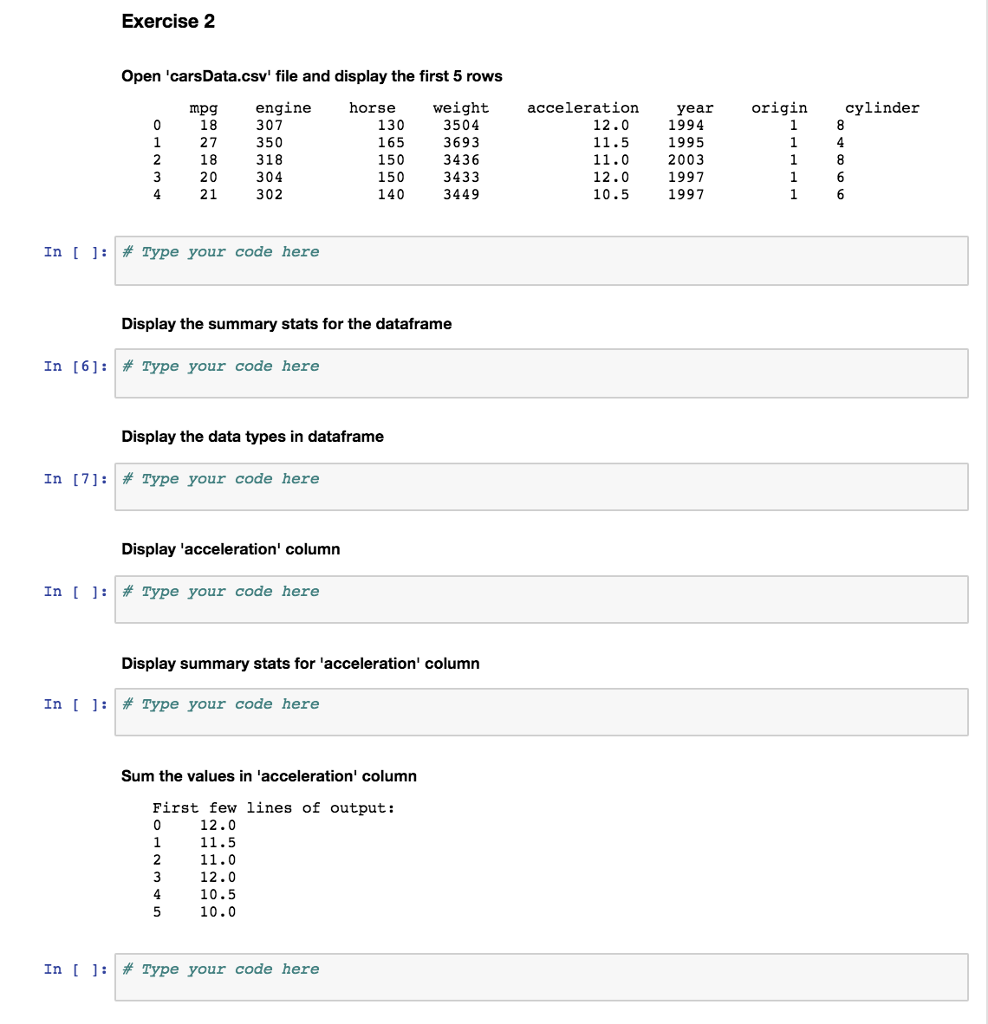
Exercise 2 Open 'carsData.csv' file and display the first 5 rows horse weight 3504 3693 3436 3433 3449 acceleration ar cylinder mpg 18 27 18 20 engine 307 350 318 304 302 ye 1994 1995 2003 1997 1997 origin 130 165 150 150 140 12.0 11.5 11.0 12.0 10.5 In [ ]: Type your code here Display the summary stats for the dataframe In [6]: # Type your code here Display the data types in dataframe In [7]: # Type your code here Display 'acceleration' column In [ ] : # Type your code here Display summary stats for 'acceleration' column In [ ]: # TYpe your code here Sum the values in 'acceleration' column First few lines of output: 12.0 11.5 11.0 12.0 10.5 10.0 In [ ]: # Type your code here
Step by Step Solution
There are 3 Steps involved in it

Get step-by-step solutions from verified subject matter experts
 Study Help