







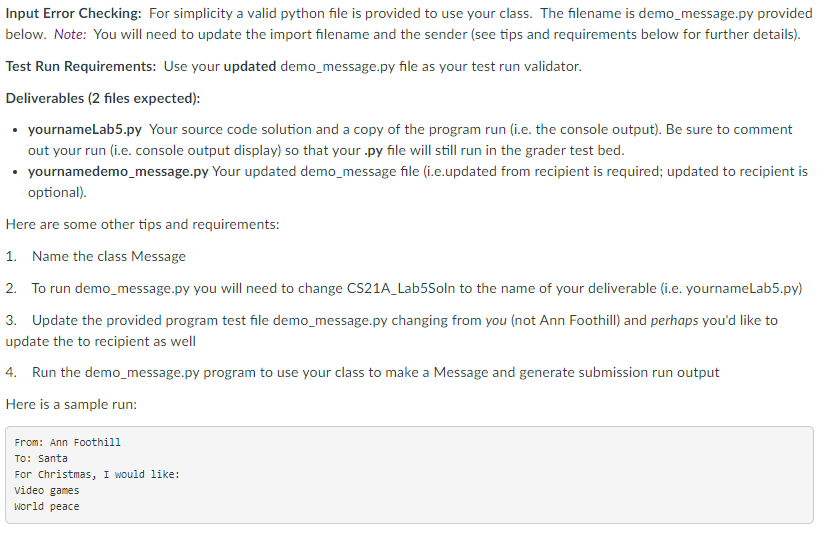
Question: PYTHON PROGRAM Classes demo_message.py ## # Demonstrate the Message class. # from CIS_117_Lab7Soln import Message # Create the message. wishList = Message(Ann, Santa) wishList.append(For Christmas,
PYTHON PROGRAM
Classes
demo_message.py

##
# Demonstrate the Message class.
#
from CIS_117_Lab7Soln import Message
# Create the message.
wishList = Message("Ann", "Santa")
wishList.append("For Christmas, I would like:")
wishList.append("Video games")
wishList.append("World peace")
# Display its contents.
print(wishList.toString())
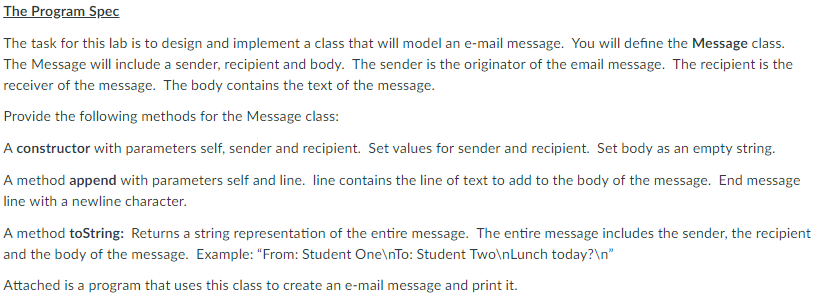
The Program Spec The task for this lab is to design and implement a class that will model an e-mail message. You will define the Message class. The Message will include a sender, recipient and body. The sender is the originator of the email message. The recipient is the receiver of the message. The body contains the text of the message. Provide the following methods for the Message class: A constructor with parameters self, sender and recipient. Set values for sender and recipient. Set body as an empty string A method append with parameters self and line. line contains the line of text to add to the body of the message. End message line with a newline character A method toString: Returns a string representation of the entire message. The entire message includes the sender, the recipient and the body of the message. Example: "From: Student One nTo: Student TwolnLunch today?1n Attached is a program that uses this class to create an e-mail message and print it
Step by Step Solution
There are 3 Steps involved in it

Get step-by-step solutions from verified subject matter experts
 Study Help