







Question: Python Task: Implement the connect _ howe _ truss _ vertices function in the code cell below. # This function adds truss elements to connect
Python Task: Implement the connecthowetrussvertices function in the code cell below. # This function adds truss elements to connect each of the top and bottom vertices according to the pattern of a Howe Truss. # It also computes and returns a list of the element ids of the "green" elements across the bottom of the bridge. # Parameters: # bridge a SystemElements object from the AnaStruct module to which we can add truss elements # topvertices a list of the xy coordinates of the vertices in the top row ordered from left to right # bottomvertices a list of the xy coordinates of the vertices in the bottom row ordered from left to right # Return values: # a list of the element ids of the "green" elements across the bottom of the bridge. def connecthowetrussverticesbridge topvertices, bottomvertices : # do not change this line in any way the function name and parameters must remain exactly as specified here. pass # ToDo: replace this line by your codeTests:testbridge anastruct.SystemElementsvtesttopvertices vvvvtestbottomvertices v v vbottomelementsresult connecthowetrussverticestestbridge testtopvertices, testbottomverticescodeanalyser.inspectbridgetestbridge bottomelementsresult, v v v vftestbridge anastruct.SystemElementsvvvtesttopvertices v v vvvvvvtestbottomvertices v v v v vbottomelementsresult connecthowetrussverticestestbridge testtopvertices, testbottomverticescodeanalyser.inspectbridgetestbridge bottomelementsresult, v v v v v v v vftestbridge anastruct.SystemElementsvvvvvtesttopvertices v v v v vvvvvvvvtestbottomvertices v v v v v v vbottomelementsresult connecthowetrussverticestestbridge testtopvertices, testbottomverticescodeanalyser.inspectbridgetestbridge bottomelementsresult, v v v v v v v v v v v vf
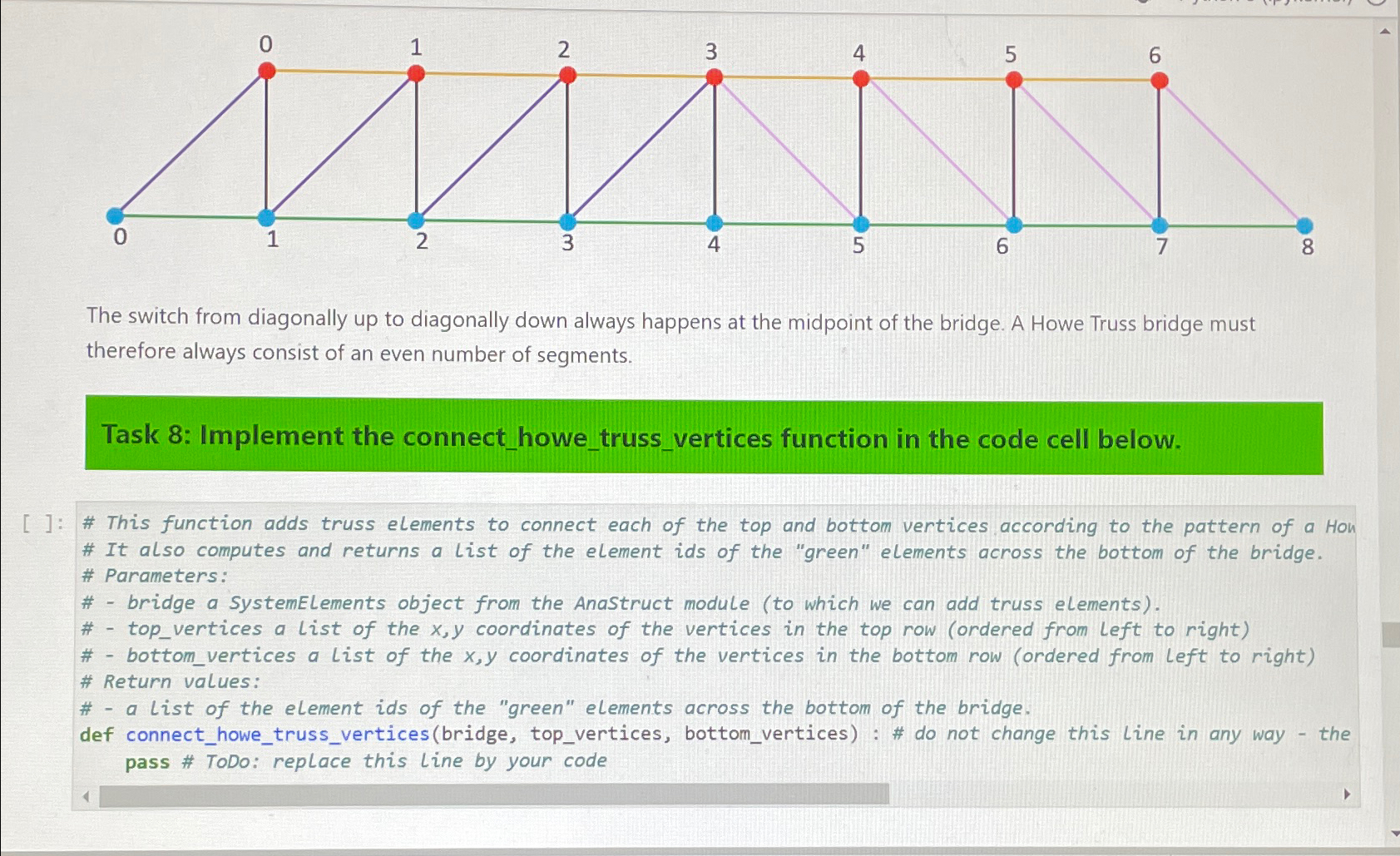
The switch from diagonally up to diagonally down always happens at the midpoint of the bridge. A Howe Truss bridge must therefore always consist of an even number of segments.
Task : Implement the connecthowetrussvertices function in the code cell below.
: # This function adds truss elements to connect each of the top and bottom vertices according to the pattern of a Hon
# It also computes and returns a list of the element ids of the "green" elements across the bottom of the bridge.
# Parameters:
# bridge a SystemElements object from the Anastruct modute to which we can add truss elements
# topvertices a list of the coordinates of the vertices in the top row ordered from left to right
# bottomvertices a list of the coordinates of the vertices in the bottom row ordered from left to right
# Return values:
# a list of the element ids of the "green" elements across the bottom of the bridge.
def connecthowetrussverticesbridge topvertices, bottomvertices: # do not change this line in any way the pass # TODo: replace this line by your code
Step by Step Solution
There are 3 Steps involved in it
1 Expert Approved Answer
Step: 1 Unlock

Question Has Been Solved by an Expert!
Get step-by-step solutions from verified subject matter experts
Step: 2 Unlock
Step: 3 Unlock
 Study Help