







Question: python The final result would look like the following graph. However, you DO NOT need to create a GUI that looks exact like this. As
python
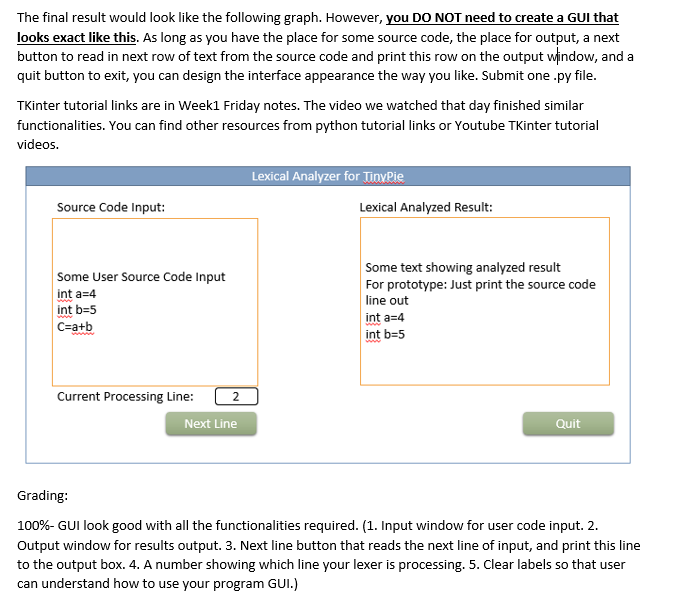
The final result would look like the following graph. However, you DO NOT need to create a GUI that looks exact like this. As long as you have the place for some source code, the place for output, a next button to read in next row of text from the source code and print this row on the output window, and a quit button to exit, you can design the interface appearance the way you like. Submit one .py file TKinter tutorial links are in Week1 Friday notes. The video we watched that day finished similar functionalities. You can find other resources from python tutorial links or Youtube TKinter tutorial videos. Lexical Analyzer for TinvPie Source Code Input: Lexical Analyzed Result: Some text showing analyzed result Some User Source Code Input For prototype: Just print the source code int a=4 int b-5 c=a+b line out int a-4 int b-5 Current Processing Line: Next Line Quit Grading: 100%-GUI look good with all the functionalities required. (1. Input window for user code input. 2. Output window for results output. 3. Next line button that reads the next line of input, and print this line to the output box. 4. A number showing which line your lexer is processing. 5. Clear labels so that user can understand how to use your program GUI.) The final result would look like the following graph. However, you DO NOT need to create a GUI that looks exact like this. As long as you have the place for some source code, the place for output, a next button to read in next row of text from the source code and print this row on the output window, and a quit button to exit, you can design the interface appearance the way you like. Submit one .py file TKinter tutorial links are in Week1 Friday notes. The video we watched that day finished similar functionalities. You can find other resources from python tutorial links or Youtube TKinter tutorial videos. Lexical Analyzer for TinvPie Source Code Input: Lexical Analyzed Result: Some text showing analyzed result Some User Source Code Input For prototype: Just print the source code int a=4 int b-5 c=a+b line out int a-4 int b-5 Current Processing Line: Next Line Quit Grading: 100%-GUI look good with all the functionalities required. (1. Input window for user code input. 2. Output window for results output. 3. Next line button that reads the next line of input, and print this line to the output box. 4. A number showing which line your lexer is processing. 5. Clear labels so that user can understand how to use your program GUI.)
Step by Step Solution
There are 3 Steps involved in it

Get step-by-step solutions from verified subject matter experts
 Study Help