







Question: Python Turtle. Here is the starter code: ''' CIS 105-01 Spring 2018 CIS 105 Python Project ''' import turtle print() #write your function for original
Python Turtle. Here is the starter code:
'''
CIS 105-01 Spring 2018
CIS 105 Python Project
'''
import turtle
print()
#write your function for original art
def drawMyPic():
#write your function for colorful art
def drawColorPic():
#function to draw squares
def draw_square():
for i in range ()
#function to draw flower
def drawFlower():
window = turtle.Screen()
window.bgcolor("blue")
pen = turtle.Turtle()
pen.color("white")
petalNumber = int(input("How many petals?"))
#draw petals
for number in range(0,petalNumber):
draw_square(pen)
pen.right(360/petalNumber)
#draw center
#draw stem
#function to draw menu
def draw_menu():
print("Press 1 for ")
print("Press 2 for ")
print("Press 3 for ")
choice = input("Enter your number selection:")
return choice
#----------------------------------
#show menu to get user selection
UserChoice = draw_menu()
#if statement check the user choice
if (UserChoice == "1"):
drawFlower()#this line calls the draw_flower function
elif(UserChoice == "2"):
drawMyPic()#this line calls your originalArt function
elif(UserChoice == "3"):
drawColorPic()#this line calls your colorful art function
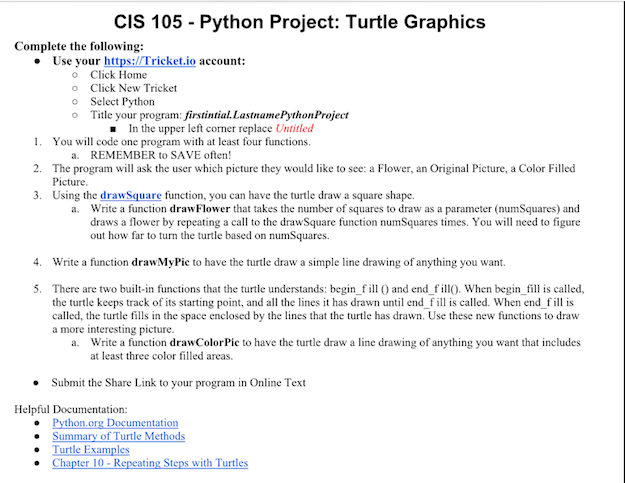
CIS 105 Python Project: Turtle Graphics Complete the following: . Use your https: Tricket.io account: o o o o Click Home Click New Tricket Select Python Title your program: firstintial. Lastname PythonProject In the upper left corner replace Untitled 1. 2. 3. You will code one program with at least four functions. a. REMEMBER to SAVE often! The program will ask the user which picture they would like to see: a Flower, an Original Picture, a Color Filled Picture Using the draw Square function, you can have the turtle draw a square shape. Write a function drawFlower that takes the number of squares to draw as a parameter (numSquares) and draws a flower by repeating a call to the drawSquare function numSquares times. You will need to figure out how far to turn the turtle based on numSquares a. 4. Write a function drawMyPie to have the turtle draw a simple line drawing of anything you want. 5. There are two built-in functions that the turtle understands: begin 0 and end fil When begin fill is called, the turtle keeps track of its starting point, and all the lines it has drawn until endis called. When end is called, the turtle fills in the space enclosed by the lines that the turtle has drawn. Use these new functions to draw a more interesting picture. Write a function drawColorPic to have the turtle draw a line drawing of anything you want that includes at least three color filled areas. a. . Submit the Share Link to your program in Online Text Helpful Documentation: e Summary of Turtle Meth s with Turtle
Step by Step Solution
There are 3 Steps involved in it

Get step-by-step solutions from verified subject matter experts
 Study Help