







Question: Question 0: You do NOT need to turn this in, but you should first make your own csv file called CarRatings.csv that contains the
 \
\

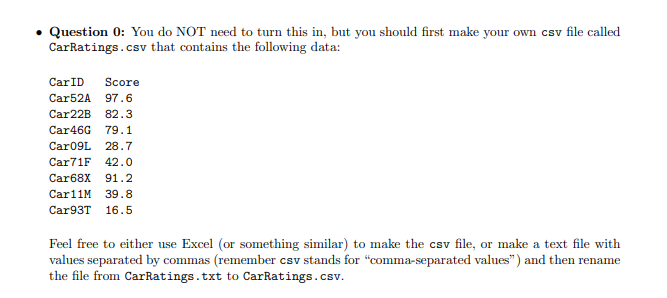
Question 0: You do NOT need to turn this in, but you should first make your own csv file called CarRatings.csv that contains the following data: CarID Score Car52A 97.6 Car22B 82.3 Car46G 79.1 Car09L 28.7 Car71F 42.0 Car68x 91.2 Car11M 39.8 Car93T 16.5 Feel free to either use Excel (or something similar) to make the csv file, or make a text file with values separated by commas (remember csv stands for "comma-separated values) and then rename the file from CarRatings.txt to CarRatings.csv. Question 0: You do NOT need to turn this in, but you should first make your own csv file called CarRatings.csv that contains the following data: CarID Score Car52A 97.6 Car22B 82.3 Car46G 79.1 Car09L 28.7 Car71F 42.0 Car68x 91.2 Car11M 39.8 Car93T 16.5 Feel free to either use Excel (or something similar) to make the csv file, or make a text file with values separated by commas (remember csv stands for "comma-separated values) and then rename the file from CarRatings.txt to CarRatings.csv
Step by Step Solution
There are 3 Steps involved in it

Get step-by-step solutions from verified subject matter experts
 Study Help